Outreach Best Practices
Cold Email vs LinkedIn Outreach: Which Gets Better Response Rates?
LinkedIn InMail gets 10-25% response rates vs cold email's 1-5%. Compare open rates, deliverability, cost, and scale to choose the right channel. Multi-channel approach wins 287% higher results.
LeadSpark AI Team
12 min read
Cold email or LinkedIn outreach—which channel should you focus on for B2B prospecting in 2026?
It's one of the most common questions in sales, and the answer isn't as simple as picking one over the other. Both channels have distinct strengths, weaknesses, and ideal use cases.
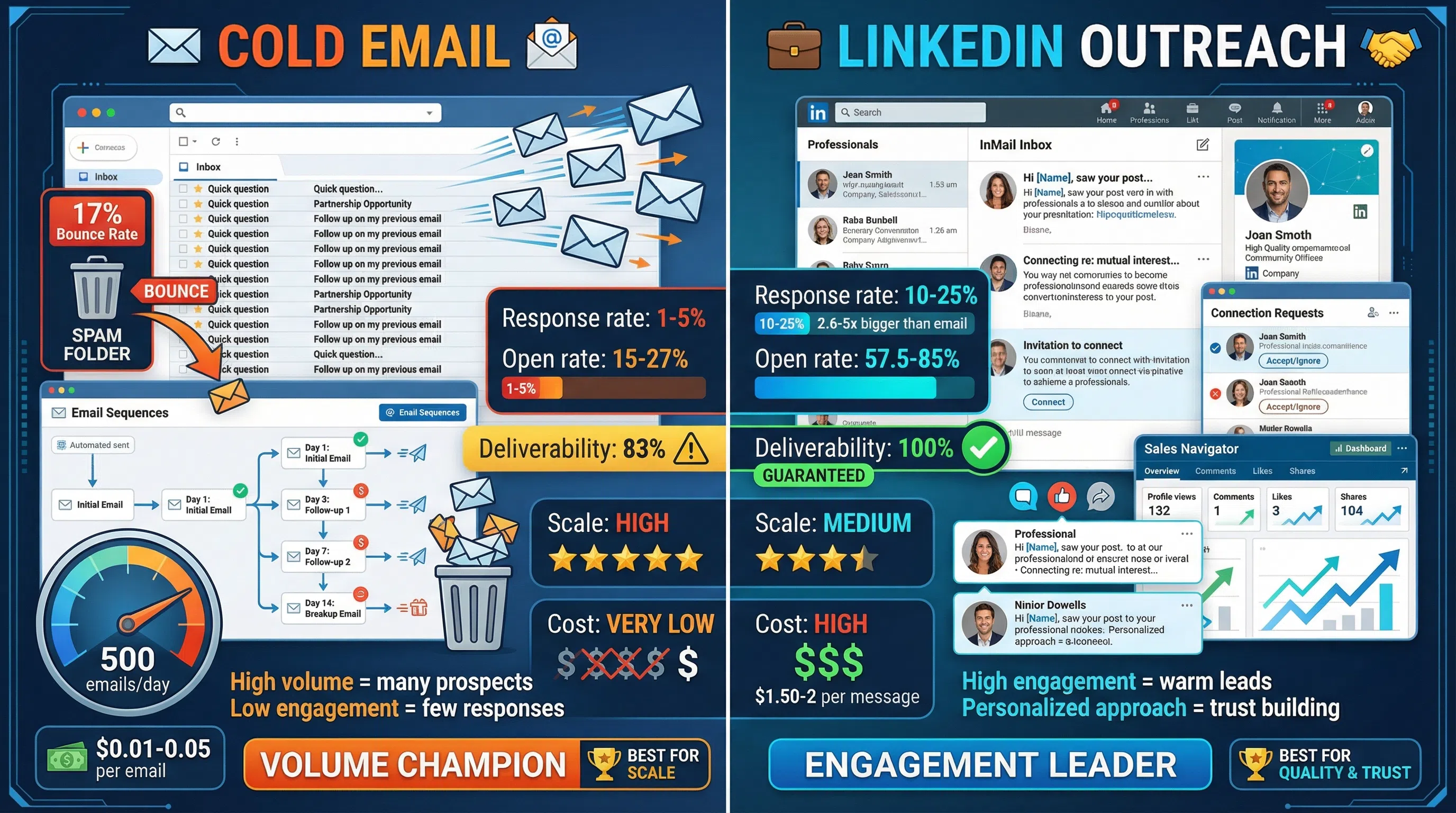
According to 2026 benchmark data, LinkedIn InMail achieves 10-25% response rates compared to cold email's 1-5%, making LinkedIn 2.6 to 5 times more effective at getting replies. But cold email scales better and costs less per message.
In this guide, we'll break down the data, compare the channels head-to-head, and show you when to use each one—or better yet, how to combine them for maximum impact.
The Cold Email Approach
Cold email remains the workhorse of B2B prospecting. It's scalable, cost-effective, and familiar to most sales teams.
How Cold Email Works
A typical cold email prospecting workflow looks like this:
- Build your prospect list: Use tools like Apollo, ZoomInfo, or Hunter.io to find contact emails
- Craft personalized emails: Write templates with personalization tokens (name, company, pain point)
- Set up email sequences: Create multi-touch campaigns with 4-9 follow-ups
- Send at scale: Use email automation tools to send hundreds or thousands of emails
- Track and optimize: Monitor open rates, reply rates, and conversions
Volume capacity: 200-500 prospects per day per sender email address
Time investment: 30-60 minutes setup per campaign, then automated
Cold Email Benchmarks (2026)
Here's what the latest data shows for cold email performance:
- Response rate: 1-5% average, 4.1% typical for most campaigns
- Elite performers: 8.5-15% response rate (highly targeted, personalized campaigns)
- Top campaigns: 40-50% reply rates (quality over volume, deep personalization)
- Open rate: 15-27% average for most senders
- Deliverability: 83% reach inbox (17% bounce or land in spam)
- Zero response: 91% of cold emails get no response
The data reveals a harsh reality: Most cold emails fail to generate responses. However, the top 10% of campaigns—those focused on quality targeting and personalization—achieve dramatically better results.
Cold Email Pros
Massive scale: Send hundreds or thousands of emails per day without platform restrictions. Cold email is the only channel that can reach your entire TAM quickly.
Cost-effective: Minimal cost per send (typically $0.01-$0.05 per email). A $50/month tool can send 50,000+ emails.
Automation-friendly: Set up sequences once and they run automatically. No daily interaction required.
Works for large TAMs: When your total addressable market includes thousands of companies, email is the only practical way to reach them all.
Fast testing: Test messaging, positioning, and offers across different segments quickly.
No platform dependency: You control the channel. No risk of account suspension if you follow best practices.
Cold Email Cons
Low response rates: Average 1-5% means 95-99% of prospects won't respond to your outreach.
Deliverability challenges: 17% of emails never reach the inbox. Spam filters are increasingly aggressive.
Limited context: No social proof, profile to review, or relationship context when the email arrives.
Feels impersonal: Even with personalization, emails from strangers often feel generic and intrusive.
High unsubscribe rates: Prospects can opt out, reducing your addressable market over time.
Inbox fatigue: Decision-makers receive 100+ sales emails weekly. Cutting through noise is increasingly difficult.
The LinkedIn Outreach Approach
LinkedIn outreach leverages the world's largest professional network for B2B prospecting. It includes connection requests, InMails, and messages to existing connections.
How LinkedIn Outreach Works
LinkedIn prospecting typically follows this workflow:
- Find prospects on LinkedIn: Use Sales Navigator or LinkedIn search filters
- Send personalized connection requests: Include a note explaining why you're connecting
- Engage with content: Like, comment on, or share prospects' posts before reaching out
- Send InMails or messages: Reach out via InMail (for non-connections) or direct messages (for connections)
- Build relationships: Continue engaging, providing value, and nurturing over time
Volume capacity: 20-30 connection requests per day, 50 InMail credits per month (Sales Navigator)
Time investment: 5-10 minutes per prospect for personalized outreach
LinkedIn Outreach Benchmarks (2026)
Here's how LinkedIn outreach performs based on 2026 data:
LinkedIn InMail:
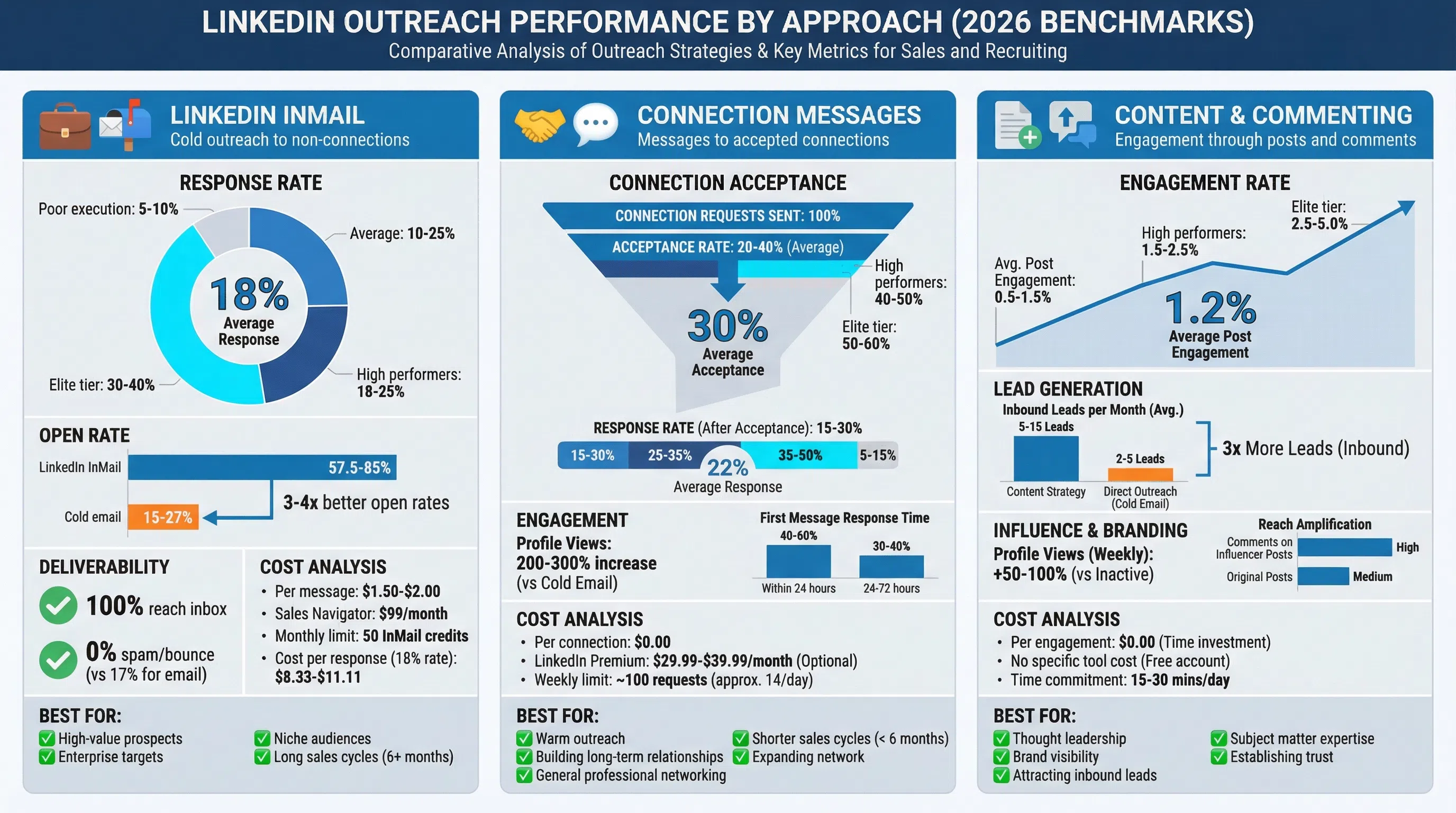
- Response rate: 10-25% average, 18-25% for high performers, 30-40% elite tier
- Open rate: 57.5-85% (most InMails eventually get opened)
- Deliverability: 100% (always reaches the recipient's inbox)
- Cost: $1.50-$2 per InMail message
- Limit: 50 InMail credits per month with Sales Navigator ($99/month)
LinkedIn Connection Messages:
- Connection acceptance: 20-55% accept rate (personalized requests with 2nd-degree connections)
- Response rate: 7.22% from accepted connections
- Deliverability: 100% for connected prospects
- Cost: Free (no per-message cost)
- Limit: 20-30 connection requests per day (LinkedIn enforces limits)
AI-Powered LinkedIn Personalization:
- Response rate: 70-90% (tools like LeadSpark AI that analyze recent posts and context)
- Engagement: Significantly higher than generic LinkedIn messages
- Scale: 500-1,000 prospects per week with automation
LinkedIn Outreach Pros
Significantly higher response rates: 10-25% for InMail vs 1-5% for cold email—a 2.6-5x improvement.
Perfect deliverability: 100% of messages reach the recipient. No spam filters or bounces.
Built-in context: Recipients can view your profile, mutual connections, and shared groups before responding.
Social proof: Recommendations, endorsements, and content establish credibility before you reach out.
Relationship-first: Platform encourages gradual relationship building through profile views, content engagement, and thoughtful messaging.
Works for niche audiences: Highly targeted prospecting works better when you can research each prospect thoroughly.
High open rates: 57.5-85% of InMails get opened vs 15-27% for cold emails.
No unsubscribes: Prospects can ignore messages, but they don't "opt out" of future outreach.
LinkedIn Outreach Cons
Volume limitations: 50 InMails per month and 20-30 connection requests per day severely limit scale.
Higher cost per message: $1.50-$2 per InMail vs $0.01-$0.05 per email.
Time-intensive: Personalized LinkedIn outreach takes 5-10 minutes per prospect vs seconds for email.
Requires premium account: Sales Navigator ($99/month minimum) needed for serious prospecting.
Platform risk: LinkedIn can suspend accounts for aggressive or spammy behavior.
Limited to LinkedIn users: Can't reach prospects who aren't active on the platform (though 1 billion+ professionals use LinkedIn).
Slower scaling: Can only reach 100-150 prospects per week manually vs thousands via email.
Head-to-Head Comparison
Let's compare cold email and LinkedIn outreach across the metrics that matter most:
Response Rates
Cold Email: 1-5% average (4.1% typical)
LinkedIn InMail: 10-25% average (18-25% high performers)
LinkedIn Connection Messages: 7.22% from accepted connections
Winner: LinkedIn InMail (2.6-5x higher response rates)
Open Rates
Cold Email: 15-27% average
LinkedIn InMail: 57.5-85%
Winner: LinkedIn InMail (3-4x higher open rates)
Deliverability
Cold Email: 83% reach inbox (17% bounce or spam)
LinkedIn: 100% deliverability
Winner: LinkedIn (perfect delivery)
Cost Per Message
Cold Email: $0.01-$0.05 per email
LinkedIn InMail: $1.50-$2 per message
LinkedIn Connection Messages: Free (after connection accepted)
Winner: Cold Email (30-200x cheaper per send)
Scale & Volume
Cold Email: 200-500 prospects per day, unlimited with multiple domains
LinkedIn InMail: 50 messages per month (1-2 per day)
LinkedIn Connections: 20-30 requests per day, unlimited messages after connection
Winner: Cold Email (10-25x higher volume capacity)
Time Investment
Cold Email: 30-60 minutes setup, then automated
LinkedIn Outreach: 5-10 minutes per prospect (personalized)
Winner: Cold Email (better time efficiency at scale)
Relationship Building
Cold Email: Direct transaction, minimal relationship context
LinkedIn: Profile visibility, mutual connections, content engagement, gradual relationship building
Winner: LinkedIn (relationship-first approach)
Platform Control
Cold Email: You own the channel (assuming proper setup)
LinkedIn: Platform controls access, can suspend accounts
Winner: Cold Email (more control, less platform risk)
When to Use Cold Email
Cold email is the right choice in these scenarios:
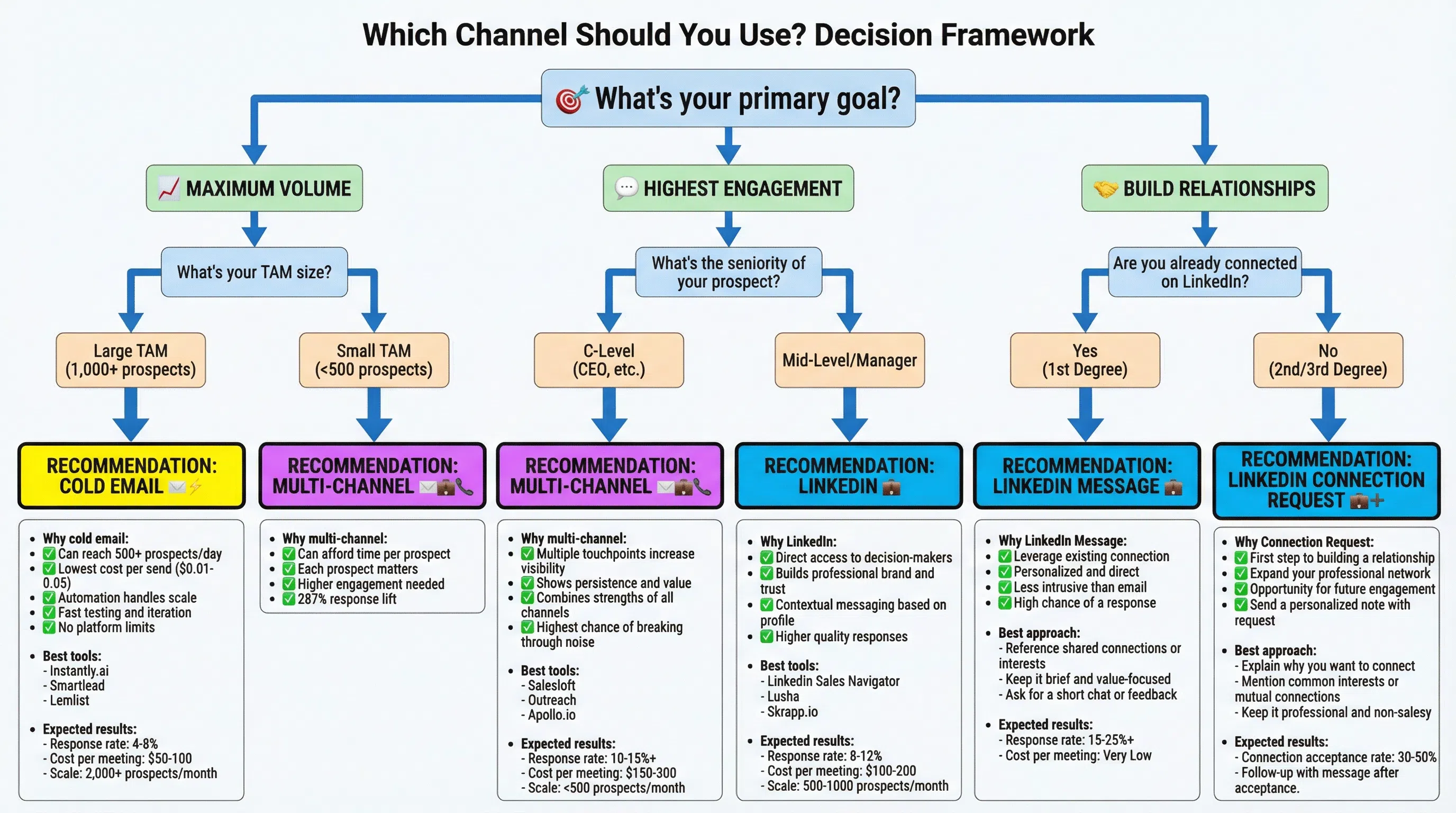
1. Large Total Addressable Markets (TAM)
When you need to reach thousands of companies across multiple industries or segments, cold email is the only channel that can handle the volume.
Example: SaaS company targeting marketing managers at 10,000+ mid-market companies in North America.
2. Transactional Sales (30-90 Day Cycles)
Short sales cycles where speed matters more than relationship depth favor cold email's scalability.
Example: Selling marketing automation software with a 45-day average sales cycle.
3. Budget Constraints
Early-stage startups or small teams with limited budgets can't afford $1.50-$2 per prospect that LinkedIn InMail requires.
Example: Startup with $500/month prospecting budget can send 10,000 cold emails vs 250 InMails.
4. Testing New Markets or Messaging
When you need to test different value propositions, pain points, or positioning across segments quickly, email allows rapid iteration.
Example: Testing 5 different messaging angles across 1,000 prospects each (5,000 total) in two weeks.
5. Volume-Based Pipeline Building
When your conversion metrics require reaching hundreds of prospects weekly to hit pipeline targets, email is the only scalable option.
Example: SDR team needs 50 qualified meetings per month, requiring outreach to 2,500 prospects (2% response rate).
6. Proven Offers with Known Conversion Rates
When you have a proven offer and know your conversion metrics, scaling with cold email makes sense.
Example: Agency with proven 3% cold email response rate and 20% meeting-to-close rate needs to scale revenue.
When to Use LinkedIn Outreach
LinkedIn outreach is the better choice in these scenarios:
1. Niche, High-Value Audiences
When targeting a small number of high-value prospects where each conversation matters, LinkedIn's superior response rates justify the cost and time.
Example: Enterprise sales targeting 200 Fortune 500 CIOs where each deal is worth $500K+.
2. Long Sales Cycles (6+ Months)
Complex sales with multiple stakeholders benefit from LinkedIn's relationship-building features and gradual engagement.
Example: Selling enterprise software with 9-12 month sales cycles requiring relationships with 3-5 stakeholders per account.
3. Roles That Live on LinkedIn
Certain job functions use LinkedIn daily and are far more responsive on the platform than via email.
Best LinkedIn audiences:
- Recruiters and HR professionals
- Sales leaders and SDRs
- Marketing directors and content creators
- Consultants and agency owners
- Investors and venture capitalists
- Real estate professionals
- MSPs and technology service providers
4. Relationship-Driven Sales
When trust, credibility, and relationships are critical to closing deals, LinkedIn's context and social proof create advantages.
Example: Selling consulting services where personal brand and credibility drive purchasing decisions.
5. Named Account Selling
Strategic account targeting where you're pursuing specific companies benefits from LinkedIn's research capabilities and multi-stakeholder visibility.
Example: Landing 20 dream accounts by mapping and engaging with 5-7 stakeholders at each company over 6 months.
6. When Email Deliverability is Poor
If your email deliverability is below 80% due to domain issues or industry spam reputation, LinkedIn provides an alternative channel with 100% delivery.
Example: Industry with heavy email saturation where inbox placement is challenging.
The Multi-Channel Approach: Best of Both Worlds
Here's the truth: You shouldn't choose between cold email and LinkedIn outreach. The most effective B2B prospecting in 2026 combines both channels in a coordinated strategy.
The Data on Multi-Channel Outreach
- 287% higher purchase rates: Multi-channel campaigns using 3+ channels see 287% higher purchase rates than single-channel efforts
- 494% increase in order rates: Using 3+ channels increases order rates by 494%
- Optimal channel count: 3-4 channels is ideal (email + LinkedIn + phone/SMS/WhatsApp)
- Diminishing returns: Adding more than 4 channels shows minimal additional benefit
Why Multi-Channel Works
Multiplied touchpoints: Viewing a LinkedIn profile, sending a connection request, and sending an email creates 3 touchpoints vs 1.
Fresh conversations: Switching channels makes each message feel like a new conversation rather than persistent follow-up.
Higher familiarity: When prospects see your name on LinkedIn and then receive your email, it feels less "cold" and more familiar.
Increased trust: Multi-channel presence signals legitimacy. Scammers rarely have professional LinkedIn profiles with content and connections.
Channel preferences: Different prospects prefer different channels. Multi-channel ensures you reach them where they're most responsive.
Recommended Multi-Channel Sequence
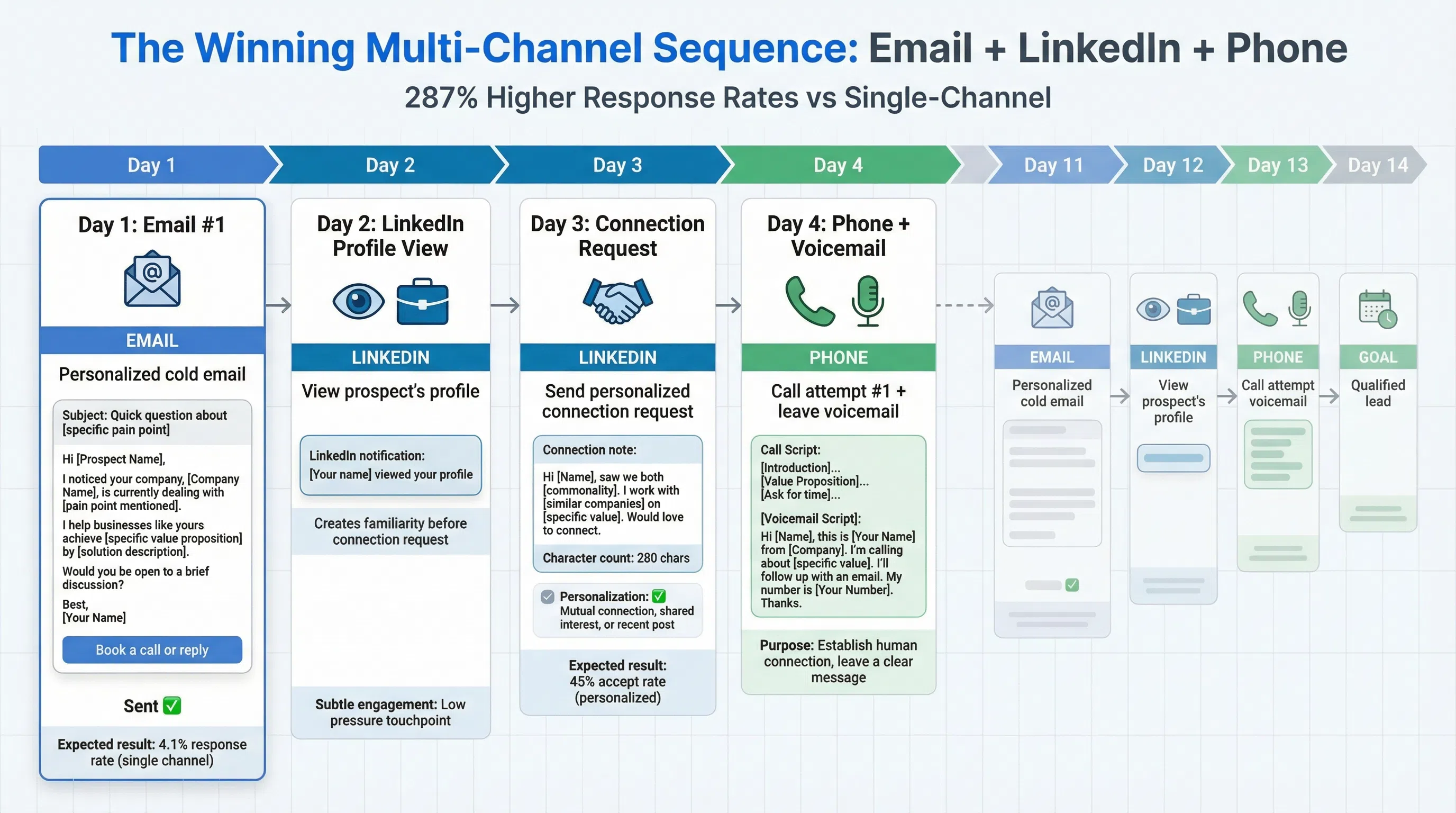
Here's a proven 14-day multi-channel sequence combining email and LinkedIn:
Day 1: Personalized cold email
Day 2: View prospect's LinkedIn profile
Day 3: LinkedIn connection request (personalized note)
Day 4: Call attempt + voicemail (if you have phone number)
Day 7: Follow-up email (different angle)
Day 10: LinkedIn message (if connected) or InMail (if not connected)
Day 14: Final call attempt or email
This sequence combines:
- 2 emails (scale)
- 2-3 LinkedIn touches (relationship building)
- 2 call attempts (personal touch)
Results: Multi-channel sequences like this achieve 15-30% response rates compared to 1-5% for email-only campaigns.
Channel Allocation by Prospect Tier
Tier 1 Accounts (Top 20 dream clients):
- LinkedIn: Primary channel (InMail, connection requests, content engagement)
- Email: Secondary (personalized, low volume)
- Phone: Tertiary (research direct lines, warm voicemail)
- Investment: 15-30 minutes per prospect
Tier 2 Accounts (100-200 high-fit prospects):
- Email: Primary channel (automated sequences)
- LinkedIn: Secondary (connection requests, messages to accepted connections)
- Investment: 5-10 minutes per prospect
Tier 3 Accounts (Volume prospects):
- Email: Primary and dominant channel
- LinkedIn: Occasional (automated profile views, selective connection requests)
- Investment: 1-2 minutes per prospect
How to Implement Your Multi-Channel Strategy
Step 1: Build Your Prospect Tiers
Segment your prospects into three tiers based on account value, fit score, and strategic importance.
- Tier 1: 20-50 accounts worth $100K+ ARR each
- Tier 2: 100-200 accounts worth $10K-$100K ARR
- Tier 3: 500-1,000 accounts worth $5K-$25K ARR
Step 2: Choose Your Channel Mix
Select 3-4 channels based on your target audience, budget, and team capacity:
- Must-have: Email (all tiers)
- High-value addition: LinkedIn (Tiers 1-2)
- Optional adds: Phone, SMS, WhatsApp, direct mail (Tier 1 only)
Step 3: Create Channel-Specific Messaging
Don't use identical messages across channels. Tailor your approach:
- Email: Direct, value-focused, clear CTA
- LinkedIn: Conversational, context-aware, relationship-first
- Phone: Concise, permission-based, focused on scheduling next step
Step 4: Set Up Automation and Workflows
Use tools to coordinate multi-channel outreach:
- Email sequences: Lemlist, Instantly.ai, Smartlead, Outreach, SalesLoft
- LinkedIn automation: LeadSpark AI (for personalized messages), Expandi, Meet Alfred
- Multi-channel platforms: HubSpot, Reply.io, Salesloft
Step 5: Track Performance by Channel
Monitor these metrics for each channel:
- Response rate: Replies per message sent
- Positive response rate: Interested replies per message sent
- Meeting booking rate: Meetings scheduled per 100 prospects
- Cost per meeting: Total channel cost divided by meetings booked
- Channel attribution: Which channel drives the meeting booking
Step 6: Optimize Based on Data
After 2-4 weeks, analyze performance:
- Which channel drives the most responses?
- Which channel drives the highest quality responses?
- What's the most cost-effective channel for your targets?
- How do multi-channel prospects perform vs single-channel?
Adjust your channel mix, messaging, and sequence timing based on results.
Frequently Asked Questions
Q: Should I use InMail or connection requests on LinkedIn?
A: Connection requests are more cost-effective (free vs $1.50-$2 per InMail) and allow ongoing messaging. Use personalized connection requests for most prospects, and reserve InMails for high-value targets who might not accept connection requests or when you need immediate access.
Q: How many follow-ups should I send via email vs LinkedIn?
A: Email: 4-9 follow-ups are optimal (research shows 70% of salespeople stop after one attempt, missing a potential 160% response rate increase). LinkedIn: 2-3 touches max to avoid appearing spammy on a relationship-focused platform.
Q: Can I automate LinkedIn outreach without getting banned?
A: Yes, if you stay within safe limits: 20-30 connection requests per day, 100 total daily actions, and use quality automation tools that mimic human behavior. Tools like LeadSpark AI work within LinkedIn's guidelines while achieving 70-90% response rates through advanced personalization.
Q: Which channel should I start with if I'm new to outbound?
A: Start with cold email for volume and fast learning, then add LinkedIn for your top-tier prospects. Email lets you test messaging quickly across larger sample sizes, while LinkedIn's higher response rates help with high-value accounts once you've refined your positioning.
Q: How do I personalize at scale across both channels?
A: Use AI-powered personalization tools. For email, tools like Lemlist and Instantly.ai offer basic personalization. For LinkedIn, LeadSpark AI analyzes prospect profiles and recent posts to generate contextual messages at scale, achieving 70-90% response rates.
Q: What if my prospects don't respond to email or LinkedIn?
A: Add phone as a third channel. Multi-channel sequences with email + LinkedIn + phone achieve 287% higher response rates than single-channel. Sometimes a personal phone call breaks through when digital channels don't.
Q: Is LinkedIn worth the cost if response rates are only 2-5x better than email?
A: It depends on your deal size and volume needs. For enterprise deals worth $100K+, LinkedIn's 10-25% response rate easily justifies $1.50-$2 per message. For smaller deals or high-volume prospecting, email's scale advantage matters more. The best approach uses both strategically.
Conclusion: Use Both, Strategically
The cold email vs LinkedIn debate misses the point. The question isn't which channel is better—it's how to use both strategically to maximize pipeline.
The reality:
- Cold email wins on scale, cost, and volume capacity
- LinkedIn wins on response rates, deliverability, and relationship building
- Multi-channel wins on overall results (287-494% improvement)
The recommended approach for 2026:
- Use cold email as your primary volume channel: Reach your full TAM, test messaging, and generate initial awareness at scale
- Use LinkedIn for high-value prospects: Target your top 20-30% of accounts with personalized LinkedIn outreach for higher engagement
- Combine both in multi-channel sequences: Use email for scale and LinkedIn for context in coordinated campaigns
- Add phone for top-tier accounts: Enterprise deals justify the time investment in personal calls
For most B2B sales teams, that means email handling 70-80% of prospecting volume while LinkedIn and phone focus on the top 20-30% of high-value accounts.
Scale Your Multi-Channel Outreach with AI Personalization
If you're ready to combine the scale of email with the response rates of LinkedIn, AI-powered personalization is the solution.
LeadSpark AI brings 70-90% LinkedIn response rates to your multi-channel prospecting by analyzing prospect profiles, recent posts, and company news to generate hyper-personalized messages at scale.
How it works in your multi-channel sequence:
- Upload your prospect list
- LeadSpark AI analyzes LinkedIn profiles and recent activity
- Generate personalized LinkedIn messages that reference specific context
- Coordinate with your email sequences for multi-channel touchpoints
- Watch response rates climb to 70-90% while maintaining volume
Start your free trial and see how AI personalization transforms your LinkedIn outreach from generic templates to contextual conversations. No credit card required.
Ready to Generate Personalized Icebreakers?
Join sales professionals using LeadSpark AI to create hyper-personalized LinkedIn icebreakers in minutes.