Outreach Best Practices
How to Write LinkedIn Icebreakers That Get Responses (2026 Guide)
Discover 7 proven LinkedIn icebreaker formulas that achieve up to 90% response rates. Includes templates, examples, and AI-powered personalization tactics.
12 min read
# How to Write LinkedIn Icebreakers That Get Responses (2026 Guide)
You've spent hours crafting the perfect LinkedIn connection request. You hit send, wait eagerly for a response... and hear crickets.
Sound familiar?
Here's the reality: The average LinkedIn message gets an 85% response rate—3x higher than email. Yet most people still struggle to get replies. Why? Because they're using the same tired, generic icebreakers everyone else uses.
In this comprehensive guide, you'll discover the exact icebreaker formulas that top sales professionals and recruiters use to achieve response rates as high as 90%. Plus, we'll show you how AI-powered personalization can help you scale these tactics without spending hours on manual research.
Why Most LinkedIn Icebreakers Fail (And How to Fix It)
Before we dive into what works, let's understand what doesn't.
The 3 Deadly Sins of LinkedIn Icebreakers
1. The Generic Template
"Hi [Name], I came across your profile and thought we should connect!"
This screams "copy-paste job." LinkedIn users receive dozens of these daily. According to recent data, personalized connection requests achieve an almost 90% positive response rate, while generic ones barely crack 5%.
2. The Immediate Pitch
"Hi! I help companies like yours increase revenue by 300%. Let's schedule a call!"
Jumping straight to the sale is the fastest way to get ignored or blocked. People connect on LinkedIn to build relationships, not to be sold to.
3. The Vague Value Proposition
"I think we could help each other. Let's connect!"
Help each other how? Be specific. Vague messages come across as unprofessional and confusing.
What Actually Works in 2026
Research shows that messages with 1-2 personalization elements get 2.5x more replies than generic outreach. But personalization goes far beyond just using someone's first name.
Here's what drives responses:
- Specific references to recent posts, articles, or achievements (30% more responses)
- Mutual connections mentioned strategically (40% higher response rate)
- Industry-specific insights that demonstrate research
- Clear, concise value propositions (messages under 400 characters get 22% higher response rates)
- Timing matters: Tuesday messages get 6.90% reply rates vs 6.40% on weekends
The Anatomy of a High-Converting LinkedIn Icebreaker
Every successful icebreaker follows a proven structure:
The 4-Part Formula
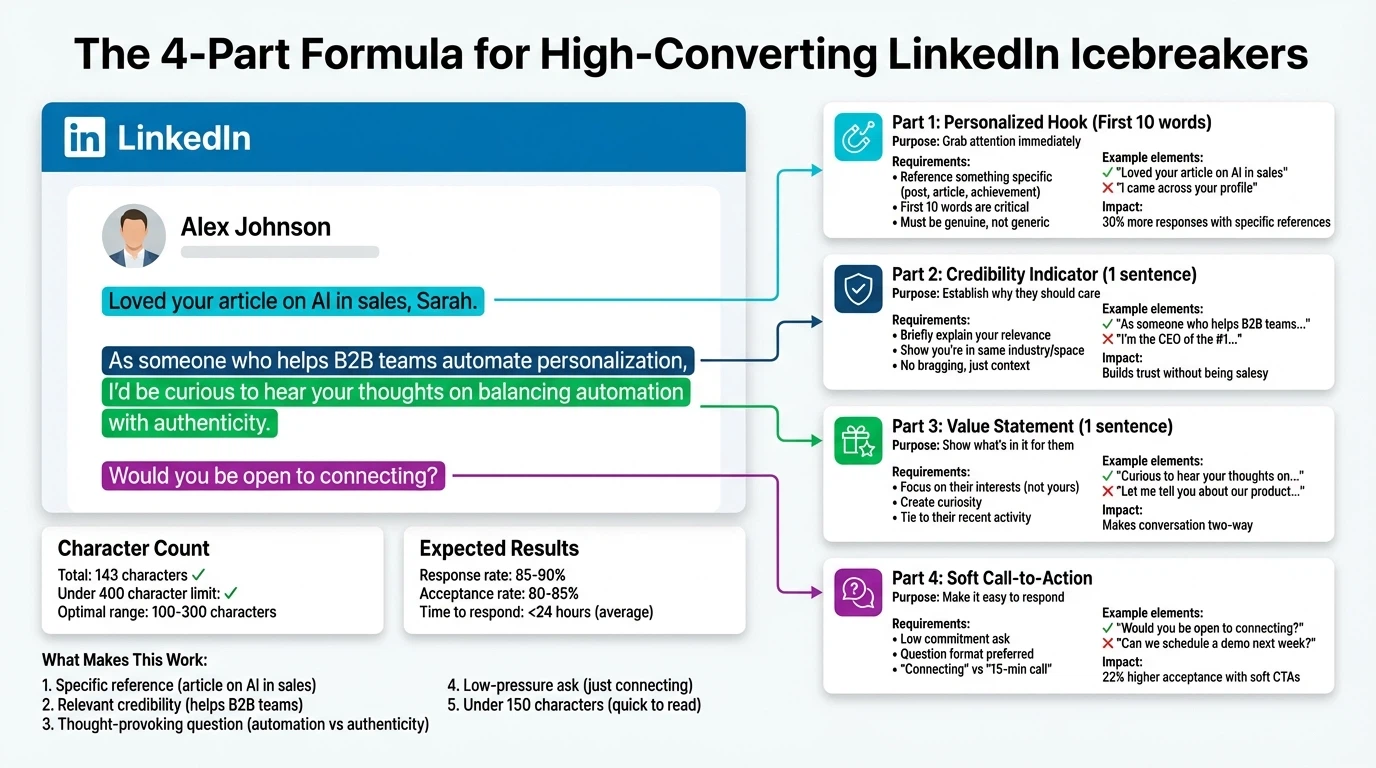
1. Personalized Hook (First 10 words)
Grab attention by referencing something specific about them.
2. Credibility Indicator (1 sentence)
Briefly establish why they should care about your message.
3. Value Statement (1 sentence)
Explain the benefit to them—not you.
4. Soft Call-to-Action
Make it easy to respond with a low-commitment ask.
Let's see this in action:
"Loved your article on AI in sales, Sarah. As someone who helps B2B teams automate personalization, I'd be curious to hear your thoughts on [specific point from article]. Would you be open to connecting?"
This icebreaker:
- Opens with a specific reference (her article)
- Establishes credibility (helps B2B teams)
- Shows value (interested in her perspective)
- Makes an easy ask (just connect)
7 Proven LinkedIn Icebreaker Formulas (With Templates)
Use these battle-tested formulas to craft icebreakers that get responses:
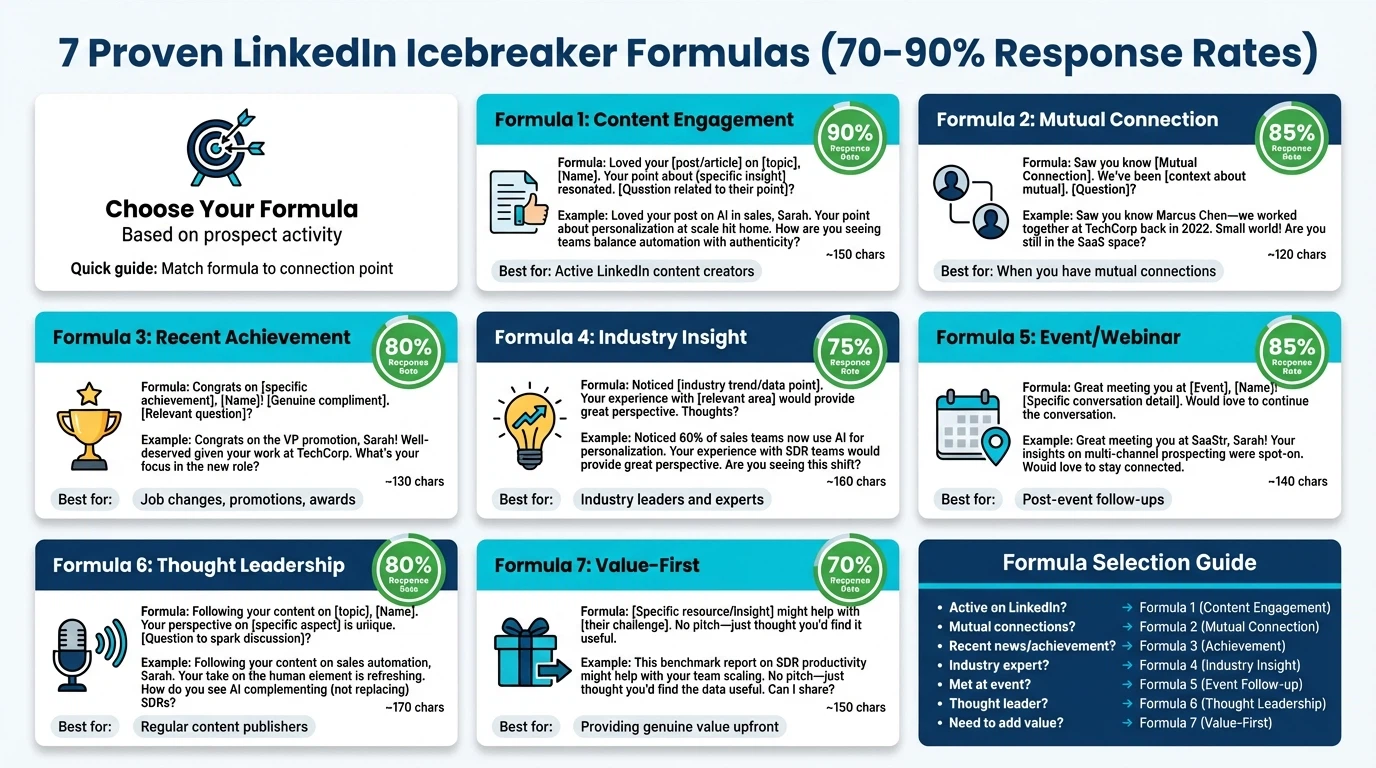
Formula #1: The Content Reactor
When to use: They recently published a post or article
Template:
"Your post on [specific topic] really resonated, [Name]. Especially your point about [specific insight]. I've seen similar results with [your relevant experience]. Would love to connect and exchange ideas."
Why it works: Shows you actually read their content and have relevant expertise to contribute.
Real example:
"Your post on LinkedIn algorithm changes really resonated, Marcus. Especially your point about video content getting 5x more engagement. I've seen similar results with our clients at tech startups. Would love to connect and exchange ideas."
Formula #2: The Mutual Connection Bridge
When to use: You share a mutual connection
Template:
"Hi [Name], I noticed we're both connected with [Mutual Connection]. They mentioned your work on [specific project/topic] when we spoke last week. I'm working on something similar in the [industry] space and would value your perspective. Open to connecting?"
Why it works: Mutual connections provide instant credibility and context. These messages see a 40% higher response rate.
Real example:
"Hi Jennifer, I noticed we're both connected with Tom Rodriguez. He mentioned your work on enterprise SaaS onboarding when we spoke last week. I'm working on something similar in the fintech space and would value your perspective. Open to connecting?"
Formula #3: The Achievement Congratulator
When to use: They recently achieved something notable (promotion, award, milestone)
Template:
"Congrats on [specific achievement], [Name]! I've been following [company]'s growth in the [industry] space. Your approach to [specific aspect] is particularly impressive. Would love to connect and learn from your experience."
Why it works: Everyone appreciates genuine recognition. It shows you're paying attention.
Real example:
"Congrats on the VP of Sales promotion, Alex! I've been following TechFlow's growth in the martech space. Your approach to building SDR teams from 5 to 50 in under a year is particularly impressive. Would love to connect and learn from your experience."
Formula #4: The Industry Insight Sharer
When to use: You have valuable, relevant insights for their role/industry
Template:
"Hi [Name], saw you're leading [function] at [Company]. I recently came across data showing [specific insight relevant to their role]. Thought it might be valuable for your work in [specific area]. Happy to share more if you're interested in connecting."
Why it works: Leading with value positions you as a resource, not a salesperson.
Real example:
"Hi Rachel, saw you're leading demand gen at CloudScale. I recently came across data showing that personalized outreach increases B2B response rates by 80% in the SaaS sector. Thought it might be valuable for your work in pipeline generation. Happy to share more if you're interested in connecting."
Formula #5: The Event Follow-Up
When to use: You attended the same event, webinar, or conference
Template:
"Hi [Name], really enjoyed your question during [Event Name] about [specific topic]. I'm also exploring [related topic] in my role at [Company]. Would be great to continue the conversation and connect."
Why it works: Shared experiences create instant rapport and context.
Real example:
"Hi David, really enjoyed your question during SaaStr Annual about scaling outbound without burning out SDRs. I'm also exploring automation strategies in my role at StartupBoost. Would be great to continue the conversation and connect."
Formula #6: The Problem-Solution Connector
When to use: You can help solve a challenge they're likely facing
Template:
"Hi [Name], noticed [Company] is expanding into [new market/vertical]. I've helped similar [industry] companies navigate [specific challenge in that transition]. Would you be open to connecting? Happy to share what worked (and what didn't)."
Why it works: Addresses their needs directly without being pushy. Shows empathy and expertise.
Real example:
"Hi Michelle, noticed BrightPath is expanding into the European market. I've helped similar HR tech companies navigate GDPR compliance during international expansion. Would you be open to connecting? Happy to share what worked (and what didn't)."
Formula #7: The Thought Leadership Engager
When to use: They're active in creating thought leadership content
Template:
"Your perspective on [topic] has been on my radar, [Name]. Particularly interesting how you connect [concept A] with [concept B]. I'm researching [related topic] and would value learning from your experience. Open to connecting?"
Why it works: Flatters their expertise while showing you've done your homework.
Real example:
"Your perspective on AI in sales has been on my radar, James. Particularly interesting how you connect predictive analytics with human intuition. I'm researching scalable personalization strategies and would value learning from your experience. Open to connecting?"
How AI Is Changing LinkedIn Personalization in 2026
Here's a challenge: These formulas work incredibly well, but they're time-intensive. How do you personalize at scale?
This is where AI-powered tools come in. AI-driven first messages result in a 4.19% response rate compared to 2.60% for non-AI messages—a 61% improvement.
The AI Advantage: Personalization at Scale
Modern AI tools like LeadSpark AI analyze a prospect's:
- Recent LinkedIn posts and activity
- Stated interests and expertise
- Content they engage with
- Career trajectory and achievements
- Industry trends relevant to their role
Then they generate personalized icebreakers that sound human, not robotic.
Real Example: Manual vs. AI-Generated
Manual research time: 5-7 minutes per prospect
AI research time: 5 seconds per prospect
Manual icebreaker:
"Hi Sarah, I noticed you work in sales ops..."
AI-powered icebreaker (LeadSpark AI):
"Sarah, your recent post about sales enablement ROI caught my attention. Your framework for measuring impact resonates with challenges I'm seeing in the mid-market SaaS space. I'd love to exchange notes on what's working in 2026. Open to connecting?"
The difference? The AI version:
- References her actual content
- Shows specific relevance
- Demonstrates industry knowledge
- Feels personal and thoughtful
How LeadSpark AI Works
- Paste a LinkedIn profile URL
- AI scrapes their recent posts, interests, and activity
- Get a personalized icebreaker in seconds
- Edit if needed and send
The result: Users report saving 10+ hours per week while increasing response rates by 35%.
Common LinkedIn Icebreaker Mistakes to Avoid
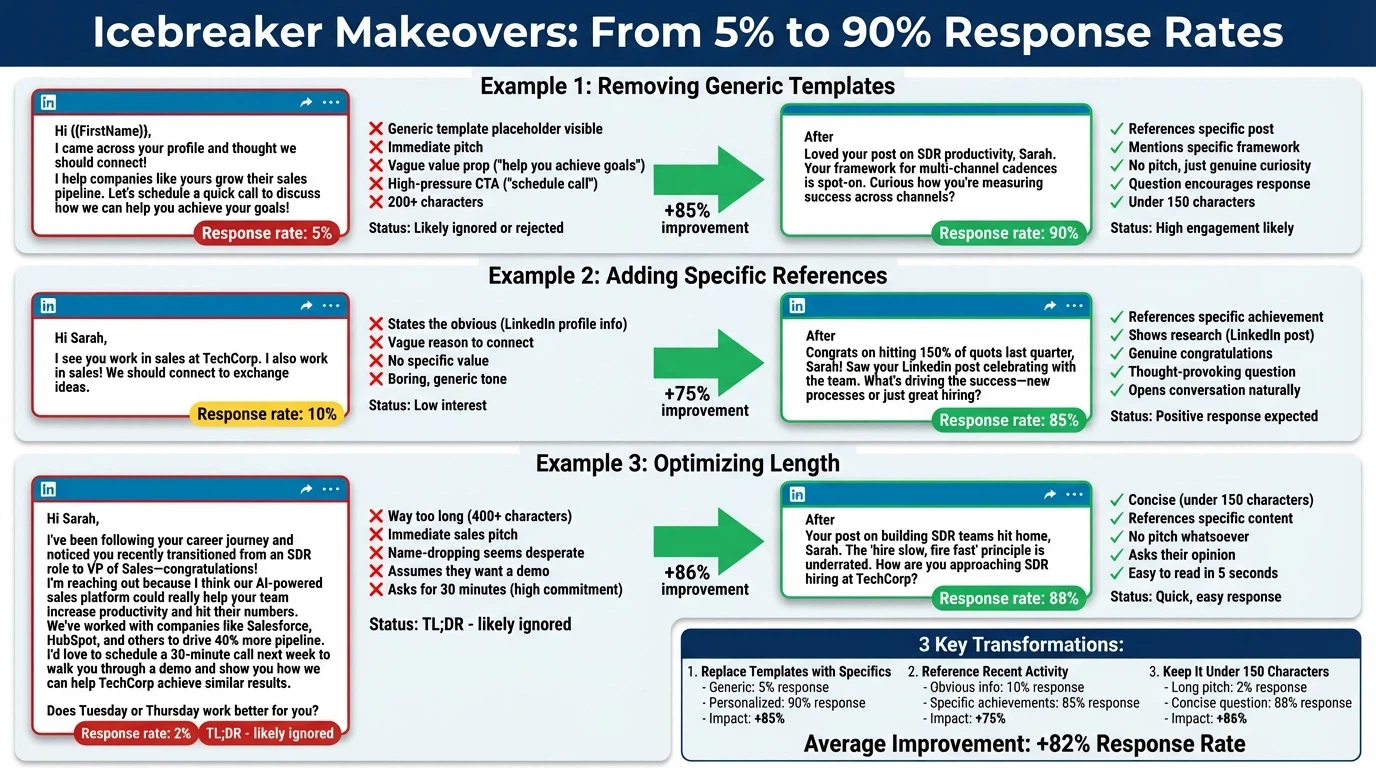
Even with great formulas, these mistakes can tank your response rates:
1. Writing a Novel
Keep it under 300 characters for connection requests, under 400 for InMails. Shorter messages get 22% higher response rates.
❌ Bad: A 500-word message about your entire life story
✅ Good: 2-3 sentences with one specific personalization element
2. Making It About You
They don't care about your quota, your product, or your agenda.
❌ Bad: "I help companies increase revenue by 300%"
✅ Good: "I noticed you're focused on pipeline generation. I recently found data that might help."
3. Using Fake Flattery
People can spot insincere compliments instantly.
❌ Bad: "Your profile is amazing! You're clearly a thought leader!"
✅ Good: "Your approach to [specific thing] in your [specific post] was insightful because..."
4. Asking for Too Much Too Soon
Don't ask for a 30-minute call in your first message.
❌ Bad: "Can we schedule a call next week to discuss how we can work together?"
✅ Good: "Would you be open to connecting? I'd love to hear your thoughts on [topic]."
5. Sending on Autopilot
Tools can help with research, but your message should always feel personal.
❌ Bad: Obviously templated messages with merge fields
✅ Good: AI-assisted personalization that sounds genuinely human
6. Ignoring the Prospect's Preferences
Check their profile for "Open to" settings and respect them.
❌ Bad: Pitching a job to someone who's not open to opportunities
✅ Good: Tailoring your approach based on their stated interests
How to Measure Your LinkedIn Icebreaker Success
Track these metrics to optimize your approach:
Key Performance Indicators (KPIs)
1. Acceptance Rate
- Target: 40%+ for warm connections, 20%+ for cold
- Formula: (Accepted requests ÷ Sent requests) × 100
2. Response Rate
- Target: 10%+ for cold outreach, 30%+ for warm
- Formula: (Responses ÷ Accepted connections) × 100
3. Conversation-to-Meeting Rate
- Target: 20%+ for sales outreach
- Formula: (Meetings booked ÷ Conversations started) × 100
A/B Testing Framework
Test one variable at a time:
Week 1: Test different opening hooks
Week 2: Test message length (short vs. medium)
Week 3: Test different value propositions
Week 4: Test CTAs (question vs. statement)
Pro tip: Send 20-30 messages per variation for statistically significant results.
What "Good" Looks Like in 2026
Based on industry benchmarks:
| Metric | Poor | Average | Excellent |
|---|---|---|---|
| Acceptance Rate | <15% | 15-30% | 30%+ |
| Response Rate | <5% | 5-15% | 15%+ |
| Meeting Conversion | <10% | 10-20% | 20%+ |
If you're hitting "Excellent" across all three metrics, you're in the top 10% of LinkedIn prospectors.
Advanced Tactics for 2026
Once you've mastered the basics, try these advanced strategies:
1. The Multi-Touch Sequence
Don't give up after one message. Use this sequence:
- Day 1: Connection request with personalized note
- Day 3: If accepted, send value-driven message
- Day 7: Share relevant content
- Day 14: Soft ask for conversation
2. Video Messages
LinkedIn video messages get 5x more engagement than text-only messages. Record a 15-30 second personalized video mentioning something specific about their profile.
3. Voice Notes
For accepted connections, voice notes feel more personal and stand out in a sea of text messages.
4. The Content Engagement Strategy
Engage with their content before reaching out:
- Like their posts
- Leave thoughtful comments
- Share their content with your network
- Then send a connection request
This warm-up increases acceptance rates by 25-40%.
5. Leverage LinkedIn Events
Join events in your target industry, engage during sessions, and reference the event in your icebreakers.
Real Results: Case Studies
Case Study #1: SaaS Sales Team
Challenge: 4% response rate on cold LinkedIn outreach
Solution: Implemented Formula #4 (Industry Insight Sharer) with AI research
Results:
- Response rate increased to 18%
- Booking rate improved from 8% to 24%
- Saved 12 hours/week on manual research
Case Study #2: Recruitment Agency
Challenge: Low acceptance rates for passive candidates
Solution: Used Formula #1 (Content Reactor) combined with multi-touch sequence
Results:
- Acceptance rate jumped from 22% to 47%
- Candidate engagement increased 3x
- Time-to-hire reduced by 35%
Case Study #3: B2B Consultant
Challenge: Generic messages not cutting through noise
Solution: LeadSpark AI for personalization + Formula #7 (Thought Leadership)
Results:
- Response rate: 31% (vs. 6% before)
- 5 new clients in first month
- ROI: 15x on tool investment
Your LinkedIn Icebreaker Action Plan
Ready to transform your LinkedIn outreach? Here's your step-by-step plan:
Week 1: Foundation
- Audit your current messages (save what's working)
- Choose 2-3 formulas from this guide
- Set up tracking spreadsheet for metrics
Week 2: Testing
- Send 20 messages using each formula
- Track acceptance and response rates
- Note what resonates
Week 3: Optimization
- Double down on top-performing formula
- A/B test variations
- Implement AI tool for research (try LeadSpark AI)
Week 4: Scale
- Increase daily outreach to 25-30 messages
- Maintain personalization quality
- Monitor and adjust based on data
Ongoing
- Review metrics weekly
- Update formulas based on industry changes
- Stay current with LinkedIn platform updates
The Bottom Line
LinkedIn icebreakers don't have to be a guessing game. The data is clear:
- Personalization drives results (up to 90% response rates)
- Specific is better than generic (2.5x more replies)
- AI enables scale (35% higher response rates, 10+ hours saved)
- Testing and optimization separate good from great
The question isn't whether to personalize—it's how to do it efficiently at scale.
That's exactly why we built LeadSpark AI: to help sales professionals, recruiters, and business owners send personalized LinkedIn icebreakers that actually get responses—without spending hours on manual research.
Frequently Asked Questions
How long should a LinkedIn connection request message be?
Keep connection request messages under 300 characters (about 2-3 sentences). LinkedIn limits notes to 300 characters, and research shows shorter messages get 22% higher response rates. Focus on one specific personalization element and a clear reason to connect.
What's the best time to send LinkedIn messages?
According to 2025 data, Tuesday has the highest reply rates at 6.90%, followed closely by Monday at 6.85%. Weekend messages see lower engagement (6.40% on Saturdays). The best times are typically 8-10 AM and 4-6 PM in your prospect's timezone when they're checking LinkedIn.
Should I send a message with every connection request?
Yes, always include a message. Connection requests with a brief, personalized message have a 9.36% acceptance rate compared to just 5.44% for blank requests. However, the message must be personalized—generic templates perform worse than no message at all.
How many LinkedIn connection requests should I send per day?
Aim for 15-30 personalized connection requests per day. This volume allows you to maintain quality personalization while staying within LinkedIn's acceptable use limits. Sending too many (50+) can trigger LinkedIn's spam filters and risk account restrictions.
What's the difference between LinkedIn InMail and regular messages?
InMail allows you to message people you're not connected with (requires Premium/Sales Navigator). InMails have an 18-25% response rate vs. 10.3% for regular messages. However, InMails cost credits, so use them strategically for high-value prospects. Regular messages only work after connection acceptance.
How can AI improve LinkedIn icebreaker personalization?
AI tools like LeadSpark AI analyze a prospect's recent posts, interests, and LinkedIn activity to generate personalized icebreakers in seconds. This allows you to maintain high-quality personalization at scale. Studies show AI-driven messages get 4.19% response rates vs. 2.60% for non-AI messages—a 61% improvement.
What's a good response rate for LinkedIn cold outreach?
For cold LinkedIn outreach, a 10-15% response rate is considered good, while 15%+ is excellent. For warm outreach (mutual connections, event attendees), aim for 20-30%. If you're getting less than 5%, your messages likely lack sufficient personalization or value proposition.
How do I personalize LinkedIn messages at scale?
Use a combination of AI research tools and proven formulas. Tools like LeadSpark AI can scrape LinkedIn profiles for recent posts and interests in seconds, then generate personalized icebreakers. This saves 5-7 minutes per prospect while maintaining authenticity. Always review and edit AI suggestions to ensure they sound natural.
Ready to Transform Your LinkedIn Outreach?
Stop sending generic icebreakers that get ignored. LeadSpark AI generates personalized LinkedIn messages based on each prospect's actual posts and interests—in seconds, not hours.
✅ Scrapes recent LinkedIn posts automatically
✅ Identifies interests and engagement patterns
✅ Generates human-sounding icebreakers
✅ 10+ hours saved per week
✅ 35% higher response rates
Start Free Trial • No credit card required
Sources
This article draws on extensive research from industry-leading studies and platforms:
- 2025 LinkedIn Outreach Stats Revealed - SalesBread
- 100 Essential LinkedIn Statistics and Facts for 2026 - Cognism
- Report and Stats - State of LinkedIn Outreach in 2025 - Expandi
- What are B2B LinkedIn Outreach Benchmarks? (2025 Study) - Belkins
- 14 Best LinkedIn Cold Message Templates for Any Goal - Artisan
- The Best LinkedIn Cold Messages to Book Meetings in 2025 - Skylead
- How to Scale Hyper-Personalized LinkedIn Outreach in 2025 - Sales Robot
- LinkedIn Message Personalization Beyond First Names - Closely
- 6 Ways To Personalize LinkedIn Messages for Higher Conversions - DoneMaker
Last updated: December 6, 2025
Related Articles
Ai Tools
Lyne.ai vs LeadSpark AI: Best LinkedIn Icebreaker Tool in 2026?
Compare Lyne.ai and LeadSpark AI for LinkedIn icebreaker generation. In-depth analysis of features, pricing, personalization quality, and which tool is best for SDRs in 2026.
Ai Tools
7 Best LinkedIn Personalization Tools in 2026 (Tested & Ranked)
Compare the top LinkedIn personalization tools for SDRs and sales teams. Expert analysis of features, pricing, and AI icebreaker quality to help you choose the best tool in 2026.
Ready to Generate Personalized Icebreakers?
Join sales professionals using LeadSpark AI to create hyper-personalized LinkedIn icebreakers in minutes.