Linkedin Prospecting
LinkedIn Prospecting Messages Guide: 50+ Templates & Examples That Work
Master LinkedIn prospecting with 50+ proven message templates. Learn what gets 18-25% response rates, avoid common mistakes, and personalize at scale with AI.
LeadSpark AI Team
16 min read
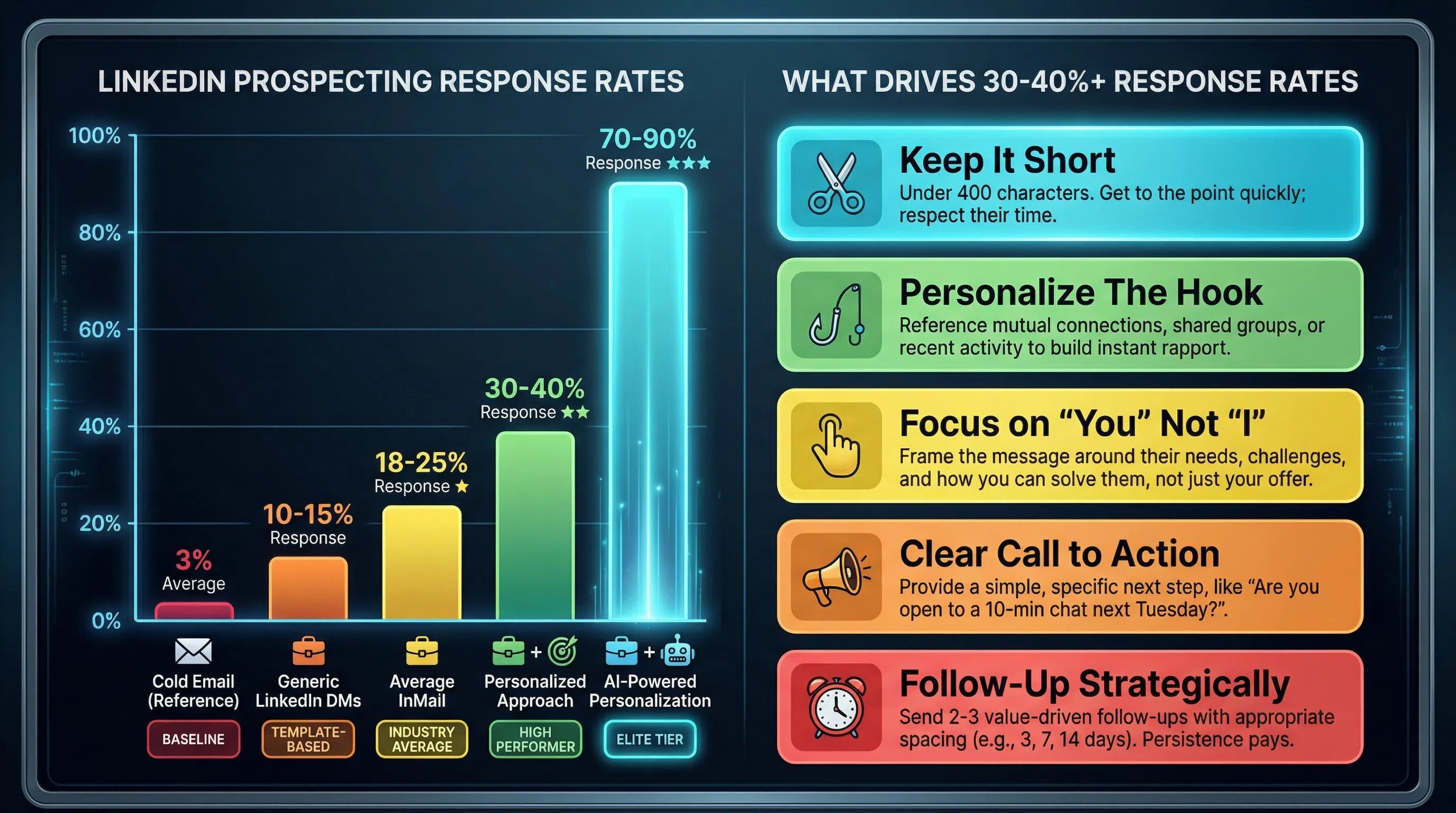
The average LinkedIn InMail response rate is 18-25%—5-8x better than cold email's 3%. High performers consistently hit 30-40% response rates, and elite SDRs achieve 70-90% with hyper-personalized approaches.
The difference? What you say and how you say it.
Generic "pitch slap" messages get ignored. Personalized messages mentioning a recent post can raise response rates by 32%. Messages under 400 characters boost response by 22%. Personalized subject lines increase response by 30.5%.
This guide provides 50+ proven LinkedIn prospecting message templates organized by scenario, plus best practices for timing, personalization, and avoiding the mistakes that tank response rates.
Why Most LinkedIn Prospecting Messages Fail
Decision-makers receive dozens of generic LinkedIn prospecting messages that get ignored because they're too salesy, not personalized, and fail to spark interest.
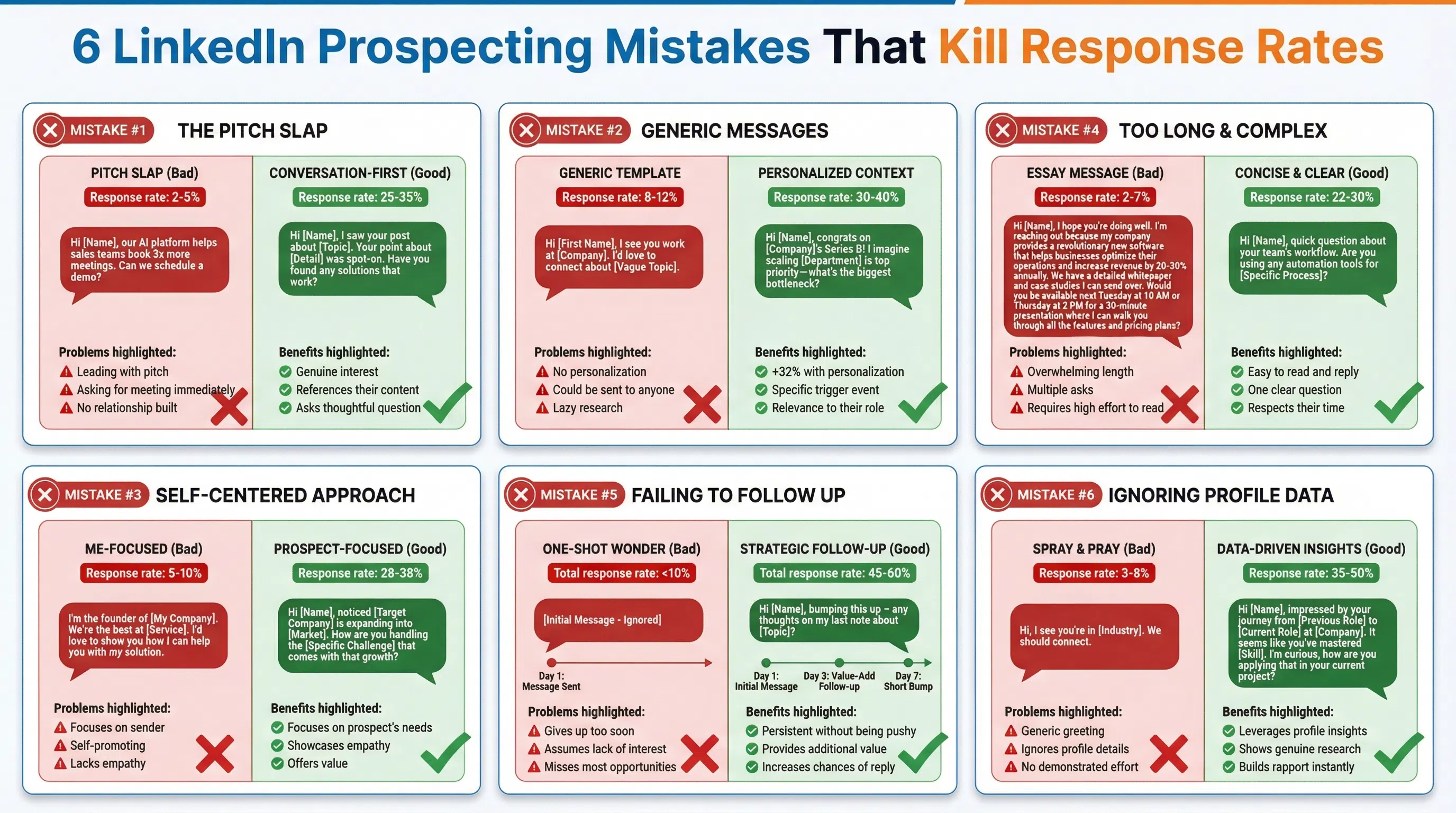
Here are the 6 biggest mistakes killing your LinkedIn response rates:
1. The "Pitch Slap" (Immediate Pitching)
Pitching your product in the first message, often called a "pitch slap," is the fastest way to get ignored or blocked.
Bad example:
"Hi [Name], I see you're in sales. Our AI platform helps sales teams book 3x more meetings. Can we schedule a 15-minute demo?"
Why it fails: You haven't earned the right to ask for anything yet. You're a stranger leading with what YOU want.
Good approach: Focus on starting a genuine conversation, not pitching.
2. Generic, Non-Personalized Messages
Generic messages are easy to spot and often ignored. Simply inserting a prospect's name and company name isn't real personalization—it just tells them you know who they are. Hardly impressive.
What real personalization looks like:
- Reference their recent LinkedIn post
- Mention shared connections or groups
- Cite a company milestone (funding, product launch, expansion)
- Comment on their content or industry news
Using a personalized message can raise your response rate by up to 32%.
3. Asking for Meetings Too Early
Jumping the gun by requesting a meeting immediately is overly aggressive and makes undue assumptions about the prospect's interest level.
Build rapport first. Provide value. Then suggest a next step.
4. Sending Long Messages
People are busy. If your message looks like an essay, they'll ignore it. A message stuffed with a long introduction and pitch can discourage responses.
Messages under 400 characters boost response rates by 22%. That's about 50-100 words—roughly what fits on one mobile screen. (Remember: 57% of LinkedIn traffic comes from mobile.)
5. Being Too Pushy or Overly Formal
LinkedIn is professional, but messages shouldn't be stiff or overly formal. A conversational tone is more likely to engage prospects. Avoid corporate jargon.
6. Over-Following Up
While persistence is key, bombarding prospects with messages is counterproductive. If you don't get a response after 2-3 follow-ups, move on. Desperation is never a good look.
LinkedIn Prospecting Response Rate Benchmarks (2026)
Before diving into templates, here's what "good" looks like:
Overall Performance:
- Average response rate: 18-25%
- High performers: 30-40%
- Elite tier (hyper-personalized): 70-90%
- Cold email comparison: 3% average (LinkedIn is 6-8x better)
Response Rates by Function:
- HR & Talent Acquisition: 12.08%
- Product Management: 10.24%
- C-Level Executives: 6.98%
- Sales & Marketing: 6.32-6.40%
What Boosts Response Rates:
- Personalized subject lines: +30.5%
- Messages under 400 characters: +22%
- Shared group members: +21%
- Individual sends (not bulk): +15%
- "Open to Work" candidates: +37%
Best Timing:
- Best days: Tuesday–Thursday
- Best times: 8–10am or 2–4pm
- Worst times: Monday mornings or Friday afternoons (-20%), Saturday (-8%)
Conversion Benchmark:
50+ LinkedIn Prospecting Message Templates by Scenario
Good prospecting on LinkedIn isn't about clever tricks or mass messages—it's about being relevant, personal, and helpful. Each message should be based on intent signals and personalized for context.
Here are templates organized by scenario:
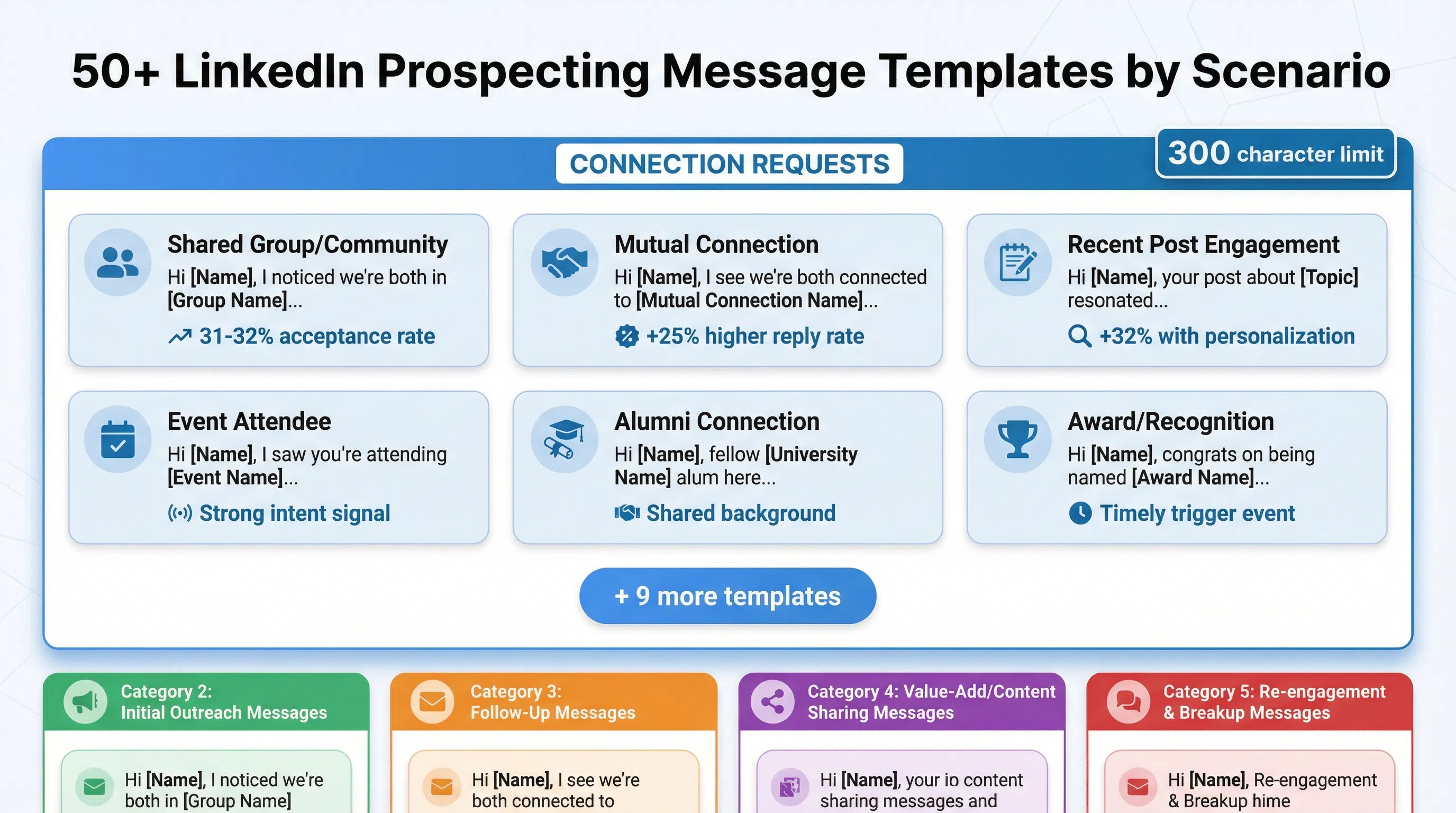
Category 1: Connection Request Messages (15 Templates)
A study found that blank notes resulted in a 31% acceptance rate, while a short introductory connection request had a 32% acceptance rate. Keep these short—you only have 300 characters.
Template 1: Shared Group/Community
`
Hi [First Name], I noticed we're both in [Group Name]. I've been following conversations about [Topic] and thought it'd be great to connect. Looking forward to exchanging ideas!
`
Template 2: Mutual Connection
`
Hi [First Name], I see we're both connected to [Mutual Connection Name]. I've been following your work in [Industry/Role] and would love to connect and learn from your experience.
`
Template 3: Recent Post Engagement
`
Hi [First Name], your recent post about [Topic] really resonated—especially [specific point]. Would love to connect and continue the conversation!
`
Template 4: Event Attendee
`
Hi [First Name], I saw you're attending [Event Name]. I'm going too! Would love to connect beforehand and perhaps meet up during the event.
`
Template 5: Industry Peer
`
Hi [First Name], I noticed we're both working in [Industry/Niche]. I've been following [Company Name]'s approach to [Strategy/Initiative] and would love to exchange insights.
`
Template 6: Job Change Congratulations
`
Hi [First Name], congrats on your new role at [Company]! Excited to see where you take [Department/Team]. Would love to connect and hear about your plans.
`
Template 7: Company Milestone
`
Hi [First Name], congrats on [Company]'s recent [Funding/Product Launch/Expansion]! Really impressive growth. Would love to connect and follow your journey.
`
Template 8: Content Creator
`
Hi [First Name], I've been following your content on [Topic]—your insights on [Specific Topic] are spot-on. Would love to connect and learn from your expertise.
`
Template 9: Similar Role
`
Hi [First Name], I see we're both [Job Title]s focused on [Specialty]. I'd love to connect and share ideas about [Challenge/Trend] in our space.
`
Template 10: Local Connection
`
Hi [First Name], I noticed you're also based in [City/Region]. Always great to connect with local [Industry] professionals. Looking forward to connecting!
`
Template 11: Alumni Connection
`
Hi [First Name], fellow [University Name] alum here! I see you're in [Industry/Role] now. Would love to connect and hear about your journey since graduation.
`
Template 12: Podcast/Webinar Guest
`
Hi [First Name], I caught your recent interview on [Podcast/Webinar]. Your take on [Topic] was fascinating. Would love to connect and continue learning from you.
`
Template 13: Award/Recognition
`
Hi [First Name], congrats on being named [Award/Recognition]! Well-deserved based on [Company]'s success with [Achievement]. Would love to connect!
`
Template 14: Shared Interest
`
Hi [First Name], I noticed you're interested in [Topic/Hobby]. I've been passionate about [Topic] for years. Would be great to connect with someone who shares that interest!
`
Template 15: No-Note Connection (Blank)
`
[No note—just send the connection request]
`
Note: Blank requests have a 31% acceptance rate, so this can work for prospects who are likely to check your profile.
Category 2: First Messages After Connection (12 Templates)
Once connected, you have more space to start a conversation. Aim for 50-100 words max.
Template 16: Value-First Approach
`
Hi [First Name], thanks for connecting! I saw you're focused on [Challenge/Goal] at [Company]. I recently came across [Resource/Article/Insight] about [Topic] that might be helpful. Here's the link: [URL]
No strings attached—just thought you'd find it useful. Let me know what you think!
`
Template 17: Question-Based Opener
`
Hi [First Name], thanks for connecting! I've been following [Company]'s work in [Area]. Quick question: how are you approaching [Specific Challenge] right now? I've seen a few different strategies and curious what's working for you.
`
Template 18: Shared Experience
`
Hi [First Name], thanks for connecting! I noticed you also worked at [Previous Company]. I was there during [Time Period]—such a formative experience. How did your time there shape your approach at [Current Company]?
`
Template 19: Recent Post Follow-Up
`
Hi [First Name], thanks for connecting! I saw your post about [Topic] last week. Your point about [Specific Detail] is something I've been thinking about a lot. Have you found any effective strategies for [Related Challenge]?
`
Template 20: Industry Insight
`
Hi [First Name], thanks for connecting! I've been noticing a trend in [Industry] around [Trend/Change]. I'm curious—are you seeing the same thing at [Company]? Would love to hear your perspective.
`
Template 21: Mutual Connection Context
`
Hi [First Name], thanks for connecting! [Mutual Connection Name] mentioned you're doing interesting work with [Project/Initiative]. I'd love to hear more about it when you have a minute.
`
Template 22: Job Change Follow-Up
`
Hi [First Name], thanks for connecting! How are the first few weeks at [New Company] going? The transition from [Old Company] to [New Company] must be interesting—especially given [Industry Difference/Challenge].
`
Template 23: Event Follow-Up
`
Hi [First Name], great connecting after [Event Name]! Did you catch [Speaker]'s session on [Topic]? I thought their take on [Specific Point] was really compelling. What did you think?
`
Template 24: Content Sharing
`
Hi [First Name], thanks for connecting! I just published a post about [Topic] that I think you'd find relevant given your work on [Related Area]. Here's the link: [URL]
Would love to hear your thoughts if you get a chance to read it!
`
Template 25: Peer Insight Request
`
Hi [First Name], thanks for connecting! I'm working on [Project/Challenge] and noticed you have experience with [Related Area]. Do you have 2 minutes for a quick question about [Specific Topic]?
`
Template 26: Company News Congratulations
`
Hi [First Name], thanks for connecting! Just saw the news about [Company Achievement]. That's huge—congrats! I'm curious, how is [Achievement] changing your approach to [Related Area]?
`
Template 27: No-Ask Introduction
`
Hi [First Name], thanks for connecting! I'm looking forward to following your insights on [Topic]. I've been working in [Industry/Role] for [X years] and always learning from folks like you who are pushing boundaries in [Area].
Excited to stay connected!
`
Category 3: Follow-Up Messages (8 Templates)
Don't give up after one message, but don't bombard them either. 2-3 follow-ups max.
Template 28: Gentle Reminder (3-5 Days Later)
`
Hi [First Name], just wanted to bump this up in case it got buried. I know inboxes can be crazy! Still curious about your thoughts on [Topic from First Message].
`
Template 29: New Value-Add (1 Week Later)
`
Hi [First Name], I know you're busy, so I won't keep following up. But I just saw [New Article/Study/Resource] about [Topic] and immediately thought of our earlier conversation. Here's the link: [URL]
Let me know if you find it useful!
`
Template 30: Different Angle (10 Days Later)
`
Hi [First Name], I realized I may have approached this from the wrong angle. Instead of [Original Topic], I'm curious—what's your biggest challenge with [Related Topic] right now?
`
Template 31: Event Trigger (When Relevant)
`
Hi [First Name], I know it's been a while since I reached out. I just saw [Company News/Industry Event] and thought of you. How is [Event] impacting [Their Role/Department]?
`
Template 32: Breakup Message (Final Attempt)
`
Hi [First Name], I'll stop bugging you after this! I know timing isn't right, but if you ever want to chat about [Topic], I'm here. Best of luck with [Current Initiative/Goal]!
`
Template 33: Re-Engagement After Silence
`
Hi [First Name], it's been a few months since we connected. I saw your recent post about [Topic] and wanted to re-open the conversation. Has your perspective on [Topic] changed since we last talked?
`
Template 34: Permission-Based Follow-Up
`
Hi [First Name], I don't want to be that person clogging your inbox. Would it be helpful if I checked back in a few weeks, or should I assume now's not the right time?
`
Template 35: Specific Date Follow-Up
`
Hi [First Name], you mentioned [Timing/Event] as a better time to connect. Just wanted to follow up now that [Event] has passed. Is now a better time to chat about [Topic]?
`
Category 4: Intent Signal-Based Messages (10 Templates)
Template 36: Job Change (Within First 30 Days)
`
Hi [First Name], congrats on the new role at [Company]! I've helped others in your position ramp up [Metric/Goal] fast during their first 90 days. Would a 10-minute conversation about [Specific Challenge] be helpful?
`
Template 37: Company Funding Announcement
`
Hi [First Name], congrats on [Company]'s Series [X] funding! That's a huge validation of what you're building. I imagine you're focused on scaling [Department/Function] now—what's the biggest bottleneck you're anticipating?
`
Template 38: Product Launch
`
Hi [First Name], just saw the announcement about [Product Name]. Really impressive approach to [Problem It Solves]. I'm curious—what was the biggest challenge getting [Product] to market?
`
Template 39: LinkedIn Event Registration
`
Hi First Name], I saw you registered for [Event Name]. [If someone registers for a LinkedIn event, it usually means they care about the topic—that's a strong signal of intent. Are you looking to solve [Problem Related to Event] at [Company]?
`
Template 40: Content Engagement (Liked/Commented)
`
Hi [First Name], I noticed you engaged with [Person]'s post about [Topic]. I've been thinking a lot about [Related Topic] lately—especially [Specific Angle]. Have you found any good resources on this?
`
Template 41: Profile View
`
Hi [First Name], I saw you checked out my profile. I'm guessing you might be interested in [Topic/Solution]? Happy to chat if you have questions about [Related Topic].
`
Template 42: Group Activity
`
Hi [First Name], I saw your question in [Group Name] about [Topic]. I actually wrote a guide on exactly that issue last month. Would you like me to send it over?
`
Template 43: Company Expansion
`
Hi [First Name], congrats on [Company] expanding into [New Market/Location]! That's exciting. I imagine [Specific Challenge] is top of mind as you scale—how are you approaching it?
`
Template 44: Award/Recognition
`
Hi [First Name], congrats on [Award/Recognition]! I'd love to hear what you think drove that success. Was there a specific strategy or decision that made the biggest impact?
`
Template 45: Hiring Signal
`
Hi [First Name], I noticed [Company] is hiring for [Role]. That usually means you're scaling [Department/Function]. What's driving that growth right now?
`
Category 5: InMail Templates (5 Templates)
InMails allow longer messages, but shorter is still better. Use InMails for prospects you're not connected to yet.
Template 46: High-Value Opener
`
Subject: Quick question about [Specific Topic]
Hi [First Name],
I've been researching [Industry/Challenge] and keep coming across [Company Name] as a leader in [Area]. I'm curious—how are you approaching [Specific Challenge] right now?
I ask because I recently helped [Similar Company] solve [Problem] and increase [Metric] by [X%]. No pitch—just genuinely curious if you're facing similar challenges.
Worth a quick chat?
Best,
[Your Name]
`
Template 47: Referral-Based InMail
`
Subject: [Mutual Connection Name] suggested I reach out
Hi [First Name],
[Mutual Connection Name] mentioned you're the right person to talk to about [Topic]. They thought you might find [Resource/Insight] valuable given [Company]'s focus on [Area].
I'm working on [Project/Research] related to [Topic] and would love 10 minutes of your perspective. Are you open to a brief call next week?
Thanks,
[Your Name]
`
Template 48: Case Study InMail
`
Subject: How [Similar Company] solved [Problem]
Hi [First Name],
I saw [Company] is focused on [Goal/Initiative]. I thought you might find this case study interesting: we helped [Similar Company] achieve [Result] by [Strategy].
No sales pitch—just sharing because I think the approach might be relevant to [Challenge They Likely Face]. Worth a read?
[Link to case study]
Best,
[Your Name]
`
Template 49: Event-Based InMail
`
Subject: See you at [Event Name]?
Hi [First Name],
I noticed you're attending [Event Name] next week. I'm planning to be there for [Session/Topic]—are you attending that one?
Would be great to connect in person. I'm always interested in meeting [Role/Industry] leaders pushing boundaries in [Area].
Let me know!
Best,
[Your Name]
`
Template 50: Problem-Solution InMail
`
Subject: Solving [Specific Problem] at [Company Type]
Hi [First Name],
Most [Industry] leaders I talk to are struggling with [Common Problem]. Is this on your radar at [Company]?
I've been working with companies like [Example 1] and [Example 2] to solve this using [Approach]. If it's relevant, I'd be happy to share what's working.
Worth a 15-minute call?
Best,
[Your Name]
`
How to Personalize LinkedIn Messages at Scale
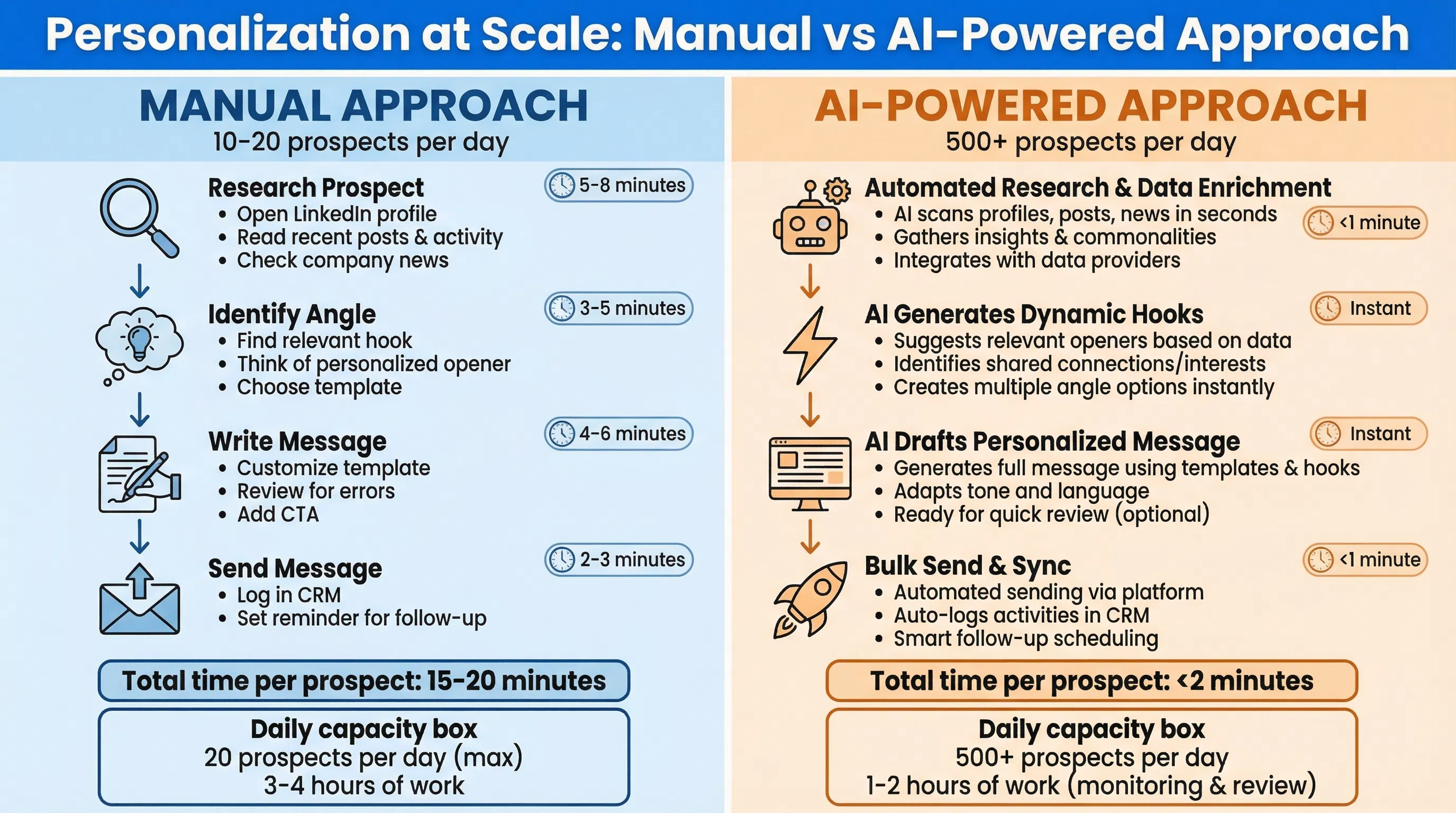
Here's the challenge: Personalization boosts response rates by 30-32%, but doing it manually for 50-100 prospects per day is impossible.
The old approach:
- Open prospect's LinkedIn profile
- Read recent posts, activity, company news
- Find a relevant angle
- Craft a custom message
- Repeat for next prospect (15-20 minutes per prospect)
The new approach (with AI):
- AI analyzes LinkedIn profiles, recent posts, and shared connections
- AI generates personalized conversation starters based on prospect activity
- You review, edit if needed, and send (2-3 minutes per prospect)
LeadSpark AI approach:
- Analyzes prospect's recent LinkedIn posts and comments
- Identifies shared connections and groups
- Detects intent signals (job changes, company news, content engagement)
- Generates context-specific message openers (not templates)
- Achieves 70-90% response rates vs. generic messages at 18-25%
Example:
Generic template approach:
"Hi [First Name], I see you're working on [Department] at [Company]. I'd love to connect and discuss [Generic Topic]."
AI-personalized approach (LeadSpark AI):
"Hi [First Name], I saw your post about challenges with [Specific Topic] at [Company]. You mentioned [Specific Detail]—that's exactly what we've been seeing across [Industry]. Have you found any solutions that are working?"
The difference: Context + relevance + genuine interest vs. name + company + generic pitch.
Common LinkedIn Prospecting Mistakes (And How to Fix Them)
Beyond the 6 mistakes covered earlier, here are additional pitfalls:
Mistake 7: Ignoring the "Why Now?" Factor
Every message should answer: "Why are you reaching out NOW?" Use trigger events:
- Job changes
- Company news (funding, product launches, expansions)
- Content they posted or engaged with
- Shared event attendance
Mistake 8: Not Testing Subject Lines (InMails)
Personalized subject lines boost response by 30.5%. Test these approaches:
- Question-based: "Quick question about [Topic]"
- Referral-based: "[Name] suggested I reach out"
- Value-based: "Thought you'd find this useful"
- Curiosity-based: "How [Company] solved [Problem]"
Mistake 9: Sending the Same Message to Multiple People at One Company
If you message 5 people at the same company with identical copy, they'll compare notes and ignore you. Customize messages by role and department.
Mistake 10: Not Leveraging Voice Notes
LinkedIn now allows voice notes in messages. For high-value prospects, a 30-second personalized voice message can dramatically increase response rates by demonstrating extra effort.
The Ultimate LinkedIn Prospecting Message Formula
After analyzing thousands of messages, here's the formula that consistently gets 30-40%+ response rates:
1. Personalized Hook (1 sentence)
Reference something specific to them: recent post, job change, company news, shared connection.
2. Relevant Context (1 sentence)
Explain why you're reaching out NOW (not last month or next year).
3. Value Proposition (1 sentence)
What's in it for THEM? Share a resource, ask a thoughtful question, offer an insight—not a pitch.
4. Low-Friction CTA (1 sentence)
Make it easy to respond: answer a question, click a link, suggest a 10-minute call (not a 60-minute demo).
Total: 4 sentences, 50-100 words, under 400 characters when possible.
Example:
Hi [First Name], I saw your post about [Topic] last week—your point about [Detail] was spot-on. (Hook)
I've been researching [Related Topic] and keep seeing [Trend/Challenge]. (Context)
I recently helped [Similar Company] solve [Problem] with [Approach]—happy to share what worked if it's relevant. (Value)
Worth a quick chat? (CTA)
LinkedIn Prospecting Best Practices Checklist
✅ Keep messages under 400 characters (22% response boost)
✅ Personalize subject lines (30.5% response boost)
✅ Send Tuesday–Thursday, 8-10am or 2-4pm (optimal timing)
✅ Reference recent posts or activity (32% response boost)
✅ Avoid pitch slaps (focus on conversation, not selling)
✅ Use shared connections/groups (21-25% higher response)
✅ Follow up 2-3 times max (don't over-follow)
✅ Send individually, not in bulk (15% higher response)
✅ Test different subject lines and openers (optimize over time)
✅ Use intent signals (job changes, company news, content engagement)
FAQs
What's a good response rate for LinkedIn prospecting messages?
The average LinkedIn InMail response rate is 18-25%, which is 6-8x better than cold email's 3% average. High performers consistently hit 30-40%, and hyper-personalized approaches using AI achieve 70-90%. If you're below 15%, focus on personalization and avoiding pitch slaps.
Should I send a note with connection requests?
A study found blank connection requests had a 31% acceptance rate, while short notes had 32%—barely different. For cold prospects, a blank request works fine. For warm prospects (shared connections, event attendees, engaged with your content), a short note (under 300 characters) can improve acceptance.
How long should LinkedIn prospecting messages be?
Messages under 400 characters boost response rates by 22%. Aim for 50-100 words—roughly what fits on one mobile screen (remember: 57% of LinkedIn traffic is mobile). Long messages stuffed with pitches discourage responses.
What's the best time to send LinkedIn messages?
Tuesday–Thursday between 8–10am or 2–4pm perform best. Monday mornings and Friday afternoons see 20% lower response rates, while Saturday sees 8% fewer responses than average. Schedule messages for mid-week mornings when prospects are most engaged.
How many follow-ups should I send on LinkedIn?
2-3 follow-ups maximum. Space them out (3-5 days, then 7-10 days). Each follow-up should add new value (share a resource, ask a different question, reference new company news). Over-following up is counterproductive and looks desperate.
What's the difference between LinkedIn messages and InMails?
LinkedIn messages go to your 1st-degree connections (people you're already connected to). InMails let you message anyone on LinkedIn, even if you're not connected. InMails require LinkedIn Premium or Sales Navigator and have a limited monthly allowance. InMails sent individually see 15% higher response rates than bulk sends.
How can I personalize LinkedIn messages at scale?
Manual personalization doesn't scale beyond 10-20 prospects per day. Use AI tools like ChatGPT or LeadSpark AI to analyze LinkedIn profiles, recent posts, and shared connections, then generate context-specific message openers. LeadSpark AI achieves 70-90% response rates by crafting messages based on what prospects actually care about, not generic templates.
What are the biggest LinkedIn prospecting mistakes to avoid?
The top 6 mistakes: 1) Pitch slapping (leading with a pitch), 2) Sending generic, non-personalized messages, 3) Asking for meetings too early, 4) Sending long messages that look like essays, 5) Being too pushy or overly formal, 6) Over-following up after no response. Focus on starting conversations, not selling.
Master LinkedIn Prospecting with These 50+ Templates
LinkedIn prospecting delivers 6-8x better response rates than cold email—but only if you do it right.
Key takeaways:
- Avoid pitch slaps: Focus on conversation, not selling
- Keep messages short: Under 400 characters (50-100 words)
- Personalize for context: Reference posts, job changes, company news
- Time it right: Tuesday–Thursday, 8-10am or 2-4pm
- Follow up 2-3 times: Space them out, add new value each time
- Use intent signals: Job changes, event attendance, content engagement
If you're prospecting at scale (50-100+ messages per day), manual personalization isn't feasible. Try LeadSpark AI to analyze LinkedIn profiles and recent posts, then generate hyper-personalized conversation starters that achieve 70-90% response rates—not by using templates, but by understanding what each prospect actually cares about.
Sources:
- LinkedIn InMail Response Rate Statistics 2026 - Sales So
- LinkedIn InMail Statistics 2026 - Sales So
- LinkedIn Prospecting: The Ultimate Guide - SMARTe
- How to Write High-Converting LinkedIn Prospecting Messages - NetHunt
- 8 LinkedIn Messaging Templates for Sales - Cognism
- Best LinkedIn Messaging Examples & Strategies - Alore
- 5 Templates for Hyper-Personalized LinkedIn Messages - Evaboot
- LinkedIn Prospecting Guide - Salesbread
- LinkedIn Prospecting Messages Examples - Evaboot
- 10 LinkedIn Message Templates - Magical
- LinkedIn Sales Message Templates - Skylead
Ready to Generate Personalized Icebreakers?
Join sales professionals using LeadSpark AI to create hyper-personalized LinkedIn icebreakers in minutes.