Ai Tools
Sales Intelligence Tools: Complete Guide for B2B Sales Teams
Discover the best sales intelligence tools for 2026. Compare 15+ platforms, learn what sales intelligence is, and how B2B teams use data to close 50% more deals with the right intelligence software.
16 min read
71% of sales reps say their data is inaccurate. They're wasting time chasing bad leads, reaching out to contacts who left companies months ago, and missing buying signals that could close deals today.
This isn't a training problem. It's a sales intelligence problem.
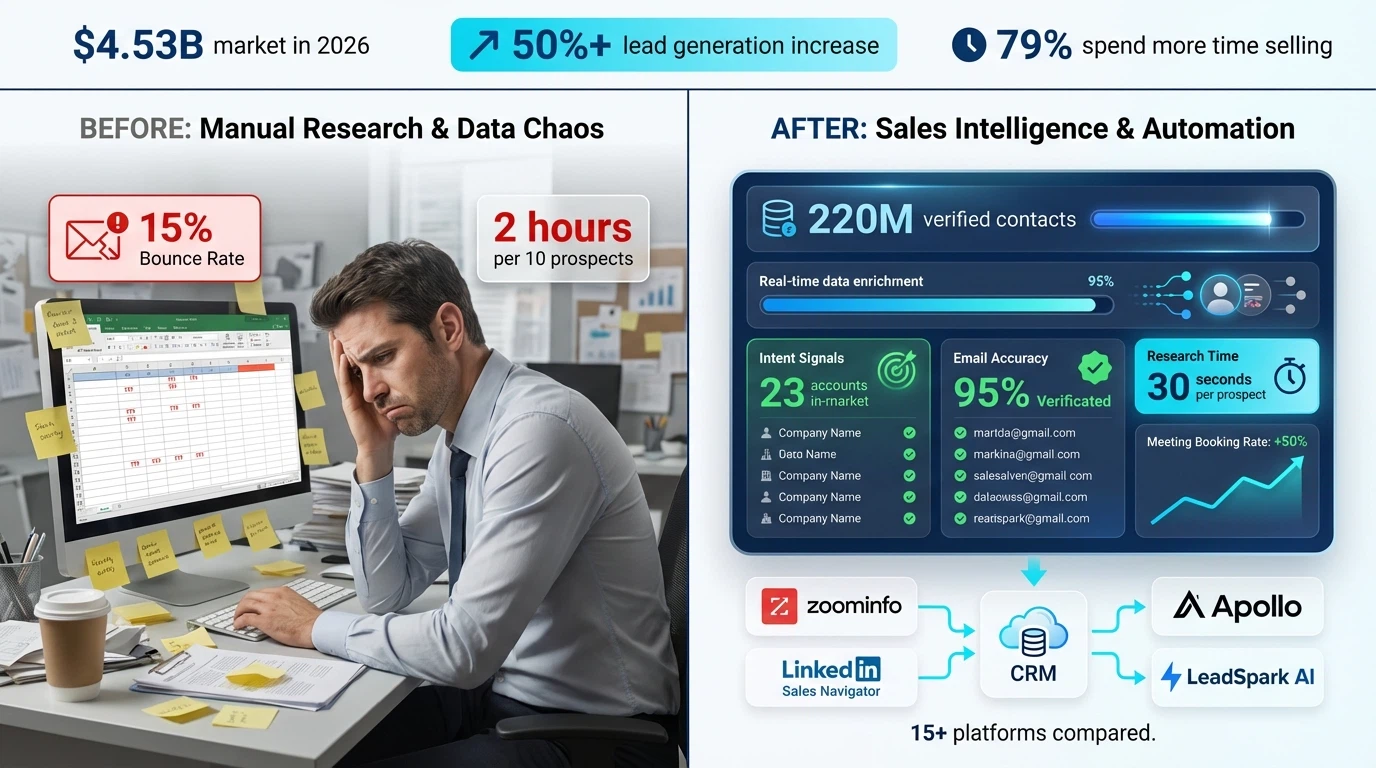
In 2026, sales intelligence tools have become essential infrastructure for B2B teams—not a nice-to-have. The market has exploded from $3.5 billion in 2025 to $4.53 billion in 2026, and for good reason: teams using sales intelligence report 50%+ increases in lead generation while significantly reducing costs (Claap, Easy Redmine).
But with 50+ platforms claiming to be "sales intelligence," how do you choose the right one?
This guide breaks down exactly what sales intelligence is, compares the top 15 platforms for 2026, and shows you how to choose tools that actually move the needle on revenue.
What is Sales Intelligence?
Sales intelligence is the collection, analysis, and application of data to help sales teams identify, understand, and engage the right prospects at the right time.
Think of it as the difference between cold calling a list of random companies versus reaching out to prospects who are actively researching solutions like yours, with personalized insights about their pain points and priorities.
Modern sales intelligence platforms combine:
- Data enrichment – Automatically fill in missing contact information, job titles, company size, and technologies used
- Intent signals – Identify prospects actively researching solutions or showing buying behavior
- Trigger events – Track job changes, funding rounds, product launches, and other opportunities to reach out
- Contact verification – Ensure emails and phone numbers are valid before outreach
- Account intelligence – Understand company hierarchies, decision-makers, and buying committees
- Behavioral insights – See what content prospects engage with and when
According to Cognism, sales intelligence refers to software platforms that collect, analyze, and deliver actionable B2B data to sales teams to enhance prospecting, streamline lead qualification, and guide smarter outreach strategies.
Sales Intelligence vs. CRM: What's the Difference?
Many teams confuse sales intelligence with CRM systems, but they serve different purposes:
| Feature | CRM (e.g., Salesforce) | Sales Intelligence (e.g., ZoomInfo) |
|---|---|---|
| Primary Function | Manage existing relationships | Find and research new prospects |
| Data Source | Manually entered by reps | Automatically gathered from external sources |
| Focus | Track activities and pipeline | Provide insights to prioritize outreach |
| Best For | Relationship management | Prospecting and lead generation |
The Power of Integration: CRM and sales intelligence work best together. Your CRM tracks relationships and activities, while sales intelligence feeds fresh signals and insights into CRM fields to help reps prioritize and personalize outreach (Claap).
Why B2B Teams Need Sales Intelligence in 2026
The B2B sales landscape has fundamentally changed. Here's why sales intelligence has become non-negotiable:
The Data Accuracy Crisis
- Only 29% of sales professionals say their data is "very accurate" (Uplead, 2025) (Claap)
- That means 7 out of 10 reps are working with stale contacts
- Email addresses decay at 22.5% per year in B2B
- Job changes and company acquisitions make contact data obsolete quickly
Impact: Without accurate data, even the best sales strategy fails. You can't personalize outreach to contacts who no longer work at the company.
The Lead Generation Challenge
Teams using sales intelligence platforms report significant improvements:
- 50%+ increase in lead generation with AI-powered intelligence (Easy Redmine)
- 85% of sales reps using AI for prospecting say it makes their efforts more effective (Fortune Business Insights)
- 79% of salespeople using AI spend more time actually selling vs. administrative tasks (Fortune Business Insights)
The Competitive Pressure
AI isn't optional for sales teams competing in 2026—your competitors are already using it (SPOTIO).
The 2026 market represents a generational technology shift:
- Platforms built before 2023 rely on keyword tracking and manual configuration
- AI-native platforms use generative AI to understand context and autonomously update systems
- Teams without modern intelligence tools are falling behind on every metric
The ROI Reality
The market speaks for itself:
- Sales intelligence market growing from $4.53 billion (2026) to $10.25 billion by 2032 at 11.3% CAGR (Grand View Research)
- Alternative forecast: $4.85 billion (2025) to $29.13 billion by 2035 (Easy Redmine)
- Over 64% of B2B sales organizations will employ technology integrating workflow, data, and analytics by 2026 (Fortune Business Insights)
Companies aren't investing billions in sales intelligence because it's trendy—they're investing because data-driven decisions generate measurable ROI.
The 15 Best Sales Intelligence Tools for 2026
Let's compare the top platforms across different use cases and price points.
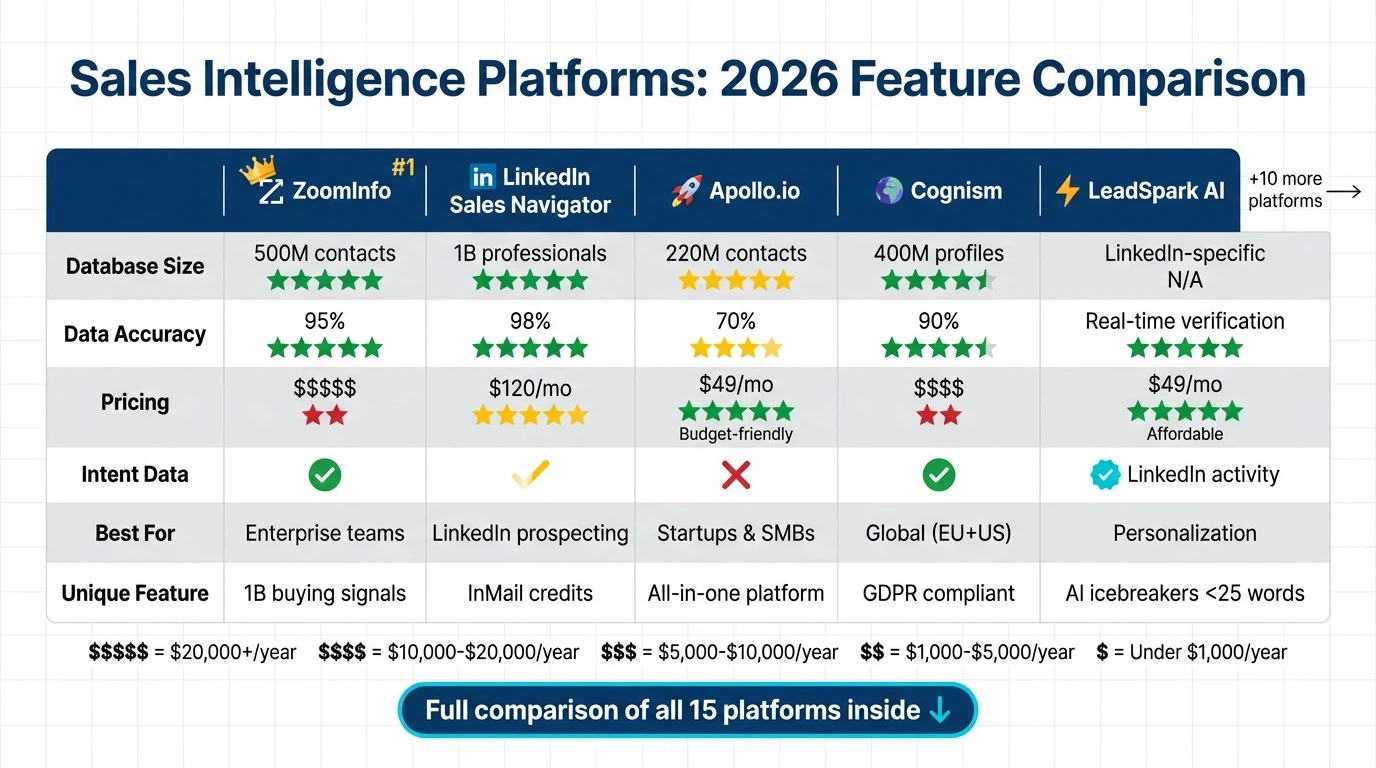
1. ZoomInfo Sales – Best Overall Sales Intelligence Platform
What It Does: The industry leader in B2B contact and company data.
Key Features:
- 100 million company profiles with firmographic data
- 500 million contact profiles with verified emails and phone numbers
- 1 billion buying signals processed monthly to identify intent
- Advanced search filters by seniority, department, technologies used, and more
- Chrome extension for LinkedIn and website visitor identification
- Integration with all major CRMs (Salesforce, HubSpot, etc.)
Best For: Mid-market to enterprise B2B companies with sales teams of 10+
Pricing: Custom pricing based on team size (typically $15,000-$30,000/year for small teams)
Pros: Most comprehensive database, highest data accuracy, powerful intent signals
Cons: Expensive for startups, complex implementation, requires training
Learn More: See our comparison in sales prospecting tools.
2. LinkedIn Sales Navigator – Best for LinkedIn-First Prospecting
What It Does: LinkedIn's premium tool for B2B prospecting and relationship building.
Key Features:
- Access to 1 billion LinkedIn professionals with up-to-date profiles
- Advanced search filters (company size, seniority, function, recent activity)
- InMail credits for messaging prospects outside your network
- Lead and account recommendations based on your ideal customer profile
- Real-time alerts when prospects change jobs or post content
- TeamLink to see 2nd-degree connections through your team
Best For: Sales teams targeting specific roles or industries on LinkedIn
Pricing:
- Core: $119.99/month
- Advanced: $159.99/month (monthly billing) (ZoomInfo Pipeline)
Pros: Most accurate professional data, LinkedIn context for personalization, relationship intelligence
Cons: No direct email/phone data (need enrichment tool), expensive for large teams
Pro Tip: Combine Sales Navigator with LeadSpark AI to analyze prospects' LinkedIn activity and generate personalized icebreakers automatically. See our LinkedIn icebreaker examples for inspiration.
3. Apollo.io – Best for Startups and SMBs
What It Does: All-in-one sales intelligence and engagement platform.
Key Features:
- 220M+ contacts with email addresses and phone numbers
- Built-in email sequencing and LinkedIn automation
- Lead scoring and recommendation engine
- Email tracking and analytics
- Chrome extension for prospecting
- Free tier available (50 email credits/month)
Best For: Startups, SMBs, and solo founders needing an affordable all-in-one solution
Pricing:
- Free: $0 (50 credits)
- Basic: $49/user/month
- Professional: $79/user/month
- Organization: $99/user/month
Pros: Affordable, combines prospecting + outreach, generous free tier, easy to use
Cons: Data quality inconsistent (60-70% accuracy), fewer intent signals than ZoomInfo
Alternative: See our full Apollo.io review.
4. Cognism – Best for Global Teams (US + EMEA)
What It Does: GDPR-compliant B2B database with global coverage.
Key Features:
- 400M+ profiles with strong European coverage
- Diamond Data®️ verified mobile numbers
- Intent data from Bombora and G2
- Salesforce and HubSpot native integrations
- Chrome extension for prospecting
- GDPR and CCPA compliant by design
Best For: Companies selling to both US and European markets
Pricing: Custom (typically $12,000-$20,000/year)
Pros: Best EMEA coverage, verified mobile numbers, strong compliance
Cons: Expensive, requires annual contract
5. Seamless.AI – Best for Real-Time Verification
What It Does: AI-powered contact finder with real-time verification.
Key Features:
- 1 billion+ business contacts verified in real-time
- Chrome extension for instant prospecting
- LinkedIn integration
- CRM integration (Salesforce, HubSpot, Pipedrive)
- Autopilot feature finds contacts matching your ICP automatically
Best For: Teams prioritizing data freshness and instant verification
Pricing:
- Free: Limited
- Basic: $147/month
- Pro: $347/month
- Enterprise: Custom
Pros: Real-time verification, Chrome extension, free tier
Cons: Data quality varies, aggressive sales tactics
6. Lusha – Best for Solo Sales Reps and Freelancers
What It Does: Simple browser extension for finding contact info.
Key Features:
- 100M+ verified contacts in North America, Europe, and Asia Pacific
- Chrome extension overlays contact info on LinkedIn, company websites
- Bulk enrichment for uploaded lists
- CRM integration
- Email verification included
Best For: Solo sales reps, freelancers, small teams under 5 people
Pricing:
- Free: 5 credits/month
- Pro: $39/month (80 credits)
- Premium: $69/month (480 credits)
- Scale: Custom
Pros: Simple, affordable, good Chrome extension, fast setup
Cons: Limited to contact finding (no intent or technographic data), smaller database
Comparison: See Lusha alternatives.
7. Kaspr – Best for European SMBs
What It Does: GDPR-first contact finder for LinkedIn prospecting.
Key Features:
- 500M+ phone numbers and email addresses
- Unlimited B2B email credits
- LinkedIn Chrome extension
- Workflow automation with Zapier
- GDPR compliant (Paris-based)
Best For: European SMBs, teams prioritizing compliance
Pricing:
- Free: 10 phone + 10 email credits/month
- Starter: $65/month
- Business: $99/month
Pros: GDPR compliant, unlimited emails, affordable
Cons: Smaller database than US platforms, fewer features
8. Hunter.io – Best for Email Finding
What It Does: Email finder and verifier focused on domain-based search.
Key Features:
- Find emails by domain or LinkedIn URL
- 200M+ indexed email addresses
- Email verification (checks deliverability before sending)
- Domain search shows all contacts at a company
- Chrome extension
- API for custom integrations
Best For: Teams focused on email-first outreach
Pricing:
- Free: 25 searches/month
- Starter: $49/month (500 searches)
- Growth: $149/month (5,000 searches)
- Business: $399/month (50,000 searches)
Pros: Excellent email verification, affordable, API access
Cons: Limited to email finding (no phone/intent data)
See More: Hunter.io alternative comparison.
9. Clearbit – Best for Marketing + Sales Alignment
What It Does: Real-time enrichment and firmographic intelligence.
Key Features:
- Real-time company and contact enrichment
- Website visitor identification (Reveal)
- Technographic data (what tools companies use)
- Intent signals and company attributes
- Native HubSpot and Salesforce integrations
- API for custom workflows
Best For: Marketing and sales teams working together on ABM
Pricing: Custom (starts around $12,000/year)
Pros: Real-time enrichment, excellent technographics, marketing+sales features
Cons: Expensive, US-focused data
10. 6sense – Best for ABM and Intent Data
What It Does: Account-based marketing and intent intelligence platform.
Key Features:
- Anonymous visitor identification
- Intent data from buying groups across accounts
- Predictive analytics (who's in-market now)
- Account engagement scoring
- Orchestration across channels (ads, email, social)
- Revenue AI for forecasting
Best For: Enterprise companies with account-based strategies
Pricing: Custom (typically $50,000+/year)
Pros: Best-in-class intent data, ABM orchestration, predictive analytics
Cons: Very expensive, requires dedicated team, complex implementation
11. LeadIQ – Best for SDR Teams
What It Does: Prospecting and tracking tool built specifically for SDRs.
Key Features:
- 50M+ verified contacts
- Track prospects across job changes
- Chrome extension captures contacts from LinkedIn, company websites
- Refresh stale contacts automatically
- Email sequencing
- CRM integration (Salesforce, Outreach, Salesloft)
Best For: SDR and BDR teams doing high-volume outreach
Pricing: Custom (typically $75-$100/user/month)
Pros: SDR-focused features, job change tracking, easy to use
Cons: Smaller database, limited to prospecting features
12. Crunchbase Pro – Best for Startup Intelligence
What It Does: Funding, investment, and startup company data.
Key Features:
- 4M+ companies with funding history
- Track funding rounds, acquisitions, IPOs
- Investor and board member information
- Company growth signals
- News and announcements
- Chrome extension
Best For: Teams selling to startups, VCs, or tracking funding events as triggers
Pricing:
- Starter: $29/month
- Pro: $49/month
- Enterprise: Custom
Pros: Best startup funding data, affordable, clean interface
Cons: Limited contact data (focuses on company intelligence), small database
13. Clay – Best for AI-Powered Data Enrichment
What It Does: Data enrichment and AI research assistant for sales teams.
Key Features:
- 50+ data sources combined in one platform
- AI research agent finds information across web, LinkedIn, news
- Waterfall enrichment (tries multiple sources automatically)
- Spreadsheet interface (familiar for sales ops)
- Custom AI prompts for personalization
- Integration with outreach tools
Best For: Sales ops teams building custom enrichment workflows
Pricing:
- Free: 100 credits/month
- Starter: $149/month (2,000 credits)
- Explorer: $349/month (10,000 credits)
- Pro: Custom
Pros: Most flexible enrichment, AI research, waterfall logic
Cons: Learning curve, requires technical setup
14. Bombora – Best for Intent Signal Data
What It Does: B2B intent data based on content consumption.
Key Features:
- Tracks 4 trillion monthly content consumption signals
- Company Surge® identifies accounts researching topics
- Intent topics organized by industry
- Integrates with ABM platforms, CRMs, ad platforms
- Contact-level intent (who specifically is researching)
Best For: Marketing teams running ABM campaigns, sales teams prioritizing accounts
Pricing: Custom (typically $20,000+/year)
Pros: Most comprehensive intent data, B2B-specific
Cons: Expensive, requires integration with other tools
15. LeadSpark AI – Best for LinkedIn Intelligence and Personalization
What It Does: AI-powered LinkedIn activity analysis for hyper-personalized outreach.
Key Features:
- Scrapes prospects' actual LinkedIn posts and interests
- AI analyzes professional activities, pain points, and priorities
- Generates personalized icebreakers under 25 words
- CSV workflow (upload list, get enriched data back)
- Works with any LinkedIn prospecting list
- Credit-based pricing (pay per lead processed)
Best For: Sales teams prioritizing personalization and LinkedIn outreach
Pricing:
- Free: 15 credits
- Founder: $49/month (200 credits)
- Pro: $99/month (500 credits)
- Team: $249/month (1,500 credits)
Pros: Unique LinkedIn post scraping, AI personalization at scale, affordable, CSV-first workflow
Cons: LinkedIn-specific (not full sales intelligence platform)
Why LeadSpark Stands Out: Unlike broad sales intelligence platforms, LeadSpark specializes in LinkedIn intelligence—analyzing what prospects actually post about to generate conversation starters that get 40-70% response rates.
Try It: Get 15 free personalized icebreakers and see the difference LinkedIn intelligence makes.
For templates and strategies, see our guide on writing LinkedIn icebreakers.
How to Choose the Right Sales Intelligence Tool
With 50+ options, choosing the right platform requires strategic thinking. Here's a framework:
Step 1: Define Your Primary Use Case
Different tools excel at different jobs:
- Need verified contact data? → ZoomInfo, Apollo, Cognism
- LinkedIn-first prospecting? → Sales Navigator + LeadSpark AI
- Building ABM campaigns? → 6sense, Demandbase
- Email finding only? → Hunter.io, Lusha
- Intent data for prioritization? → Bombora, 6sense
- Startup/funding intelligence? → Crunchbase Pro
- Personalization at scale? → LeadSpark AI, Clay
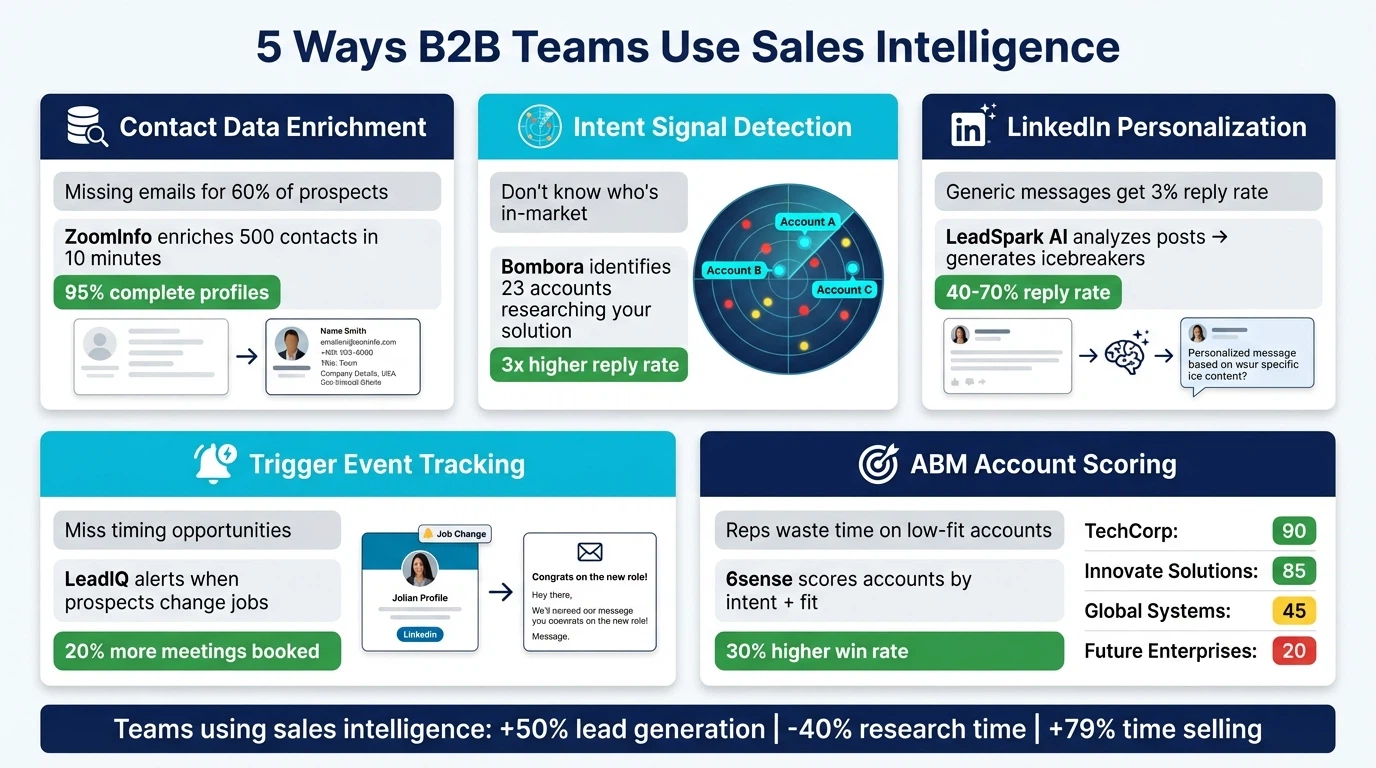
Start with the problem: What's your biggest bottleneck? Bad contact data? Generic outreach? Not knowing who's in-market? Choose tools that solve that specific problem first.
Step 2: Consider Your Team Size and Budget
Solo Founders/Freelancers ($0-$100/month):
- Free tiers: Apollo Free, Hunter.io Free, Lusha Free
- Budget options: LeadSpark AI Founder ($49), Hunter.io Starter ($49)
Small Teams 2-10 ($500-$2,000/month):
- Apollo Professional ($79/user)
- Sales Navigator Core ($120/user)
- LeadSpark AI Pro or Team ($99-$249)
- Kaspr Business ($99/user)
Mid-Market 10-50 ($5,000-$20,000/month):
- ZoomInfo Sales
- Cognism
- Clearbit
- LeadIQ
Enterprise 50+ ($20,000+/month):
- ZoomInfo SalesOS
- 6sense Revenue AI
- Demandbase One
- Multiple specialized tools
Step 3: Evaluate Data Quality
Questions to ask vendors:
- How often is data refreshed?
- What's your email accuracy rate? (Look for 90%+)
- Do you verify contacts in real-time?
- What's your data collection methodology?
- Can I test with 50-100 contacts before committing?
Red Flags:
- No free trial or test credits
- Vague answers about data accuracy
- No real-time verification
- Refusal to share data sources
Step 4: Check Integration Ecosystem
Your sales intelligence tool should integrate with:
- CRM: Salesforce, HubSpot, Pipedrive, etc.
- Sales engagement: Outreach, Salesloft, Reply.io
- LinkedIn: Chrome extension for prospecting
- Enrichment: APIs for custom workflows
Pro Tip: The best stack combines multiple specialized tools:
- Data source: ZoomInfo or Apollo for contacts
- Intent signals: Bombora for who's in-market
- Personalization: LeadSpark AI for LinkedIn icebreakers
- Engagement: Instantly or Lemlist for sequences
See our guide on sales automation for workflow ideas.
Step 5: Calculate ROI Potential
Measure success by:
Time Saved:
- Hours per week on manual research (baseline)
- Hours saved with automation
- Value of rep's time ($50-$150/hour)
Lead Quality:
- Current email bounce rate (should decrease to <2%)
- Reply rates (should increase with better targeting)
- Meeting booking rate (should improve with personalization)
Pipeline Impact:
- New opportunities created
- Deal velocity (time to close)
- Win rate (better targeting = higher close rates)
Acceptable CAC: If a tool costs $100/month and generates 10 extra qualified meetings, that's $10/meeting. If your close rate is 20%, that's $50 customer acquisition cost. Worth it if LTV exceeds $500.
Best Practices for Using Sales Intelligence Tools
Buying the tool is easy. Getting value from it requires discipline:
1. Start with Clean ICP Targeting
Don't spray and pray with a bigger database.
- Define your Ideal Customer Profile precisely (see our B2B email list building guide)
- Build small, targeted lists (100-300 contacts) before scaling
- Test messaging before automating
Example ICP: "VP of Sales at B2B SaaS companies, 50-200 employees, Series A-B funded, using Salesforce, actively hiring SDRs."
2. Combine Multiple Data Sources
No single platform has perfect data. The best teams layer sources:
- ZoomInfo for company and contact data
- Bombora for intent signals
- Sales Navigator for LinkedIn context
- LeadSpark AI for personalized icebreakers
Waterfall Logic: Try source 1 → if no data, try source 2 → if no data, try source 3. Tools like Clay automate this.
3. Verify Before Sending
Even "verified" data isn't perfect:
- Run email verification before sequences (NeverBounce, ZeroBounce)
- Check LinkedIn profiles manually for high-value accounts
- Test with small batches (50-100) before scaling
Impact: 2% bounce rate vs. 10% bounce rate is the difference between inbox and spam folder.
4. Personalize Using Intelligence, Not Just Data
Bad personalization:
"Hi {{First Name}}, I see you're a {{Title}} at {{Company}}..."
Good personalization using intelligence:
"Saw your post about AI in sales—our tool analyzes LinkedIn activity for personalization. Curious if it'd help your team?"
How to scale good personalization:
- Use LeadSpark AI to analyze LinkedIn activity
- Reference specific posts, achievements, or company news
- Connect their interests to your solution
See our 50 LinkedIn icebreaker examples for templates.
5. Keep Data Fresh
B2B data decays at 22.5% per year:
- Re-enrich contacts quarterly
- Set up alerts for job changes (trigger new outreach)
- Archive inactive contacts (no engagement in 90 days)
- Update company data when funding/acquisition events occur
Automation: Tools like Clay and LeadIQ automatically refresh data when contacts change jobs.
Common Sales Intelligence Mistakes to Avoid
1. Buying Tools Before Defining Process
Mistake: "ZoomInfo has millions of contacts—let's buy it!"
Fix: Define your go-to-market strategy first. Who are you targeting? What's your outreach channel? What data do you actually need?
Many teams buy expensive platforms and use 10% of the features.
2. Relying on One Data Source
Mistake: Assuming ZoomInfo (or any single platform) has 100% accurate data.
Fix: Layer multiple sources. Email from Hunter.io + phone from Lusha + LinkedIn context from Sales Navigator + personalization from LeadSpark AI.
3. Not Training the Team
Mistake: Buying software and expecting reps to figure it out.
Fix: Dedicate time to onboarding:
- Week 1: Tool training and best practices
- Week 2: Build first targeted list (100 contacts)
- Week 3: Launch test campaigns
- Week 4: Analyze results and refine
ROI hinges on adoption. A $20,000 platform used by 2 reps is worse than a $500 tool used by the whole team.
4. Ignoring Data Privacy Laws
Mistake: Scraping LinkedIn aggressively or emailing EU contacts without consent.
Fix: Understand regulations:
- GDPR (EU): Requires legitimate interest or consent for cold outreach
- CCPA (California): Requires opt-out mechanisms
- CAN-SPAM (US): Requires physical address and unsubscribe links
Use compliant tools like Cognism for EU prospecting.
5. Measuring Vanity Metrics
Mistake: "We have 50,000 contacts in our database!"
Fix: Measure what matters:
- Not list size, but ICP match rate (% who fit your ideal customer profile)
- Not total emails sent, but reply rate and meeting booking rate
- Not data coverage, but data accuracy (bounce rate <2%)
A list of 1,000 perfect-fit prospects beats 50,000 random contacts every time.
FAQ: Sales Intelligence Tools
What is the difference between sales intelligence and sales engagement?
Sales intelligence tools help you find and research prospects (e.g., ZoomInfo, Apollo, LeadSpark AI). They provide data, intent signals, and insights about who to contact and why.
Sales engagement tools help you reach out and follow up with prospects (e.g., Outreach, Salesloft, Instantly). They automate email sequences, track opens, and manage multi-channel cadences.
The relationship: Sales intelligence identifies the right people → Sales engagement executes personalized outreach.
Best practice: Use both. Intelligence without engagement is research without action. Engagement without intelligence is spray-and-pray.
How accurate is sales intelligence data in 2026?
Accuracy varies widely by platform:
- Top platforms (ZoomInfo, Cognism): 90-95% email accuracy
- Mid-tier platforms (Apollo, Lusha): 70-80% accuracy
- Low-quality databases: 40-60% accuracy
Why accuracy matters: A 90% accurate list with 10% bounces is deliverable. A 60% accurate list with 40% bounces destroys your sender reputation and lands all emails in spam.
How to verify: Use email verification tools (NeverBounce, ZeroBounce) before sending, and monitor bounce rates closely (<2% is healthy).
Do I need sales intelligence if I already have a CRM?
Yes, for these reasons:
- CRMs don't find new prospects – They manage relationships with contacts you already have
- CRMs contain stale data – Most contact information is manually entered and rarely updated
- CRMs lack intelligence – They don't tell you who's in-market, what prospects care about, or when to reach out
Think of it this way:
- CRM = relationship management (backward-looking)
- Sales intelligence = prospecting and insights (forward-looking)
They work together: Intelligence tools feed fresh data and insights into your CRM, making it more valuable.
What's the best sales intelligence tool for small teams?
For teams under 10 people, we recommend:
- Apollo.io ($49-$79/user/month) – Best all-in-one value, includes prospecting + engagement
- LinkedIn Sales Navigator ($120/user/month) + LeadSpark AI ($49-$99/month) – Best for LinkedIn-focused teams
- Hunter.io ($49-$149/month) + Lusha ($39-$69/month) – Budget-friendly email + phone combo
Why these work for small teams:
- Affordable (under $200/month total)
- No long-term contracts or minimums
- Free trials to test before committing
- Easy to implement without dedicated sales ops
How do sales intelligence tools get their data?
Common data sources:
- Public web scraping – LinkedIn, company websites, social media, news sites
- User contributions – Some platforms reward users for sharing contacts
- Partnerships – Data sharing agreements with other B2B platforms
- 3rd-party data providers – Purchasing bulk datasets from aggregators
- Real-time verification – Calling phone numbers and emailing addresses to verify accuracy
Ethical considerations: Reputable platforms only use publicly available data and comply with GDPR/CCPA. Avoid platforms that scrape private LinkedIn data or violate terms of service.
Can I use sales intelligence for LinkedIn outreach?
Absolutely, and you should. LinkedIn is the #1 B2B prospecting channel:
The workflow:
- Use LinkedIn Sales Navigator to find prospects matching your ICP
- Export list to CSV with LinkedIn URLs
- Enrich with LeadSpark AI to analyze their LinkedIn activity and generate personalized icebreakers
- Upload to CRM or outreach tool
- Send personalized connection requests or InMails
Why this works: You're combining targeting (Sales Navigator) + intelligence (LeadSpark AI) + personalization (actual post references) to achieve 40-70% response rates vs. 3-5% for generic messages.
See our complete guide: How to write LinkedIn icebreakers.
What ROI should I expect from sales intelligence tools?
Typical results from well-implemented intelligence platforms:
Efficiency Gains:
- 10-20 hours saved per rep per week on research
- 50%+ faster list building
- 2-3x more prospects contacted per day
Quality Improvements:
- Email bounce rates drop from 10-15% to <2%
- Reply rates increase from 3-5% to 5-10%
- Meeting booking rates improve by 30-50%
Revenue Impact:
- 50%+ increase in lead generation (Easy Redmine)
- 20-30% reduction in sales cycle length
- 15-25% higher win rates (better targeting)
Acceptable Payback: If a $200/month tool saves 10 hours/week ($500-$1,000 value) and generates 5 extra meetings ($2,500-$5,000 value), ROI is 5-15x.
How is AI changing sales intelligence in 2026?
Major AI advancements in 2026:
- Generative AI for personalization – Tools like LeadSpark AI analyze LinkedIn activity and generate custom icebreakers at scale
- Intent prediction – AI predicts which accounts are in-market before they show explicit buying signals
- Automated research agents – Platforms like Clay use AI to research prospects across multiple sources automatically
- Natural language queries – Ask "Find VP Sales at SaaS companies in California hiring SDRs" and get instant lists
The shift: Pre-2023 platforms required manual configuration and keyword filtering. AI-native platforms understand context and autonomously find relevant prospects.
What this means: Teams using AI-powered intelligence are 2-3x more productive than those using legacy tools.
Can sales intelligence replace SDRs?
No, but it makes them dramatically more effective.
What intelligence automates:
- Manual research (finding contacts, company info)
- Data entry (enriching CRM records)
- Basic targeting (who fits your ICP)
- Initial personalization (analyzing LinkedIn activity)
What still requires humans:
- Strategic targeting (evolving ICP based on wins/losses)
- Nuanced personalization (connecting prospect pain to your solution)
- Relationship building (multi-touch, multi-channel conversations)
- Objection handling (complex sales conversations)
The future: SDRs will focus exclusively on high-value activities (conversations, strategy) while AI handles research and administration.
Result: 79% of salespeople using AI spend more time actually selling (Fortune Business Insights).
Conclusion: Build Your Sales Intelligence Stack for 2026
Sales intelligence isn't optional anymore—it's foundational infrastructure for B2B teams competing in 2026.
The market is clear: The sales intelligence market is growing from $4.53 billion (2026) to $10.25 billion by 2032 because teams using intelligence tools generate 50%+ more leads while reducing costs significantly.
Your next steps:
- Audit your current data quality – What's your bounce rate? Reply rate? How much time do reps spend on research?
- Define your primary use case – Contact data? Intent signals? LinkedIn intelligence? Start with your biggest bottleneck
- Test 2-3 platforms – Most offer free trials. Test with 50-100 prospects before committing
- Start small, then scale – Build a 300-person targeted list, test outreach, measure results
- Layer specialized tools – Combine broad databases (ZoomInfo, Apollo) with specialized intelligence (LeadSpark AI for LinkedIn personalization)
For LinkedIn-focused teams:
Stop wasting hours researching prospects manually. Try LeadSpark AI free and get 15 personalized icebreakers based on your prospects' actual LinkedIn activity—generated in seconds, not hours.
The teams winning in 2026 aren't the ones with the biggest databases. They're the ones using intelligence to personalize at scale.
Sources
- SPOTIO: Best AI Sales Tools for 2026
- ZoomInfo Pipeline: Top Sales Intelligence Tools
- Cognism: Sales Intelligence Tools Comparison 2026
- Monday.com: Sales Intelligence Solutions 2026
- Claap: Sales Intelligence Guide 2026
- Easy Redmine: Sales Intelligence Tools 2026
- Cognism: What is Sales Intelligence
- Fortune Business Insights: Sales Intelligence Market
- Grand View Research: Sales Intelligence Market Analysis
Ready to Generate Personalized Icebreakers?
Join sales professionals using LeadSpark AI to create hyper-personalized LinkedIn icebreakers in minutes.