Ai Tools
ChatGPT for Sales: 50+ Prompts to Write Cold Emails That Convert [2026]
Master ChatGPT for sales with 50+ copy-paste prompts to write cold emails, LinkedIn messages, and icebreakers. Includes templates for SDRs, BDRs, and sales teams looking to automate outreach.
18 min read
You're an SDR staring at a LinkedIn profile, trying to craft the perfect cold email. Five minutes pass. Ten minutes. You research their posts, scan their company news, and finally draft something that feels... generic.
What if you could generate personalized cold emails in 30 seconds instead of 10 minutes? ChatGPT can do exactly that—IF you know the right prompts.
In this guide, you'll get:
- 50+ copy-paste ChatGPT prompts for every sales scenario
- How to use ChatGPT for cold emails, LinkedIn messages, and follow-ups
- When ChatGPT works (and when it doesn't)
- How to automate the entire workflow
Tools like LeadSpark AI have automated this entire process, but first, let's master the fundamentals with ChatGPT.
Table of contents
- Why sales teams use ChatGPT (and why it's not enough)
- How to use ChatGPT for sales prospecting: Step-by-step
- 50+ ChatGPT prompts for sales
- Cold email icebreakers (10 prompts)
- LinkedIn connection requests (10 prompts)
- Follow-up emails (10 prompts)
- Email subject lines (10 prompts)
- Value propositions (10 prompts)
- Call-to-action lines (5 prompts)
Why sales teams use ChatGPT (and why it's not enough)
Sales professionals are turning to ChatGPT in droves. Why? Because manual personalization doesn't scale.
According to HubSpot's 2025 State of Sales Report, AI adoption among sales representatives nearly doubled from 24% in 2023 to 43% in 2024. Even more impressive: 47% of sales professionals now use generative AI tools like ChatGPT to write sales content and prospect outreach messages.
The reason? ChatGPT saves massive amounts of time. Sales professionals who use AI daily are twice as likely to exceed their sales targets, and 73% report that AI has significantly improved team productivity.
Benefits of ChatGPT for sales:
- Save time on research - Turn prospect insights into emails in seconds, not minutes
- Overcome writer's block - Never stare at a blank email again
- A/B test messaging - Generate 5 variations in seconds
- Scale personalization - Process more prospects per day
- Improve performance - 56% of daily AI users report exceeding sales targets
But here's the reality check: ChatGPT still requires manual work. You must manually find LinkedIn posts, copy-paste prospect information, and format outputs. It's faster than writing from scratch, but it's not automated.
ChatGPT is powerful, but it's just the first step. For sales teams processing 50+ leads daily, tools like LeadSpark AI automate the entire workflow—from LinkedIn research to icebreaker generation. But more on that later.
First, let's master ChatGPT prompts.
How to use ChatGPT for sales prospecting: Step-by-step
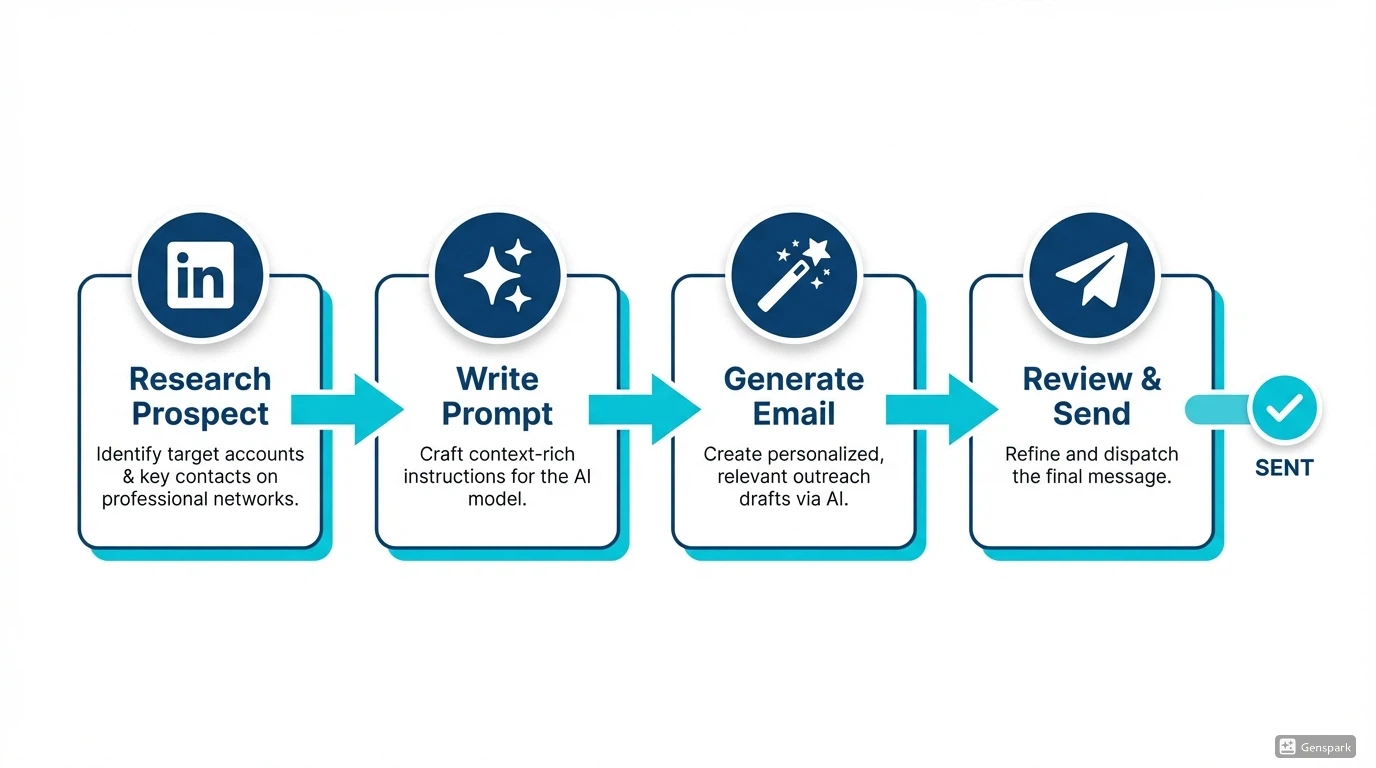
ChatGPT for sales follows a simple four-step workflow:
Step 1: Research your prospect on LinkedIn
Before you can prompt ChatGPT, you need context. Visit your prospect's LinkedIn profile and look for:
- Recent posts - What are they talking about?
- Job changes - New role, promotion, company switch?
- Company news - Funding, product launches, expansion?
- Shared interests - Mutual connections, groups, content?
Copy relevant snippets—these become your prompt fuel.
Step 2: Open ChatGPT and use a structured prompt
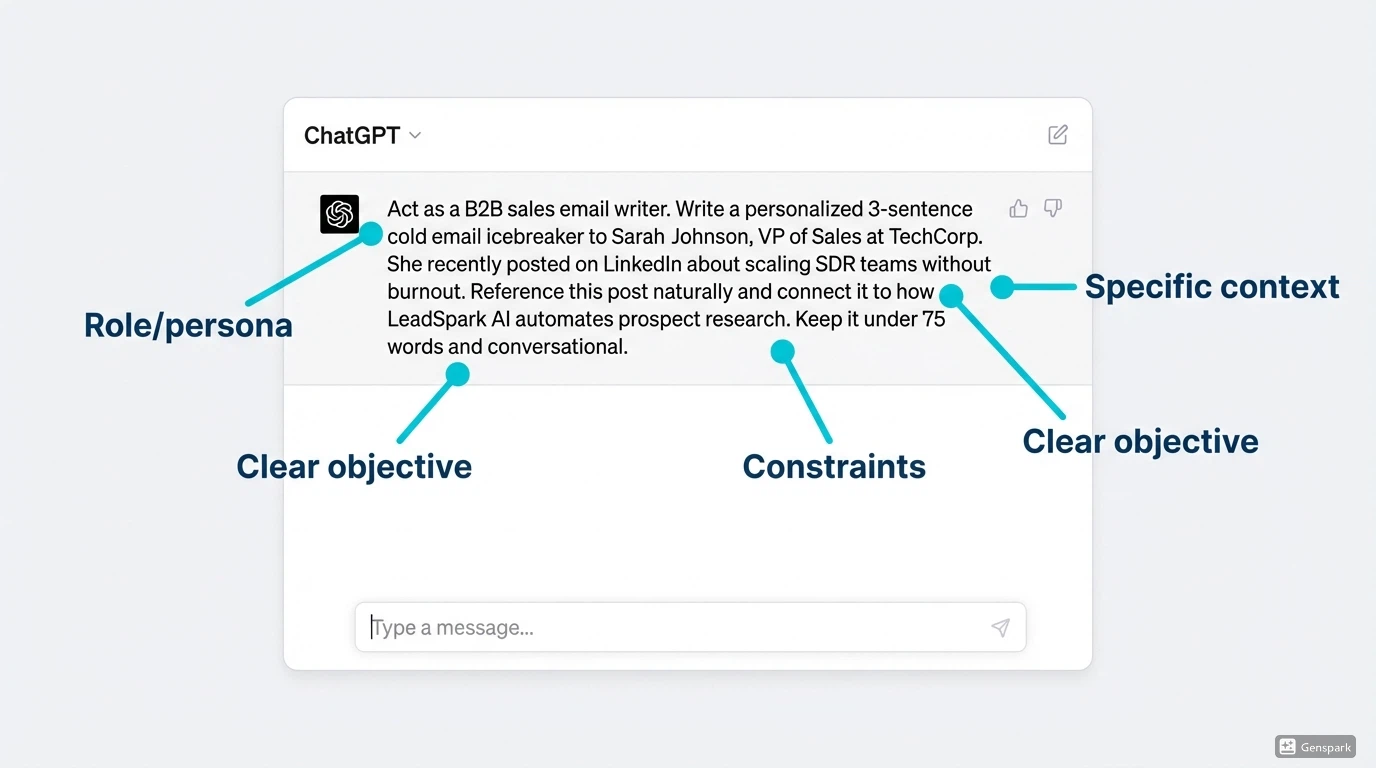
Generic prompts = generic outputs. The best ChatGPT prompts for sales include:
- Role/persona - "Act as a B2B sales email writer"
- Specific context - Prospect details, pain points, insights
- Clear objective - "Write a 3-sentence cold email icebreaker"
- Constraints - Word count, tone, format
- Desired format - Connection request, email, subject line
Example template:
Act as a sales email writer. Write a personalized cold email to [Name] who [describe their situation]. Reference [specific detail]. Keep it under 100 words.Step 3: Review and edit the output
ChatGPT often over-explains. Cut the fluff. Add your personal touch. Verify facts are accurate.
Remember: ChatGPT is your assistant, not your replacement. The best cold emails combine AI speed with human judgment.
Step 4: A/B test variations
Generate 3-5 different versions using the same prompt. Test which style gets more replies. Use winning patterns in future prompts.
Of course, AI-powered tools like LeadSpark AI can automate this entire research and generation workflow—scraping LinkedIn posts and generating icebreakers in seconds instead of minutes. But if you're sticking with ChatGPT, these 50+ prompts will save you hours.
Now, let's get to the copy-paste templates.
50+ ChatGPT prompts for sales
Here are 55 battle-tested ChatGPT prompts organized by use case. Each is copy-paste ready—just replace the bracketed placeholders with your prospect's information.
Cold email icebreakers (10 prompts)
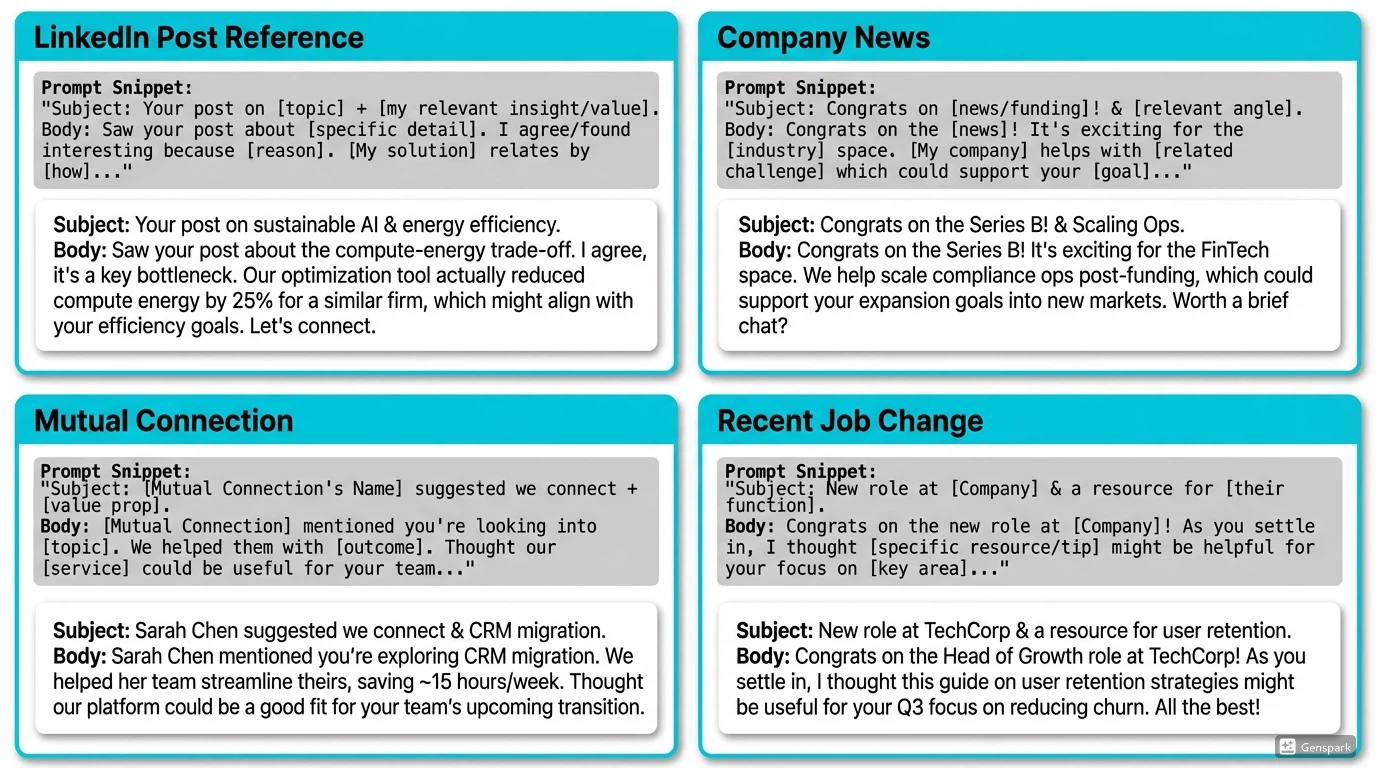
Prompt 1: Reference LinkedIn post
Act as a B2B sales email writer. Write a personalized 3-sentence cold email icebreaker to [Name], [Title] at [Company]. They recently posted on LinkedIn about [topic]. Reference this post naturally and connect it to how [your product/service] solves [related pain point]. Keep it under 75 words and conversational.Example output:
"Hi Sarah, loved your post on scaling SDR teams without burning out your reps. It's a challenge we hear constantly. We've helped 50+ SaaS companies automate prospect research while keeping messages personal—curious if you'd be open to a quick chat?"
When to use: Prospect has recent LinkedIn activity (posts, comments, shares).
Prompt 2: Company news angle
Write a personalized cold email opener to [Name] at [Company]. They recently [company milestone: funding, product launch, expansion]. Congratulate them authentically and connect to how [your solution] helps companies at this stage. 2-3 sentences, conversational tone.When to use: Company just raised funding, launched a product, or announced growth.
Prompt 3: Industry pain point
Act as a sales copywriter. Write a cold email icebreaker addressing this pain point: [describe pain]. The prospect is [title] at a [company size/industry] company. Make it empathetic, specific, and position [your solution] as helpful. Under 60 words.When to use: You know a universal pain point in their industry/role.
Prompt 4: Mutual connection
Write a warm introduction email to [Name] at [Company]. We share a mutual connection: [Connection Name], who [how you know them]. Reference this connection naturally and suggest a brief intro call. Keep it friendly and low-pressure. 3 sentences max.When to use: You have a genuine mutual LinkedIn connection.
Prompt 5: Recent job change
Craft a congratulatory cold email to [Name] who just started as [New Title] at [Company]. Acknowledge the transition, mention a specific challenge they're likely facing in this role, and offer [your solution] as a resource. Keep it genuine and brief (under 70 words).When to use: Prospect recently changed jobs or got promoted.
Prompt 6: Content engagement
Write an email to [Name] who engaged with [specific content: article, webinar, podcast]. Mention what caught your attention about their engagement and connect to [your offering]. Use a conversational, peer-to-peer tone. 2-3 sentences.When to use: Prospect liked, commented on, or shared relevant content.
Prompt 7: Competitor mention
Act as a sales email writer. [Name] at [Company] currently uses [Competitor]. Write a soft, non-aggressive email highlighting one key differentiator of [your product] that [Competitor] doesn't offer. Focus on value, not criticism. Under 80 words.When to use: You know they use a competitor and you have a clear advantage.
Prompt 8: Event follow-up
Write a follow-up email to [Name] who attended [Event Name]. Reference a specific session or topic from the event that relates to [your solution]. Suggest continuing the conversation. Keep it warm and contextual. 3 sentences.When to use: You both attended the same conference, webinar, or industry event.
Prompt 9: Problem-solution hook
Create a cold email opener addressing this problem: [prospect's likely problem]. Target audience: [title/industry]. Open with the problem, validate it empathetically, then introduce [your solution]. Under 65 words, avoid buzzwords.When to use: You want to lead with a problem they definitely have.
Prompt 10: Social proof angle
Write a cold email to [Name] mentioning that [Similar Company] uses [your product] to achieve [specific result]. Connect this to [Name]'s likely goals. Keep it humble and results-focused. 2-3 sentences, under 70 words.When to use: You have impressive clients similar to your prospect's company.
Pro tip: For even faster personalization, check out our sales email templates page—or let LeadSpark AI automate the entire workflow.
LinkedIn connection requests (10 prompts)
LinkedIn connection requests are capped at 300 characters, so brevity is key. According to LinkedIn's best practices, personalized connection requests significantly increase acceptance rates compared to generic invitations.
Prompt 11: LinkedIn post reference
Write a LinkedIn connection request note (under 300 characters) to [Name]. Reference their recent post about [topic]. Keep it brief, friendly, and make it clear why you're connecting. No sales pitch.Example output:
"Hi Marcus, your post on AI in sales was spot-on. I work with B2B teams on personalization at scale—would love to connect and exchange ideas!"
When to use: Prospect posted something relevant to your work.
Prompt 12: Mutual connection bridge
Create a LinkedIn connection message to [Name]. Mention our mutual connection [Connection Name] and why [Name]'s work interests you. Under 280 characters, warm and professional.Prompt 13: Industry peer
Write a LinkedIn connection note to [Name], [Title] at [Company]. Position yourself as an industry peer interested in their perspective on [specific topic]. No sales angle—pure networking. Under 250 characters.Prompt 14: Content compliment
Craft a LinkedIn connection request to [Name] who wrote [article/post] about [topic]. Compliment a specific insight and suggest connecting to discuss further. Keep it authentic and brief (under 280 chars).Prompt 15: Event connection
Write a LinkedIn connection message to [Name] who attended [Event]. Reference the event and suggest connecting to continue industry discussions. Friendly, no-pressure tone. Under 270 characters.Prompt 16: Role-specific value
Create a connection request to [Name], [Title]. Mention how you help people in similar roles with [specific challenge] and suggest connecting to share insights. Under 290 characters.Prompt 17: Company growth mention
Write a LinkedIn connection note to [Name] at [Company] which recently [growth milestone]. Congratulate them and express interest in connecting. Keep it genuine and brief. Under 260 characters.Prompt 18: Thought leader engagement
Craft a connection request to [Name] whose thought leadership on [topic] you follow. Mention a specific point they've made and suggest connecting. No flattery—be specific. Under 280 characters.Prompt 19: Local connection
Write a LinkedIn connection message to [Name] who is also based in [Location]. Mention the local connection and suggest networking. Warm and community-focused. Under 250 characters.Prompt 20: Podcast/interview reference
Create a connection request to [Name] who was featured on [Podcast/Interview]. Reference a specific insight from their appearance and suggest connecting. Under 290 characters.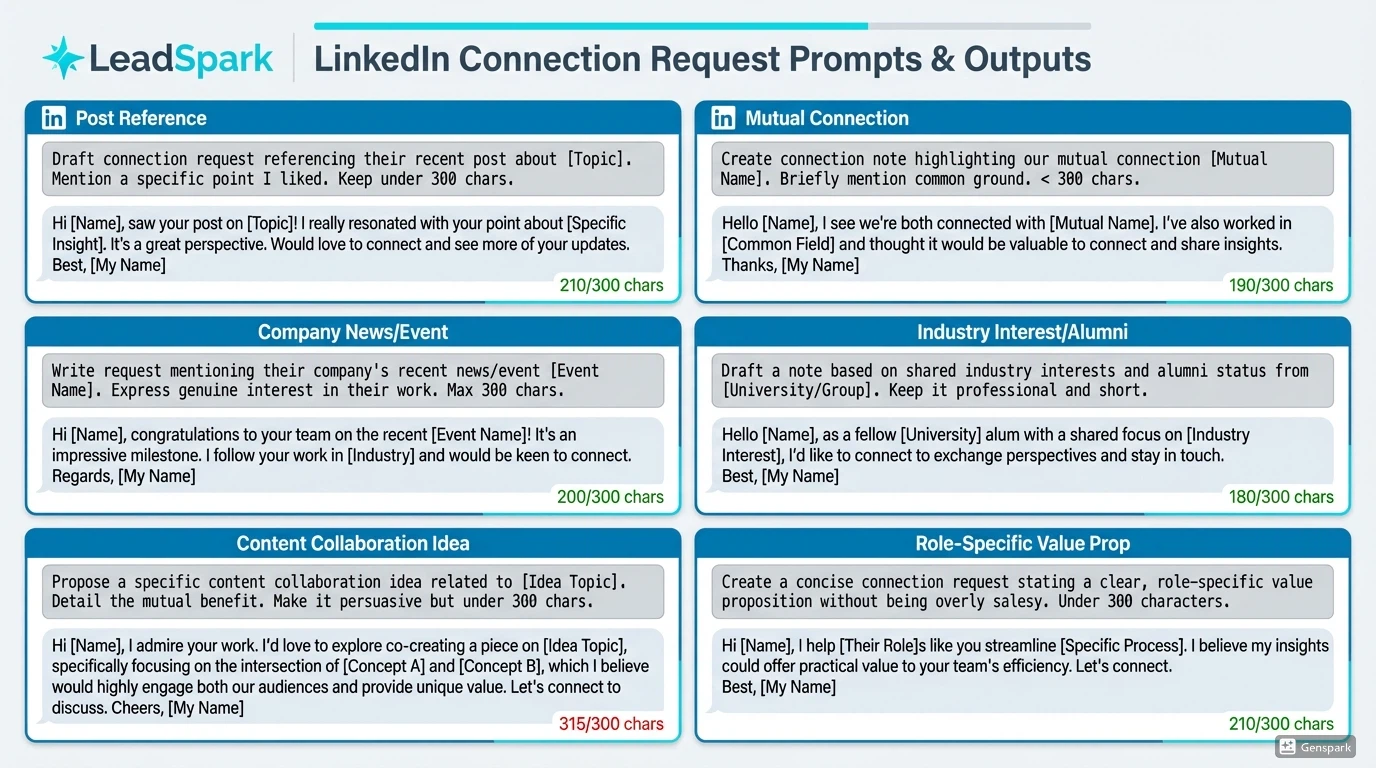
Want more LinkedIn icebreaker strategies? Check out our guide on LinkedIn icebreakers that get responses.
Follow-up emails (10 prompts)
Prompt 21: No-response follow-up (soft)
Write a gentle follow-up email to [Name] after no response to initial outreach. Acknowledge they're busy, add one new piece of value [relevant insight/resource], and give an easy out. Keep it short and respectful. 2-3 sentences.Prompt 22: Value-add follow-up
Create a follow-up email to [Name] sharing [relevant article/resource/insight] that relates to our previous conversation about [topic]. Don't ask for anything—just provide value. Under 60 words.Prompt 23: Breakup email
Write a final follow-up email to [Name] after multiple attempts. Acknowledge this is your last message, briefly restate the value, and leave the door open. Professional and graceful exit. 3 sentences max.Prompt 24: Event reminder follow-up
Craft a follow-up email to [Name] after they showed interest but didn't book a call. Mention an upcoming event/deadline that creates urgency without being pushy. Under 70 words.Prompt 25: Social proof follow-up
Write a follow-up email to [Name] mentioning that [Similar Company] just achieved [result] using [your solution]. Connect this to their likely goals. Keep it humble and outcome-focused. 2-3 sentences.Prompt 26: Multi-thread follow-up
Create a follow-up email to [Name] asking if there's someone else on their team who handles [specific function]. Position it as helpfully redirecting, not aggressive. Professional and considerate tone. Under 65 words.Prompt 27: Timing-based follow-up
Write a follow-up email to [Name] for [timing reason: new quarter, budget season, end of year]. Mention why now is a good time to revisit the conversation. Under 70 words, conversational.Prompt 28: Feedback request follow-up
Craft a follow-up email to [Name] asking for honest feedback on why [your solution] isn't a fit. Position it as genuinely wanting to learn, not a sales tactic. Short and authentic. 2 sentences.Prompt 29: Re-engagement after months
Write a re-engagement email to [Name] after 3-6 months of silence. Reference [new development: product feature, case study, market change] and suggest reconnecting. Under 75 words, fresh angle.Prompt 30: Meeting follow-up
Create a post-meeting follow-up email to [Name] summarizing [key points discussed], next steps, and thanking them for their time. Professional, organized, and actionable. Keep it concise.Email subject lines (10 prompts)
Prompt 31: Curiosity-driven subjects
Write 5 email subject line options for a cold email to [Name] at [Company] about [topic]. Make them curiosity-driven without being clickbait. Under 50 characters each. Professional B2B tone.Example outputs:
- "Quick question about [Company]'s SDR team"
- "Noticed your post on AI in sales"
- "Idea for scaling your outreach"
- "[Mutual Connection] suggested I reach out"
- "Saw [Company]'s Series B announcement"
Prompt 32: Personalized subject lines
Generate 5 personalized subject lines for an email to [Name] who [specific detail: posted about X, works at Y, recently did Z]. Each should be under 45 characters and reference the detail naturally.Prompt 33: Value-first subject lines
Write 5 subject lines that lead with value for [Target Audience]. Each should promise a specific benefit without overpromising. Under 50 characters. No "you" or "your" in the subject.Prompt 34: Question-based subjects
Create 5 subject lines formatted as questions for [Industry/Role]. Each should address a pain point without being salesy. Under 55 characters. Conversational tone.Prompt 35: Pattern interrupt subjects
Write 5 unconventional subject lines for cold outreach to [Audience] about [Topic]. Break typical patterns while staying professional. Under 50 characters each.Prompt 36: Social proof subjects
Generate 5 subject lines mentioning [Company Name/Industry Leader] who uses [your solution]. Make them intriguing without being name-droppy. Under 60 characters.Prompt 37: Urgency-based (authentic)
Write 5 subject lines creating authentic urgency for [Offer/Event/Deadline]. Avoid false scarcity. Professional B2B tone. Under 50 characters.Prompt 38: Industry-specific subjects
Create 5 subject lines for [Specific Industry] that use industry terminology naturally. Should signal relevance immediately. Under 55 characters each.Prompt 39: Follow-up subject lines
Write 5 follow-up email subject lines after no response. Each should add new value or angle. No "Just checking in." Under 50 characters, respectful tone.Prompt 40: Referral subject lines
Generate 5 subject lines for emails with a mutual connection or referral. Make the connection clear immediately. Under 55 characters, warm tone.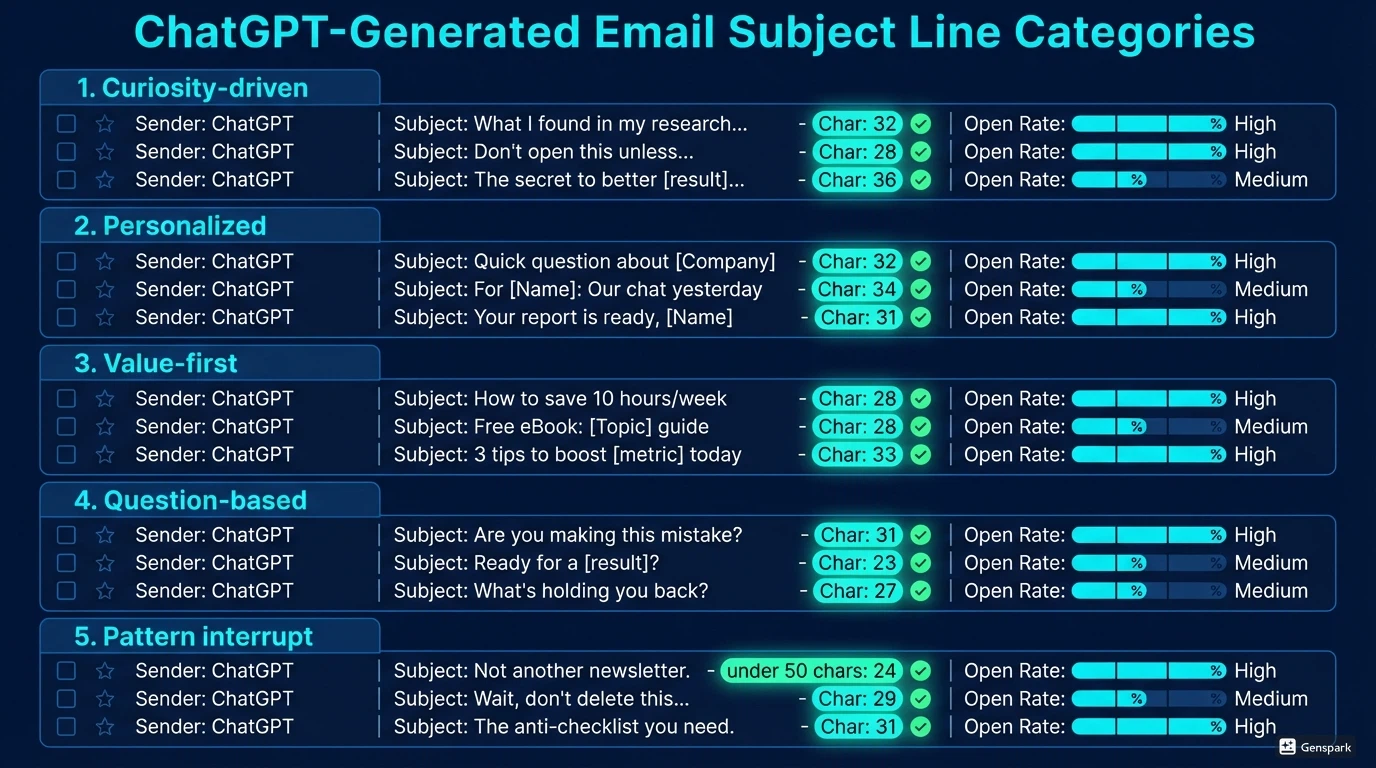
Value propositions (10 prompts)
Prompt 41: Core value proposition
Write a one-sentence value proposition for [your product/service] targeting [specific role/industry]. Focus on the transformation, not features. Under 25 words. Clear and specific.Example: "LeadSpark AI turns hours of LinkedIn research into seconds, generating personalized icebreakers from actual prospect posts."
Prompt 42: Pain-solution value prop
Create a 2-sentence value proposition starting with [specific pain point] and ending with your solution. Target: [audience]. Empathetic and outcome-focused. Under 35 words total.Prompt 43: Comparison value prop
Write a value proposition positioning [your solution] against [manual process/competitor]. Highlight the key differentiator in one sentence. Under 30 words, confident but not aggressive.Prompt 44: Time-saving value prop
Craft a value proposition emphasizing time savings for [role]. Include specific time metrics if possible (e.g., "from 10 hours to 10 minutes"). Under 25 words. Results-focused.Prompt 45: ROI-focused value prop
Write a value proposition focusing on ROI for [target audience]. Mention specific metrics or outcomes without overpromising. One sentence, under 30 words. Data-driven tone.Prompt 46: Quality-focused value prop
Create a value proposition emphasizing quality over quantity for [audience who values this]. Differentiate from "spray and pray" approaches. Under 25 words. Confident and clear.Prompt 47: Industry-specific value prop
Write a value proposition for [specific industry] using their terminology and addressing their unique challenges. One sentence, under 30 words. Industry-native language.Prompt 48: Simple vs complex value prop
Craft a value proposition explaining [complex solution] in simple terms for [non-technical audience]. No jargon. One sentence, under 25 words. Crystal clear.Prompt 49: Before-after value prop
Write a before-after value proposition for [solution]. Format: "Stop [bad thing]. Start [good thing]." Under 20 words. Punchy and direct.Prompt 50: Unique mechanism value prop
Create a value proposition highlighting [your unique method/technology] that competitors don't have. Focus on the "how" that creates the result. Under 30 words. Differentiating.Call-to-action lines (5 prompts)
Prompt 51: Low-commitment CTAs
Write 5 low-commitment call-to-action options for a cold email. Each should require minimal effort from the prospect (e.g., "Worth a 10-minute chat?"). Conversational, not pushy. Under 12 words each.Example CTAs:
- "Worth a quick 10-minute call?"
- "Open to a brief chat next week?"
- "Curious to see a 2-minute demo?"
- "Should I send over a quick example?"
- "Mind if I share how we helped [similar company]?"
Prompt 52: Question-based CTAs
Generate 5 CTAs formatted as questions that naturally lead to "yes." Each should be easy to respond to. Conversational tone. Under 15 words each.Prompt 53: Value-first CTAs
Write 5 CTAs that lead with value (e.g., "I'll send over 3 examples that worked for [industry]"). Each promises something helpful. Under 20 words each.Prompt 54: Two-option CTAs
Create 5 CTAs offering two options (A or B) to increase response likelihood. Make both options low-commitment. Under 25 words each. Professional tone.Prompt 55: Time-bound CTAs
Write 5 CTAs with specific time frames (e.g., "15-minute call Thursday?"). Make them concrete but flexible. Under 15 words each. Respectful of their time.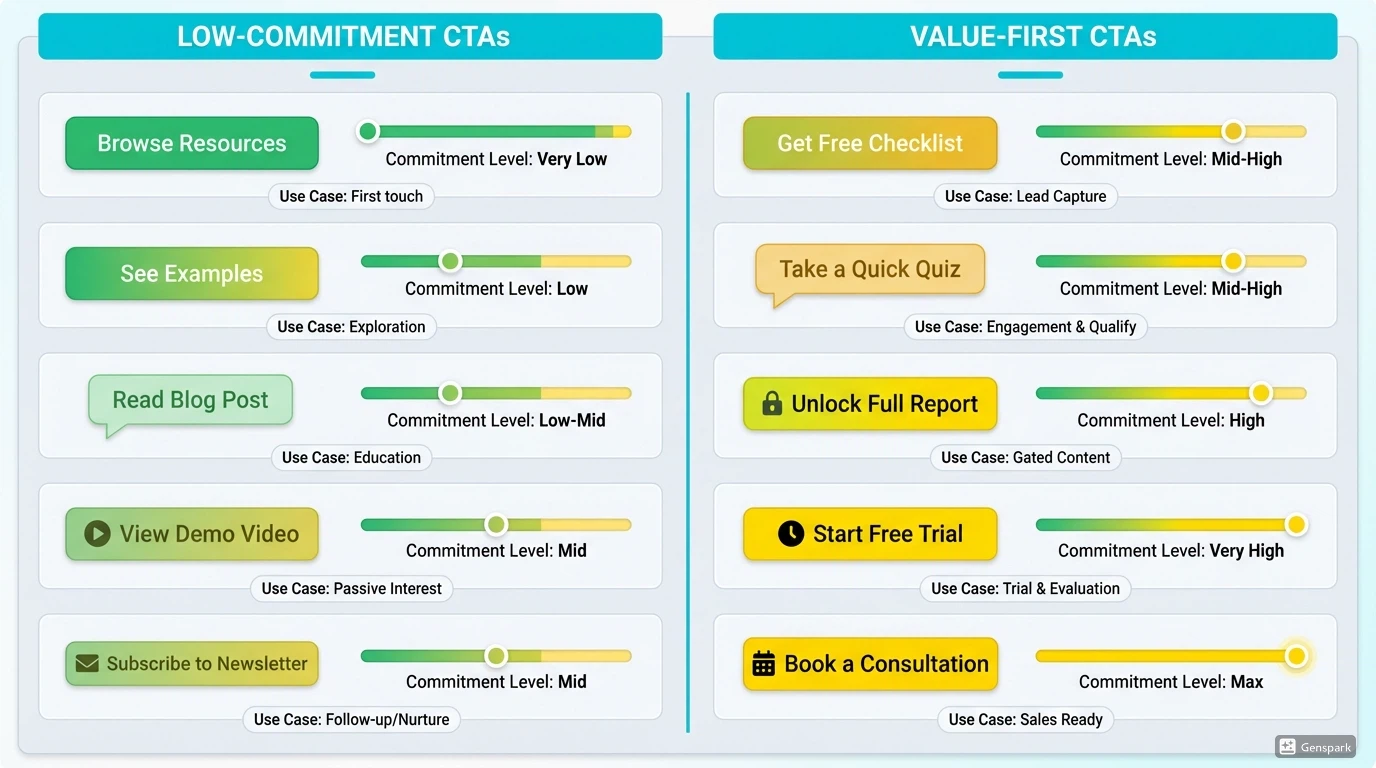
Tired of copy-pasting prompts for every prospect?
LeadSpark AI automates the entire workflow—scraping LinkedIn posts, researching prospects, and generating personalized icebreakers in one click.
✅ No manual research required
✅ Process 200+ leads in minutes
✅ CSV in → CSV out
ChatGPT limitations for sales teams
ChatGPT is powerful, but it's not perfect for sales teams. Here are the five critical limitations every SDR should know:
1. Manual research still required
ChatGPT doesn't scrape LinkedIn or Google for you. You must manually find LinkedIn posts, company news, and prospect insights before you can prompt. This takes time—often 3-5 minutes per prospect.
2. Generic outputs without context
The quality of ChatGPT's output depends entirely on your prompt. Vague prompts = vague emails. If you don't provide specific prospect context, you'll get generic templates that could be sent to anyone.
"Garbage in, garbage out" applies heavily here.
3. No integration with your workflow
You're copy-pasting from ChatGPT to your email client or LinkedIn for every single prospect. No CSV processing. No CRM integration. No batch operations.
It's a manual, one-at-a-time process that doesn't scale beyond 20-30 prospects per day.
4. Inconsistent quality
ChatGPT sometimes over-explains, uses buzzwords, or misses the mark on tone. You need to review and edit every output—which defeats the purpose of automation.
In fact, according to HubSpot's research, 98% of sales professionals report making at least some edits to text created with AI. One prompt might generate a great email. The next might be unusable. Quality control is your responsibility.
5. Not designed for sales at scale
If you're processing 50+ leads per day, ChatGPT becomes a bottleneck. Manual prompting for each prospect takes time. Tracking which prospects you've messaged becomes messy.
It's a tool for individuals, not sales teams.
This is why tools like LeadSpark AI exist—to automate the entire workflow from LinkedIn research to icebreaker generation. Instead of manually prompting for each prospect, you upload a CSV and get personalized icebreakers for hundreds of leads in minutes.
But if you're committed to ChatGPT, these prompts will save you hours.
ChatGPT vs automated AI tools
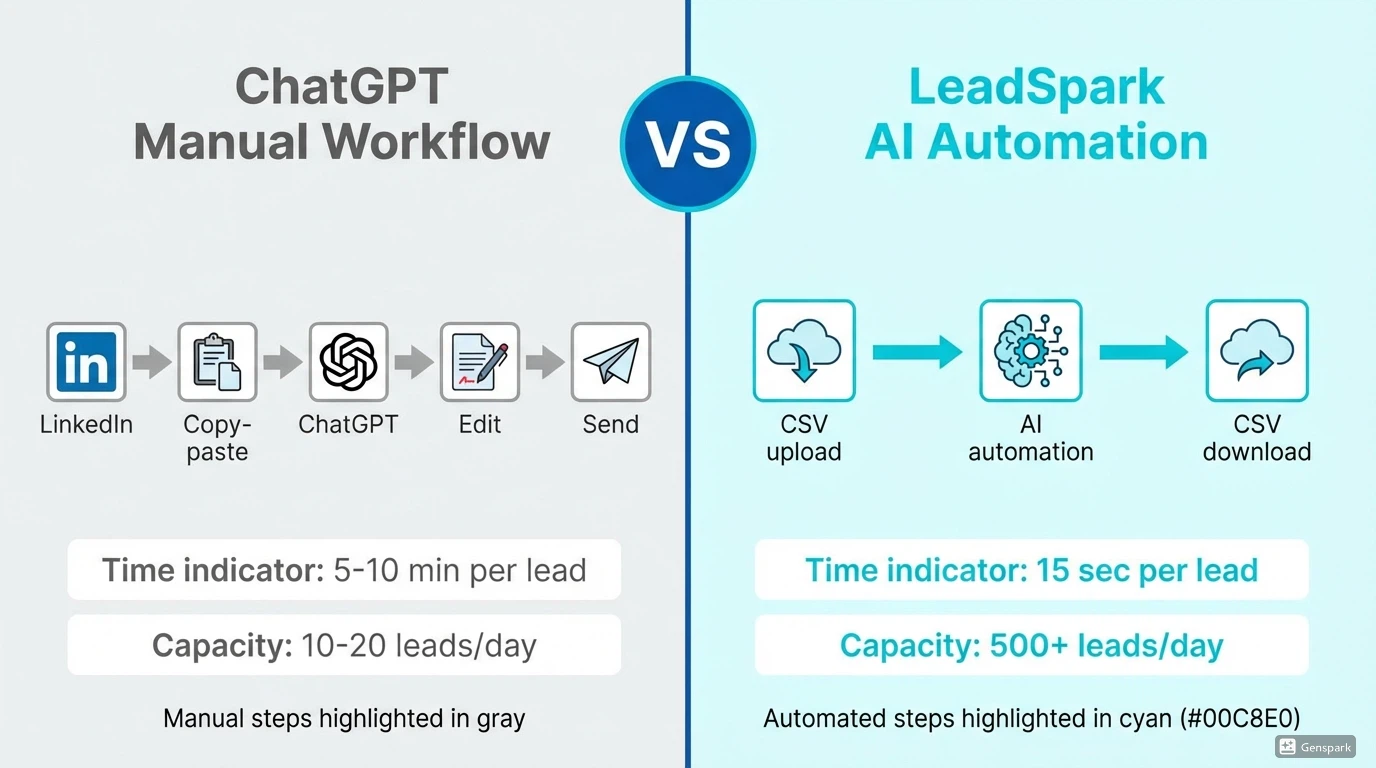
Here's the honest comparison between using ChatGPT manually and AI automation tools designed for sales.
Gartner predicts that by 2027, 95% of seller research workflows will begin with AI, up from less than 20% in 2024. The question isn't whether to use AI—it's which AI approach works best for your sales process.
| Feature | ChatGPT (Manual) | AI Automation (LeadSpark AI) |
|---|---|---|
| Research | Manual LinkedIn/Google search | Automated LinkedIn post scraping |
| Time per lead | 5-10 minutes | 15 seconds |
| Icebreaker quality | High (if prompted well) | High (consistently) |
| Scalability | 10-20 leads/day | 500+ leads/day |
| Workflow | Copy-paste each time | CSV upload → CSV download |
| Cost | Free (time cost) | Credit-based ($0.25-0.50/lead) |
| Integration | Manual | CRM-ready CSV export |
| Learning curve | Prompt engineering required | Plug-and-play |
When to use ChatGPT
- Learning sales copywriting - Great for understanding what makes good cold emails
- Generating 1-5 emails per day - Manual process is fine at this volume
- A/B testing messaging - Experiment with different angles before scaling
- Budget constraints - Free tier works for small-scale outreach
When to use AI automation (LeadSpark AI)
- Processing 50+ leads per day - Manual ChatGPT becomes a bottleneck
- LinkedIn-focused prospecting - Automated LinkedIn post scraping saves hours
- Need for consistent quality - No "garbage in, garbage out" issues
- Want to save 10+ hours per week - ROI justifies the cost
- Ready to scale results - According to industry research, 83% of sales teams using AI witness significant revenue growth year-over-year
Skip the manual prompts—automate the entire workflow
LeadSpark AI scrapes LinkedIn posts, researches prospects, and generates personalized icebreakers automatically.
✅ No prompts to write
✅ No copy-pasting
✅ CSV in → CSV out
Frequently asked questions
Is ChatGPT free for sales teams?
Yes, ChatGPT offers a free tier that's sufficient for basic sales email generation. ChatGPT Plus ($20/month) provides faster responses and access to GPT-4, which generates higher-quality sales copy. However, both require manual research and prompt engineering for each prospect.
Can ChatGPT replace sales email copywriters?
ChatGPT is a powerful assistant but not a replacement for strategic copywriting. It excels at generating variations and overcoming writer's block but requires human oversight for quality, tone, and accuracy. Use ChatGPT to accelerate your writing, not replace your expertise in understanding buyer psychology and objections.
What's the best ChatGPT prompt for cold emails?
The best prompt includes: (1) Role/persona ("Act as a B2B sales writer"), (2) Specific context about the prospect, (3) Clear objective ("Write a 3-sentence cold email"), (4) Constraints (word count, tone), and (5) Desired format. Generic prompts produce generic outputs. The more specific and contextual your prompt, the better the result.
How long does it take to generate sales emails with ChatGPT?
ChatGPT generates email drafts in 5-10 seconds. However, the full process—researching the prospect on LinkedIn, crafting the prompt, reviewing the output, and editing—takes 5-10 minutes per email. For scale (50+ prospects daily), AI automation tools like LeadSpark AI are more efficient.
Can I use ChatGPT for LinkedIn messages?
Yes, ChatGPT works well for LinkedIn connection requests, InMails, and messages. Use prompts that specify character limits (LinkedIn connection notes are capped at 300 characters). For icebreakers based on actual LinkedIn posts, tools like LeadSpark AI automate both the research and writing in one workflow.
The bottom line: ChatGPT for sales in 2026
ChatGPT has democratized AI-powered sales copywriting. With the 50+ prompts in this guide, any SDR, BDR, or founder can generate personalized cold emails and LinkedIn messages in seconds instead of hours.
Key takeaways:
- Use specific, contextual prompts for better outputs
- Always research prospects before prompting ChatGPT
- Edit AI-generated content for tone and accuracy
- A/B test different prompt variations to find what works
- Know when to automate vs. when to go manual
However, ChatGPT is just the first step. If you're prospecting at scale (50+ leads daily), you'll quickly hit the limitations of manual research and copy-pasting.
This is where AI automation shines.
Ready to automate your entire sales research workflow?
LeadSpark AI eliminates the manual work entirely:
✅ Automatically scrapes LinkedIn posts (no manual research)
✅ Generates personalized icebreakers (no prompt engineering)
✅ CSV upload → enriched CSV download (no copy-pasting)
✅ Process 200+ leads in minutes (not hours)
Start with 15 free credits—no credit card required.
Already using ChatGPT for sales? See how LeadSpark AI compares to other automation tools →
Want more LinkedIn outreach strategies? Explore our resources for guides on personalization, icebreaker generation, and AI-powered prospecting.
Related Articles

Ai Tools
7 Best LinkedIn Personalization Tools in 2026 (Tested & Ranked)
Compare the top LinkedIn personalization tools for SDRs and sales teams. Expert analysis of features, pricing, and AI icebreaker quality to help you choose the best tool in 2026.

Outreach Best Practices
How to Write LinkedIn Icebreakers That Get Responses (2026 Guide)
Discover 7 proven LinkedIn icebreaker formulas that achieve up to 90% response rates. Includes templates, examples, and AI-powered personalization tactics.
Ai Tools
Lyne.ai vs LeadSpark AI: Best LinkedIn Icebreaker Tool in 2026?
Compare Lyne.ai and LeadSpark AI for LinkedIn icebreaker generation. In-depth analysis of features, pricing, personalization quality, and which tool is best for SDRs in 2026.
Ready to Generate Personalized Icebreakers?
Join sales professionals using LeadSpark AI to create hyper-personalized LinkedIn icebreakers in minutes.