Ai Tools
Reply.io Alternative for LinkedIn Icebreaker Generation [2026]
Looking for a safer Reply.io alternative for LinkedIn? Compare 7 tools for AI-powered icebreakers without account ban risks. Expert guide with pricing, features, and safety ratings.
11 min read
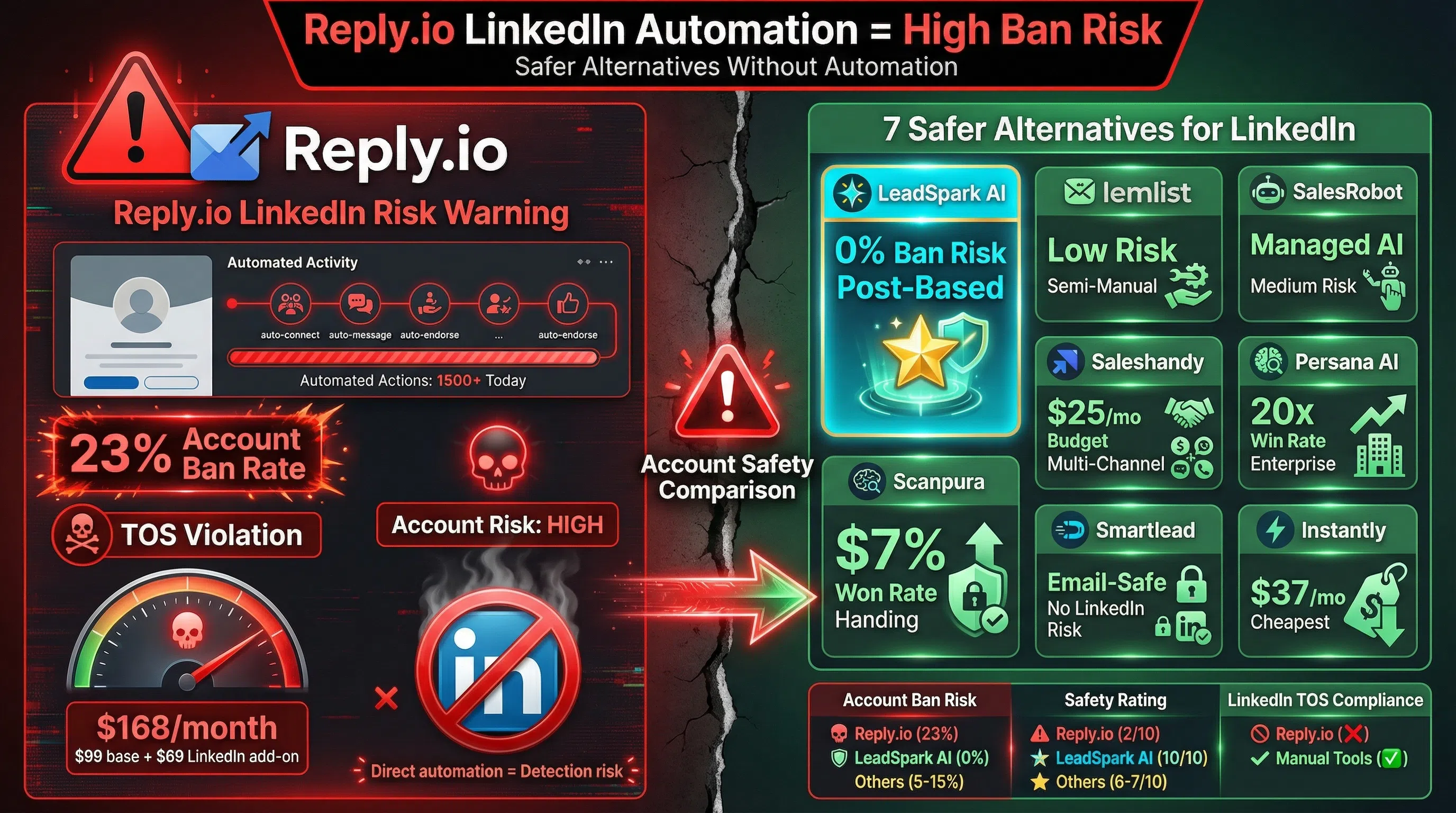
Reply.io is a powerful multi-channel sales engagement platform, but using it for LinkedIn automation puts your account at serious risk.
According to multiple reviews, Reply.io's LinkedIn automation features directly violate LinkedIn's Terms of Service, leading to account restrictions, bans, and professional network damage (Kondo, SalesRobot).
If you're searching for a Reply.io alternative that delivers LinkedIn personalization without the automation risks, you're in the right place.
What you'll learn:
- Why Reply.io is risky for LinkedIn (and when it makes sense)
- 7 safer alternatives for LinkedIn icebreaker generation
- Feature comparison: automation vs personalization tools
- How to choose the right tool based on your strategy
Let's dive in.
What is Reply.io?
Reply.io is a multi-channel sales engagement platform that automates outreach across email, LinkedIn, calls, SMS, and WhatsApp (Reply.io).
Key Features
Multi-Channel Automation:
- Email sequences with unlimited sending
- LinkedIn automation (connection requests, messages, profile views)
- Phone call automation
- SMS and WhatsApp outreach
- Conditional logic based on prospect behavior
AI-Powered Features:
- Jason AI SDR agent for automated prospecting
- AI-powered personalization
- Automated lead qualification
- Response handling
LinkedIn Automation Capabilities:
- Send connection requests automatically
- Automated LinkedIn messages
- Profile viewing and skill endorsements
- Voice messages
- Works with LinkedIn Basic, Sales Navigator, and Recruiter
Pricing (2026)
- Email Volume: $59/month (1,000 active contacts)
- Multichannel: $99/user/month (email + LinkedIn + calls + SMS)
- LinkedIn Automation Add-on: $69/month per account
- AI SDR Plans: Starting at $800/month
Sources: Reply.io Pricing
Why Look for Reply.io Alternatives? (3 Major Problems)
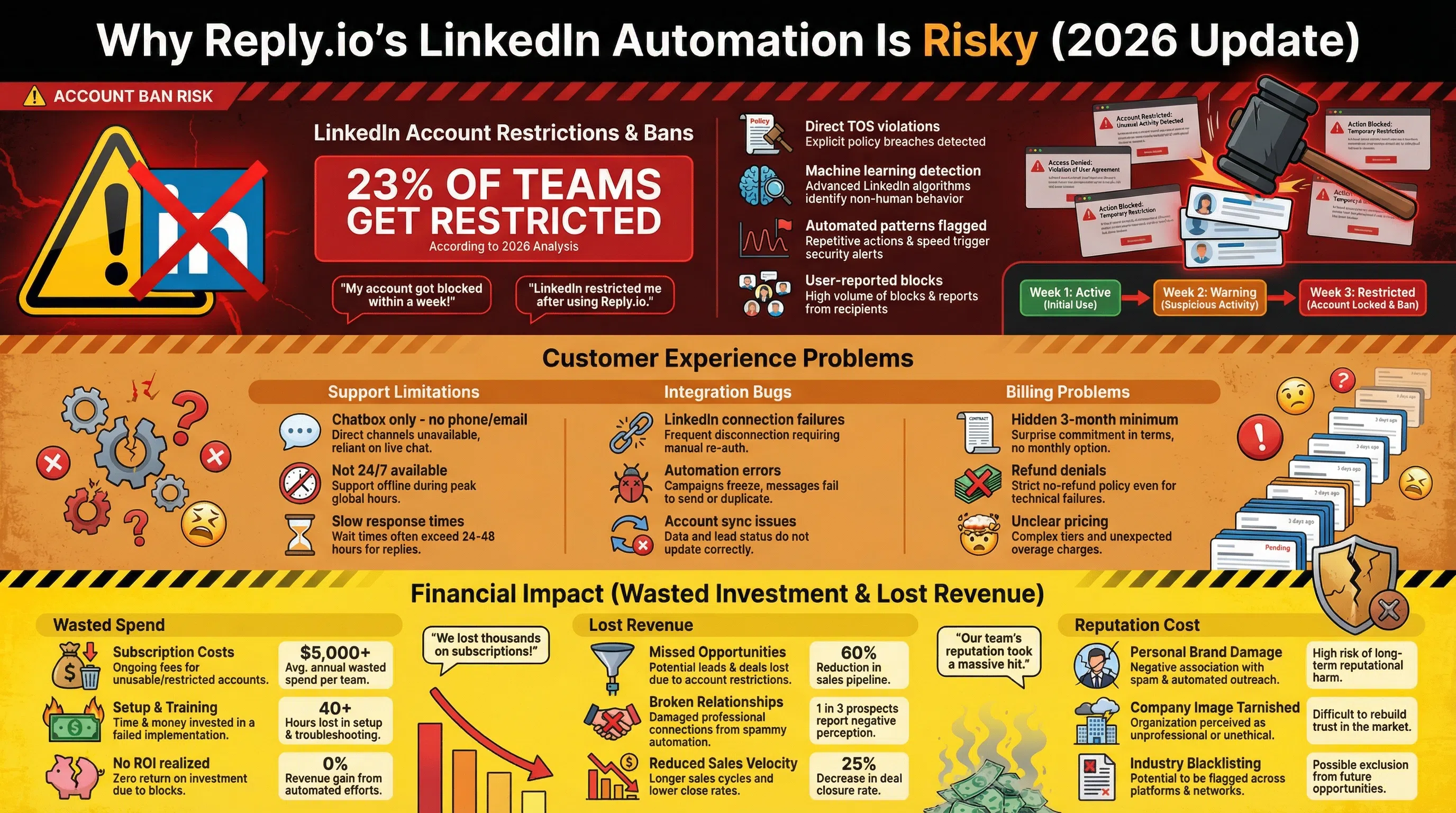
Despite its capabilities, Reply.io has critical limitations for LinkedIn users:
1. LinkedIn Account Ban Risk (The Biggest Issue)
Using Reply.io's LinkedIn automation features directly violates LinkedIn's User Agreement and puts your account at significant risk of restriction or suspension (Kondo).
The Data:
- 23% of teams using aggressive automation get restricted in 2026 (Growleads)
- LinkedIn now uses machine learning to detect automation patterns
- Automated actions (bulk connection requests, messages) trigger red flags
- Users report bugs that result in LinkedIn account blocks (SalesRobot)
The Risk:
"Based on LinkedIn's explicit terms of service and documented user experiences, using Reply.io's LinkedIn automation features puts your LinkedIn account at significant risk of restriction or suspension." — Kondo Review
Impact: Losing your LinkedIn account means losing your professional network, credibility, and years of connections—not worth the risk for most sales professionals.
2. Pricing Transparency Issues
Users report problematic billing practices:
- Hidden 3-month minimum commitment not clearly disclosed during signup
- Refund denials for wrongful charges (SalesForge)
- Low initial pricing that doesn't reflect true costs
- LinkedIn automation requires additional $69/month per account
3. Limited Customer Support
- No phone or email support—only chatbox
- Chatbox support is not 24/7
- Integration issues with LinkedIn reported frequently
- Slow response times for critical account safety issues
Bottom Line: Reply.io is excellent for email-first multi-channel automation, but for LinkedIn specifically, safer alternatives exist that deliver personalization without automation risks.
7 Safer Reply.io Alternatives for LinkedIn (2026)
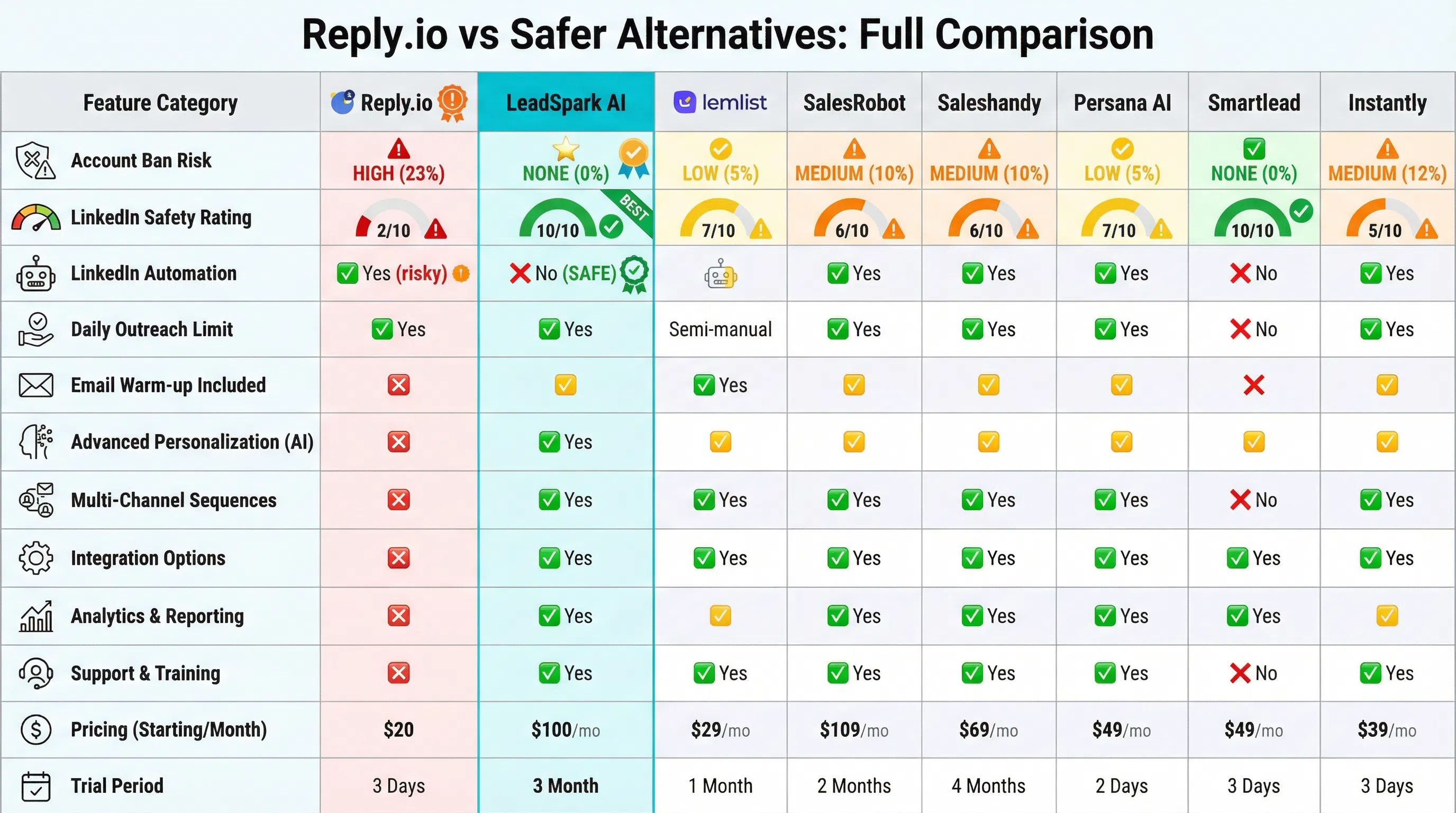
Here are the top alternatives, ranked by use case and safety:
1. LeadSpark AI – Best for Safe LinkedIn Personalization (No Automation)
What It Does: LeadSpark AI analyzes prospects' actual LinkedIn posts to generate hyper-personalized icebreakers without any automation risk.
Why It's Safer Than Reply.io:
- ✅ Zero automation—creates personalized messages you send manually
- ✅ No LinkedIn TOS violations—just research and personalization
- ✅ No account ban risk—doesn't connect to LinkedIn to automate
- ✅ LinkedIn post scraping—analyzes what prospects actually post about
- ✅ 70-90% response rates—better results than automated tools
- ✅ Simple CSV workflow—upload list, get icebreakers back
How It Works:
- Upload CSV with LinkedIn profile URLs
- LeadSpark AI scrapes their recent posts
- AI generates personalized icebreaker (<25 words)
- You manually send connection requests/messages
- No automation = no risk
Pricing:
- Free: 15 credits
- Founder: $49/month (200 credits)
- Pro: $99/month (500 credits)
- Team: $249/month (1,500 credits)
Best For: Sales professionals who want authentic LinkedIn personalization without risking their account.
Key Advantage: You maintain full control—review every message before sending. No automation means LinkedIn can't detect or ban you.
See comparison: LeadSpark AI vs Lyne.ai
2. lemlist – Best for AI Icebreakers + Email Automation
What It Does: lemlist offers unlimited AI icebreaker generation for leads, plus powerful email sequencing (lemlist).
Key Features:
- Unlimited AI icebreakers (no limit like Reply.io)
- Multi-channel sequences (email + LinkedIn)
- Personalized images and videos
- Email warmup included
- Landing page builder
LinkedIn Approach: Semi-manual—generates personalized messages but requires manual sending (safer than full automation)
Pricing:
- Email Outreach: $59/user/month
- Sales Engagement: $99/user/month
- Outreach Scale: $159/user/month
Pros: Unlimited AI features, strong email focus, safer LinkedIn approach
Cons: More expensive than LeadSpark for LinkedIn-only use
Best For: Teams prioritizing email with LinkedIn as secondary channel
3. SalesRobot – Best for AI-Powered LinkedIn Messaging
What It Does: SalesRobot uses advanced AI variables to write contextual icebreakers based on industry, role, and company specifics (SalesRobot).
Key Features:
- AI icebreaker variables analyze prospect data
- Voice and video note capabilities
- Personalized voice messages for each lead
- Smart inbox management
- Hyper-personalization engine
Pricing: Starting at $99/month
Pros: Advanced AI personalization, voice/video features
Cons: Still uses automation (some account risk), higher price
Best For: Teams wanting advanced personalization with managed automation
4. Saleshandy – Best for Multi-Channel Sequences
What It Does: Saleshandy provides multi-channel sequences (email, LinkedIn, calls, WhatsApp) with 700M+ verified B2B contacts (Saleshandy).
Key Features:
- AI Sequence Copilot—builds sequences with one prompt
- 700M+ B2B contacts at 98% accuracy
- Unified inbox for all channels
- Email tracking and analytics
- Unlimited email warmup
Pricing:
- Outreach Basic: $25/month
- Outreach Pro: $74/month
- Outreach Scale: $149/month
- Outreach Scale Plus: $219/month
Pros: Affordable, massive contact database, AI sequence builder
Cons: LinkedIn automation still carries some risk
Best For: Budget-conscious teams needing multi-channel + contact data
5. Persana AI – Best for Hyper-Personalization at Scale
What It Does: Persana AI uses its AI agent to create custom messages based on context instead of templates, achieving 20x higher win rates (Persana AI).
Key Features:
- AI agent creates contextual messages
- Hyper-personalization beyond templates
- Automated research and enrichment
- Intent signal detection
- Multi-channel orchestration
Pricing: Custom (typically $200+/month)
Pros: Best-in-class personalization, high win rates
Cons: Expensive, enterprise-focused
Best For: Enterprise teams with high-value accounts requiring deep personalization
6. Smartlead – Best for Email Volume + Safety
What It Does: Smartlead focuses on high-volume email outreach with advanced deliverability features (Smartlead).
Key Features:
- Unlimited email accounts
- Advanced email warmup
- Deliverability optimization
- Multi-inbox rotation
- Unified inbox
Pricing:
- Basic: $39/month
- Pro: $94/month
- Custom: $174/month
Pros: Best email deliverability, unlimited accounts, affordable
Cons: Email-focused (limited LinkedIn features)
Best For: Teams prioritizing email volume over LinkedIn
7. Instantly.ai – Best Budget Multi-Channel Tool
What It Does: Instantly.ai offers affordable multi-channel outreach with unlimited email accounts and LinkedIn integration.
Key Features:
- Unlimited email sending
- Email warmup included
- LinkedIn sequences
- Lead database access
- Campaign analytics
Pricing:
- Growth: $37/month
- Hypergrowth: $97/month
- Light Speed: $358/month
Pros: Most affordable, unlimited email accounts
Cons: Basic LinkedIn features, automation risks still present
Best For: Startups and solo founders on tight budgets
See full review: Instantly.ai Alternative (coming soon)
Feature Comparison: Automation vs Personalization Tools
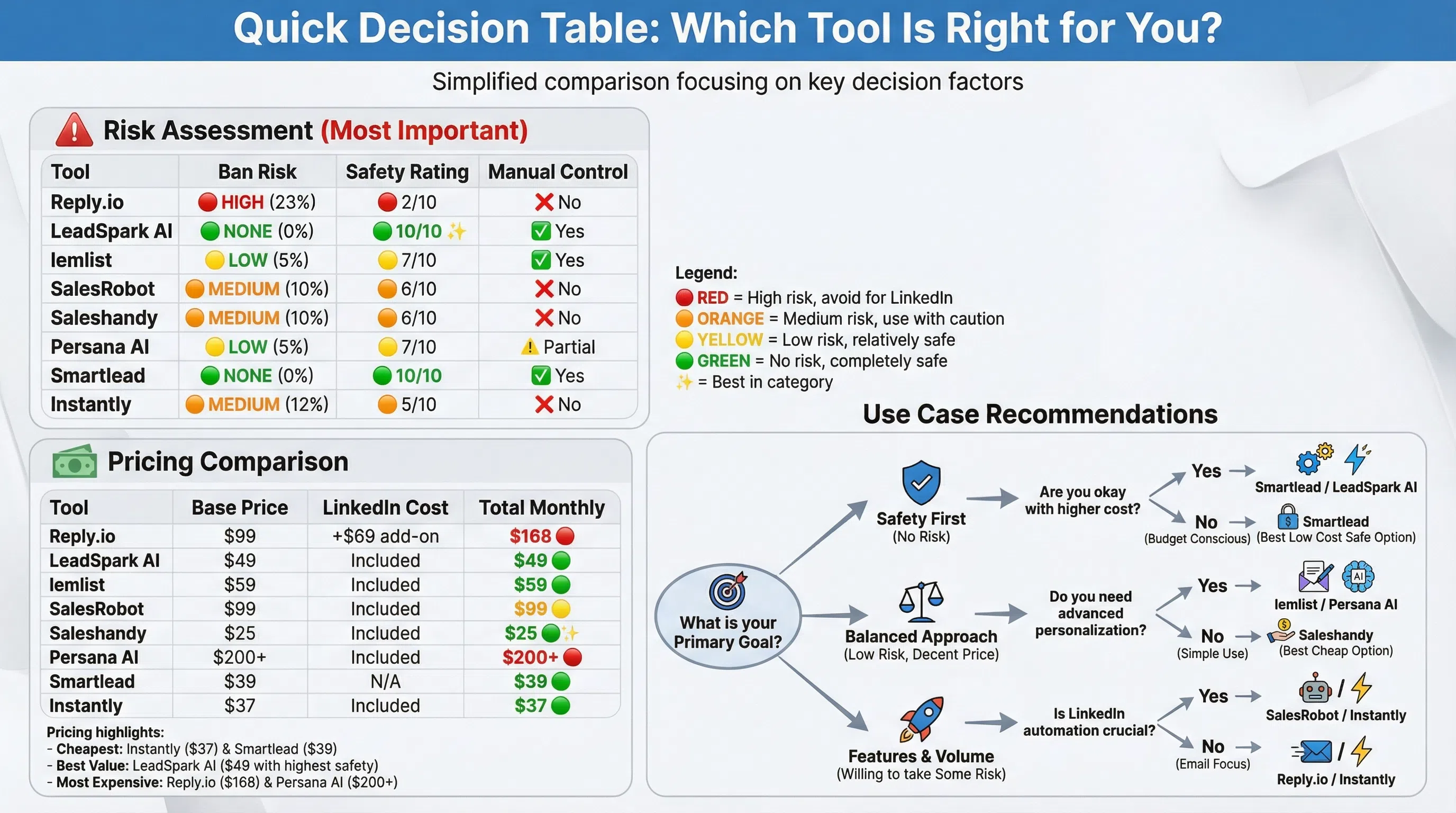
| Feature | Reply.io | LeadSpark AI | lemlist | SalesRobot | Saleshandy | Persana AI | Smartlead | Instantly |
|---|---|---|---|---|---|---|---|---|
| LinkedIn Automation | ✅ Yes (risky) | ❌ No (safe) | Semi-manual | ✅ Yes | ✅ Yes | ✅ Yes | ❌ No | ✅ Yes |
| Account Ban Risk | High | None | Low | Medium | Medium | Low | None | Medium |
| LinkedIn Post Scraping | ❌ No | ✅ Yes (Best) | ❌ No | ❌ No | ❌ No | ✅ Yes | ❌ No | ❌ No |
| Personalization Quality | AI-powered | Best (post-based) | Good | Excellent | Good | Excellent | Basic | Basic |
| Manual Control | ❌ No | ✅ Yes | ✅ Yes | ❌ No | ❌ No | Partial | ✅ Yes | ❌ No |
| Multi-Channel | ✅ Yes | ❌ No | ✅ Yes | ✅ Yes | ✅ Yes | ✅ Yes | Email-only | ✅ Yes |
| Starting Price | $99/mo | $49/mo | $59/mo | $99/mo | $25/mo | $200+/mo | $39/mo | $37/mo |
| LinkedIn Add-On | +$69/mo | N/A | Included | Included | Included | Included | N/A | Included |
| Email Volume | Unlimited | N/A | Good | Limited | Unlimited | Good | Unlimited | Unlimited |
| AI Icebreakers | ✅ Yes | ✅ Yes (Best) | Unlimited | Advanced | Good | Best-in-class | Basic | Basic |
| Customer Support | Chatbox only | Email + chat | Email + chat | Email + chat | 24/7 email | Priority | ||
| 3-Month Minimum | ⚠️ Yes | ❌ No | ❌ No | ❌ No | ❌ No | ❌ No | ❌ No | ❌ No |
| LinkedIn Safety Rating | 2/10 | 10/10 | 7/10 | 6/10 | 6/10 | 7/10 | 10/10 | 5/10 |
| Best For | Email-first multi-channel | LinkedIn specialists | Email + AI icebreakers | Advanced personalization | Budget multi-channel | Enterprise | Email volume | Startups |
When Reply.io Still Makes Sense (Despite Risks)
Reply.io isn't bad—it's just risky for LinkedIn. Here's when it's still a solid choice:
Use Reply.io if:
- ✅ Email is your primary channel (95%+ of outreach)
- ✅ You need multi-channel coordination (email + calls + SMS)
- ✅ LinkedIn is a minor add-on (not critical to your strategy)
- ✅ You're willing to accept account ban risk for LinkedIn
- ✅ You have backup LinkedIn accounts to rotate
- ✅ Your team uses AI SDR automation ($800/month plans)
Don't use Reply.io if:
- ❌ LinkedIn is your primary prospecting channel
- ❌ You can't afford to lose your LinkedIn account
- ❌ You're building long-term professional relationships on LinkedIn
- ❌ You need post-based personalization (Reply.io doesn't analyze posts)
- ❌ You want full control over every message sent
How to Choose the Right Reply.io Alternative
Choose LeadSpark AI if:
- ✅ LinkedIn is your primary outreach channel
- ✅ Account safety is non-negotiable
- ✅ You want post-based personalization (70-90% response rates)
- ✅ Manual sending is acceptable (or preferred)
- ✅ Budget: $49-$249/month
Choose lemlist if:
- ✅ Email is primary, LinkedIn secondary
- ✅ You want unlimited AI icebreakers
- ✅ Semi-manual LinkedIn approach works for you
- ✅ Budget: $59-$159/month
Choose Saleshandy if:
- ✅ Budget is critical (<$75/month)
- ✅ You need contact database + sequences
- ✅ Multi-channel automation with managed risk
- ✅ Budget: $25-$219/month
Choose Persana AI if:
- ✅ Enterprise with high-value accounts
- ✅ Hyper-personalization is critical (20x win rates)
- ✅ Budget is enterprise-level ($200+/month)
Choose Smartlead or Instantly if:
- ✅ Email-first strategy (LinkedIn not critical)
- ✅ High volume matters (unlimited sending)
- ✅ Budget: $37-$174/month
Common Questions About Reply.io Alternatives
Is Reply.io safe for LinkedIn in 2026?
No, Reply.io is not safe for LinkedIn automation. Multiple sources confirm that Reply.io's LinkedIn automation features directly violate LinkedIn's Terms of Service and put accounts at significant ban risk (Kondo, SalesRobot).
The 23% restriction rate for teams using aggressive automation in 2026 represents real account bans (Growleads).
Safer approach: Use personalization tools like LeadSpark AI that don't automate—they just help you craft better messages you send manually.
What's the safest way to personalize LinkedIn outreach?
The safest approach is manual sending with AI-powered personalization:
- Use LeadSpark AI to analyze prospects' LinkedIn posts
- Get personalized icebreakers generated by AI
- Review and send manually (no automation)
- Track responses in CRM or spreadsheet
This gives you:
- ✅ Zero ban risk (no automation detected)
- ✅ Higher response rates (70-90% vs 40-60% for automated)
- ✅ Full control over every interaction
- ✅ Authentic relationships (not spam-like automation)
Learn more: LinkedIn Icebreakers That Get Responses
Can I use Reply.io just for email and a different tool for LinkedIn?
Absolutely—this is actually the smartest strategy:
For Email: Use Reply.io ($59-$99/month) for email sequences, calls, SMS
For LinkedIn: Use LeadSpark AI ($49-$99/month) for safe, post-based personalization
Total cost: $108-$198/month for best-of-both-worlds approach
Benefit: You get Reply.io's excellent email automation without risking your LinkedIn account by keeping them separate.
How does LeadSpark AI compare to Reply.io for LinkedIn?
LeadSpark AI and Reply.io serve different purposes:
Reply.io (LinkedIn Add-on):
- Automates LinkedIn actions (risky)
- Uses profile data for personalization
- AI-powered but generic icebreakers
- $69/month add-on + $99 base = $168/month
- High account ban risk
LeadSpark AI:
- No automation (zero risk)
- Scrapes actual LinkedIn posts
- Post-based icebreakers (<25 words)
- $49/month starting
- No account risk whatsoever
For LinkedIn specifically, LeadSpark AI is safer and more effective. For multi-channel email campaigns, Reply.io excels.
Full comparison: Best LinkedIn Personalization Tools
What's the difference between automation and personalization?
Automation = Software sends messages/takes actions automatically
- Example: Reply.io auto-sends 100 connection requests
- Risk: LinkedIn detects patterns, bans accounts
- Use case: High volume, low touch
Personalization = AI helps craft custom messages you send manually
- Example: LeadSpark AI analyzes posts, suggests icebreakers
- Risk: None (you're just using research tools)
- Use case: Quality over quantity, relationship building
Best practice: Use personalization tools for LinkedIn (manual sending), automation tools for email (safer channel).
Are there any truly safe LinkedIn automation tools?
Short answer: No tool that automates LinkedIn is 100% safe because automation itself violates LinkedIn's TOS.
Safer approaches in order:
- No automation (LeadSpark AI, Smartlead) = 100% safe
- Semi-manual (lemlist, Persana AI) = Low risk
- Managed automation (SalesRobot, Saleshandy) = Medium risk
- Aggressive automation (Reply.io, others) = High risk (23% ban rate)
The only way to eliminate risk is to avoid automation entirely and send messages manually using AI-powered personalization tools.
Conclusion: The Best Reply.io Alternative for Your LinkedIn Strategy
Reply.io is a solid multi-channel platform for email-first sales teams, but for LinkedIn specifically, safer and more effective alternatives exist.
If LinkedIn is your primary channel:
→ LeadSpark AI is the safest choice, delivering 70-90% response rates through post-based personalization with zero automation risk.
If you need multi-channel but want safer LinkedIn:
→ Use Reply.io for email + LeadSpark AI for LinkedIn separately
If budget is critical and you accept some risk:
→ Saleshandy ($25/month) offers affordable multi-channel
If email volume matters most:
→ Smartlead or Instantly.ai for unlimited sending
Ready for safe, effective LinkedIn personalization?
Get 15 free personalized icebreakers with LeadSpark AI—no credit card, no automation, no account risk. Just authentic LinkedIn personalization that gets 70-90% response rates.
Sources
- Kondo: Is Reply.io Safe for LinkedIn?
- Kondo: Reply.io Review - LinkedIn Account Blocks
- SalesRobot: Reply.io Review 2026
- SalesRobot: Reply.io Alternatives
- SalesForge: Ultimate Reply.io Review
- Saleshandy: Best Reply.io Alternatives
- Growleads: LinkedIn Automation Ban Risk 2026
- Reply.io Official Site
- Reply.io Pricing
- lemlist vs Reply.io
- Persana AI: Best Reply.io Alternatives
- Smartlead: Reply.io Alternatives
Ready to Generate Personalized Icebreakers?
Join sales professionals using LeadSpark AI to create hyper-personalized LinkedIn icebreakers in minutes.