Outreach Best Practices
How Long Should LinkedIn Messages Be? Data-Backed Length Guidelines [2026]
Data-backed LinkedIn message length guide for maximum response rates. Character counts, word limits, and optimal lengths for connection requests and InMail.
9 min read
How long should your LinkedIn messages be? It's one of the most common questions SDRs and BDRs ask—and the data is clear.
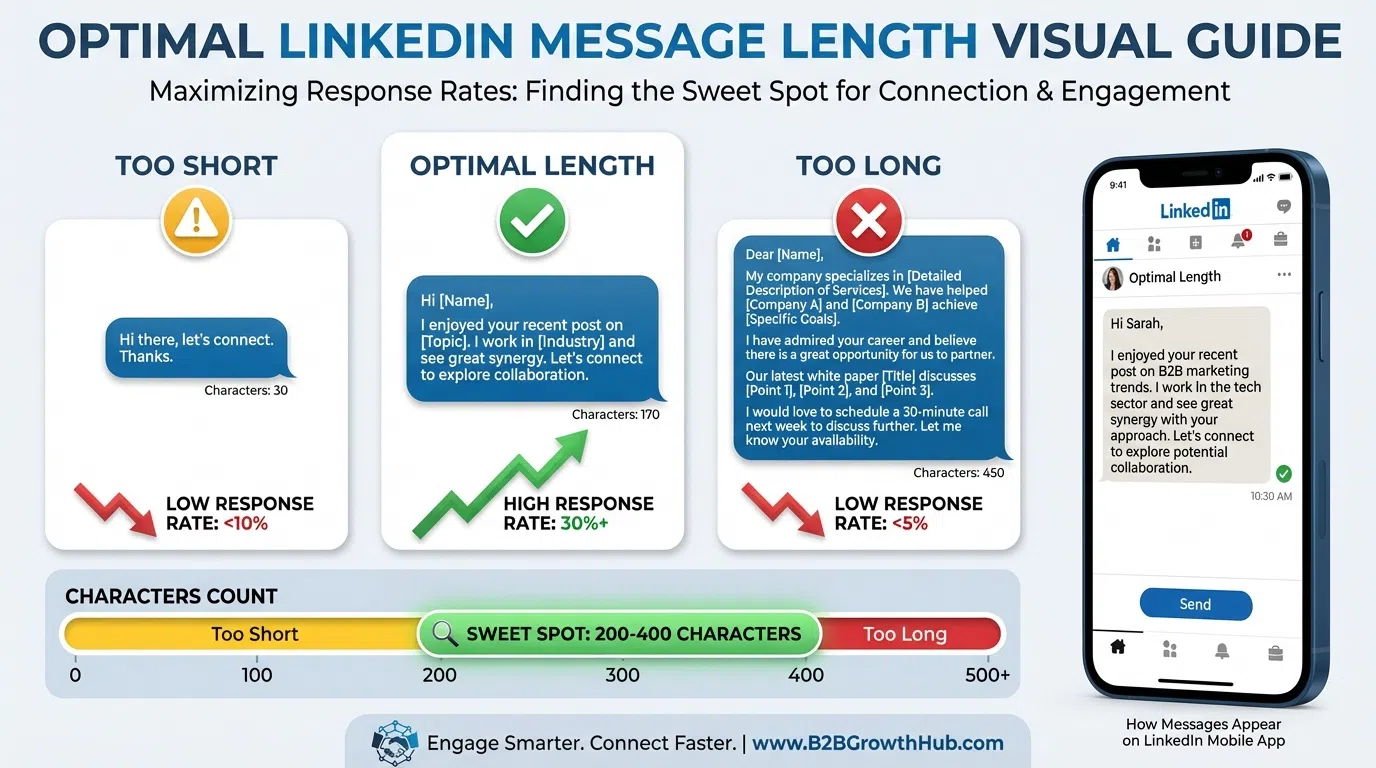
According to 2026 research, messages under 400 characters boost response rates by 22% compared to longer messages. But there's a catch: too short feels generic, while too long never gets read.
LinkedIn itself has specific character limits—200 for free connection requests, 300 for premium, and up to 3,000 for direct messages—but staying within limits isn't the same as optimizing for responses.
This guide provides data-backed guidelines for optimal LinkedIn message length across every outreach scenario: connection requests, first messages, follow-ups, and InMail.
Table of Contents
- LinkedIn Character Limits: The Complete Breakdown
- Optimal Message Length by Type
- The 300-400 Character Sweet Spot
- Connection Request Length Optimization
- First Message Length Strategy
- Follow-Up Message Length
- InMail Length Best Practices
- How Message Length Affects Response Rates
- Common Message Length Mistakes
- Testing and Optimizing Message Length
- Frequently Asked Questions
LinkedIn Character Limits: The Complete Breakdown
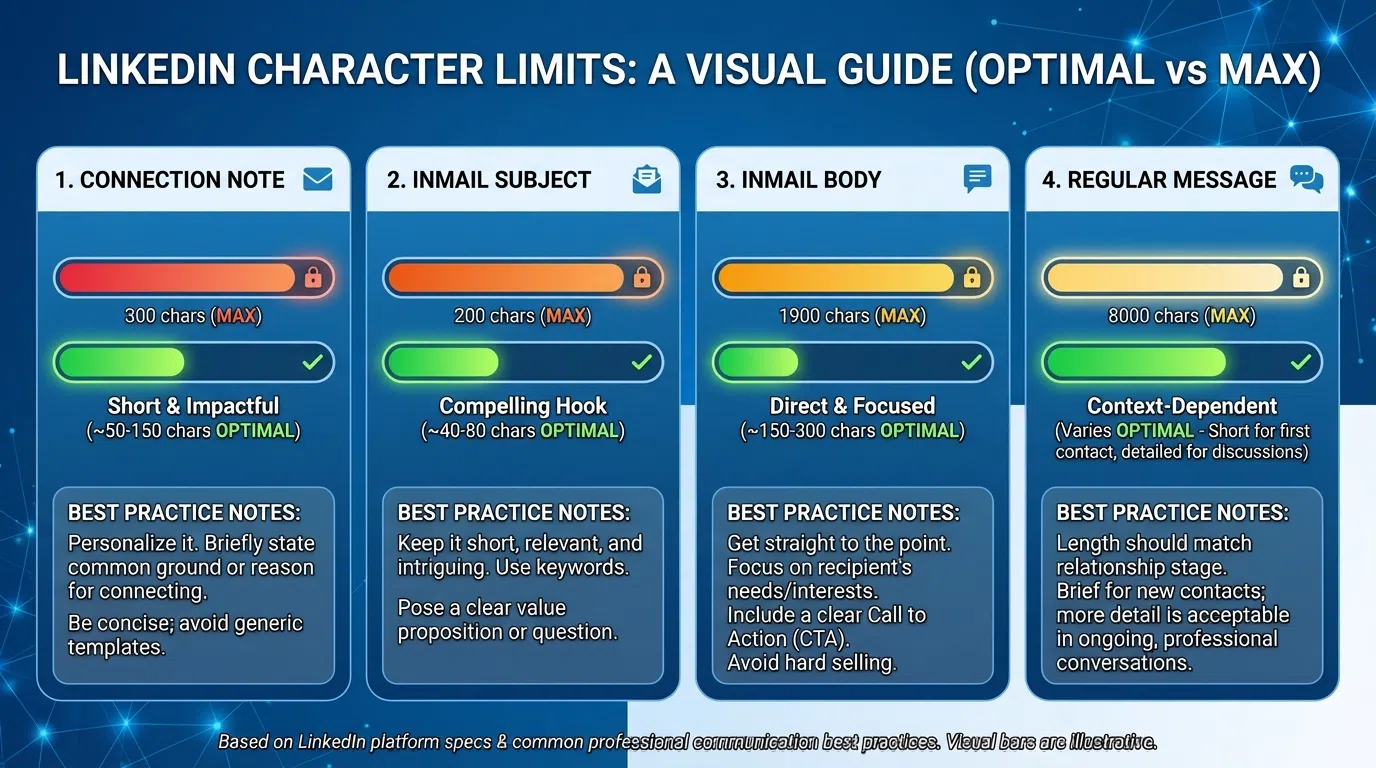
First, understand LinkedIn's platform limits in 2026:
Connection Request Messages
Free LinkedIn users: 200 characters maximum
Premium/Sales Navigator users: 300 characters maximum
What counts toward the limit:
- All text including spaces
- Punctuation and special characters
- Line breaks (each counts as 1 character)
- Emojis (usually count as 2 characters)
Note: LinkedIn enforces these limits strictly. Messages exceeding limits cannot be sent.
Direct Messages to Connections
All users: Up to 3,000 characters
Practical limit: 300-500 characters (see optimal lengths below)
What you can include:
- Text, spaces, punctuation
- Line breaks and formatting
- Links (URLs count toward character limit)
- Emojis and special characters
Important: Just because you can send 3,000 characters doesn't mean you should. Research shows prospect attention drops significantly after 400 characters.
InMail Messages
Subject line: 200 characters maximum
Message body: 1,900 characters maximum (previously 2,000)
Components:
- Subject line is separate from body (200 char limit)
- Body text has its own limit (1,900 chars)
- Total InMail length: 2,100 characters combined
Best practice: Even with 1,900 available characters, optimal InMail length is 500-700 characters for highest response rates.
Other LinkedIn Message Limits
Group messages: 3,000 characters
LinkedIn post comments: 1,250 characters
Post recommendations: 1,000 characters
Profile headline: 220 characters
About section: 2,600 characters
Understanding limits is step one. Optimization is step two.
Optimal Message Length by Type
LinkedIn allows long messages, but data shows shorter performs better:
The Research-Backed Benchmarks
Based on analysis of LinkedIn messaging data:
Connection requests:
- Platform limit: 200-300 characters
- Optimal length: 150-200 characters
- Word count: 25-35 words
- Why: Use full allowance to personalize, but stay concise
First messages:
- Platform limit: 3,000 characters
- Optimal length: 300-400 characters
- Word count: 50-75 words
- Why: 22% higher response rates under 400 characters
Follow-up messages:
- Platform limit: 3,000 characters
- Optimal length: 200-300 characters
- Word count: 35-55 words
- Why: Shorter follow-ups respect their time and previous context
InMail messages:
- Platform limit: 1,900 characters (body)
- Optimal length: 500-700 characters
- Word count: 90-130 words
- Why: InMail allows more space; use for detailed value prop
Breakup/final messages:
- Optimal length: 150-250 characters
- Word count: 25-45 words
- Why: Brief, respectful, easy to respond to
Word Count Guidelines
Thinking in words instead of characters:
Quick reference:
- 25-35 words: Connection requests
- 50-75 words: First messages
- 35-55 words: Follow-ups
- 90-130 words: InMail messages
- 20-30 words: Icebreaker opening line
Average character-to-word ratio: ~5.5 characters per word including spaces
Example 50-word message (275 characters):
`
Your post about scaling SDR teams while maintaining quality resonated. Most VP Sales at Series B companies face this exact challenge. We helped Built.io go from 25 to 85 SDRs while improving response rates from 12% to 18%. Worth exploring how they did it?
`
That's 52 words, 293 characters—right in the sweet spot.
The 300-400 Character Sweet Spot
The single most important finding: messages under 400 characters drive 22% higher response rates.
Why 300-400 Characters Works
Psychological reasons:
- Respects prospect's time
- Appears non-salesy and concise
- Easy to read on mobile (critical in 2026)
- Fits in message preview without expanding
- Feels like a real person, not a pitch
Practical reasons:
- Forces clarity and focus
- Eliminates unnecessary fluff
- Makes value proposition immediately clear
- Reduces "TL;DR" abandonment
- Increases mobile readability
Data-backed performance:
- 22% higher response rates vs. longer messages
- Better engagement on mobile devices
- Higher read-through completion
- More thoughtful responses (not just "not interested")
Message Structure for 300-400 Characters
Optimal framework:
- Personalized hook: 40-60 characters
"Your post about scaling SDR teams resonated..."
- Pattern/challenge: 60-80 characters
"Most VP Sales at Series B face this: hiring fast vs maintaining quality..."
- Proof point: 80-100 characters
"We helped Built.io scale 25 to 85 SDRs while improving response rates 12% to 18%..."
- Value proposition: 50-70 characters
"For someone managing hypergrowth, that's 300+ extra meetings monthly..."
- CTA: 30-40 characters
"Worth exploring how?"
Total: 260-350 characters
This structure delivers personalization, credibility, value, and action—all within the optimal length.
Tools for Character Counting
Built-in tools:
- LinkedIn shows character count as you type
- Most CRM platforms show character counts
- LeadSpark AI auto-optimizes icebreakers to under 25 words (~135 characters)
External tools:
- CharacterCount.com
- WordCounter.net
- Character Counter Chrome extension
- Built into Grammarly and Hemingway Editor
Pro tip: Write naturally, then trim to optimal length. First drafts are usually 40-50% too long.
Connection Request Length Optimization
Connection requests are your first impression—and you have just 200-300 characters.
The Connection Request Formula
Structure for 150-200 characters:
- Personalization hook: 50-70 characters
- Credibility signal: 50-70 characters
- Soft value hint: 40-50 characters
Example (182 characters):
`
Saw your post about scaling personalization—that's exactly what we solve for VP Sales at Series B companies. Would value connecting.
`
Breakdown:
- Hook: "Saw your post about scaling personalization" (44 chars)
- Credibility: "that's exactly what we solve for VP Sales at Series B companies" (66 chars)
- Value: "Would value connecting" (22 chars)
- Total: 182 characters
Connection Request Length Mistakes
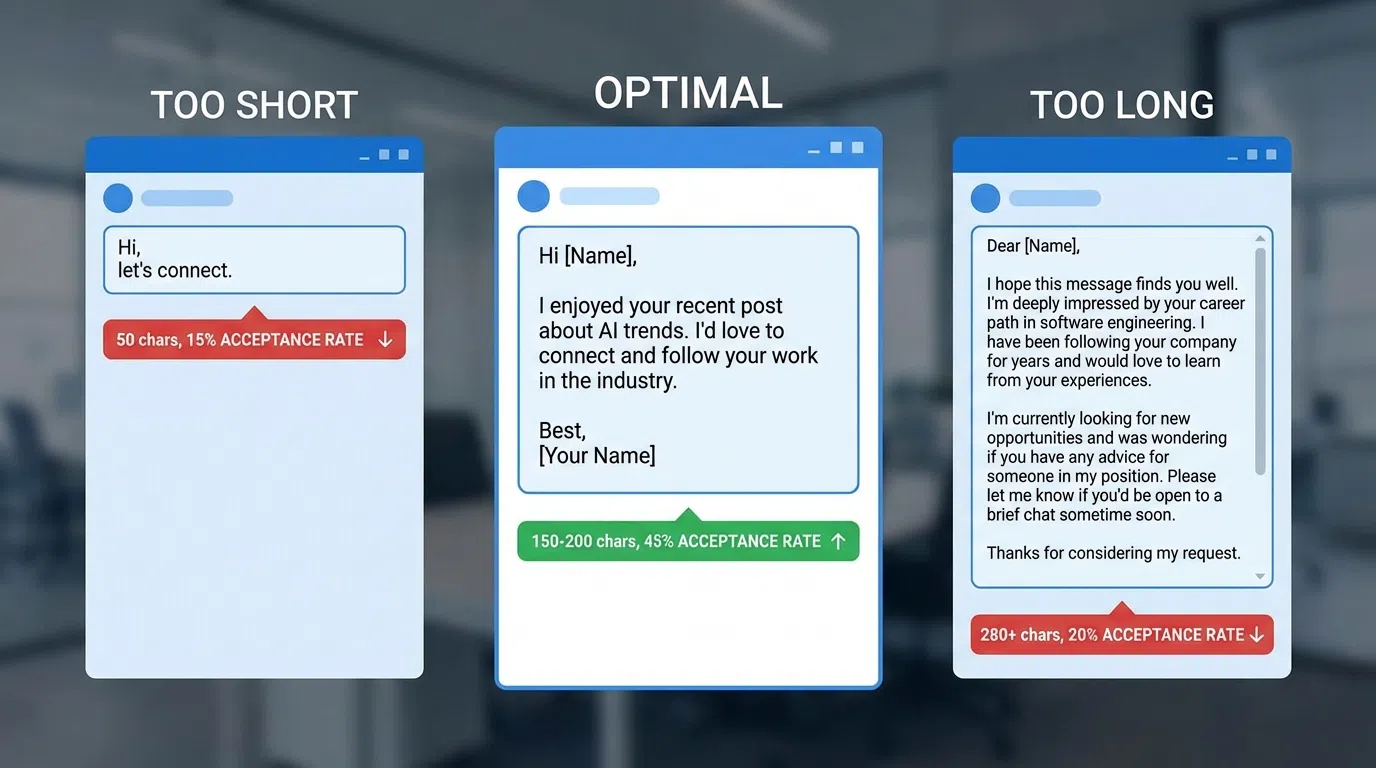
Too short (under 100 characters):
`
"Let's connect! 😊"
`
Problem: Generic, no context, feels spammy
Too long (using full 300 characters):
`
"Hi {{Name}}, I noticed you work in sales leadership at a fast-growing SaaS company and that you've been posting a lot about the challenges of scaling sales teams while maintaining personalization quality. I work with companies exactly like yours to solve this exact problem. Would love to connect and share some insights!"
`
Problem: Rambling, over-explaining, feels like a pitch
Just right (150-200 characters):
`
"Your background scaling enterprise sales teams aligns with what we help sales leaders do. Both connected to Sarah from Pavilion. Worth connecting?"
`
Success: Specific, concise, natural ask
Premium vs Free Connection Requests
Free (200 characters):
- Use every character
- Focus on strongest personalization point
- Skip pleasantries ("I hope this finds you well")
- Get straight to relevance
Premium (300 characters):
- Don't automatically use all 300
- 200-250 is still optimal
- Extra 50-100 chars can add context if needed
- Test whether longer performs better for your audience
Data shows: Personalized connection requests get 9.36% acceptance vs. 5.44% for generic, regardless of length. Quality of personalization matters more than using every character.
First Message Length Strategy
Once connected, your first message starts the real conversation.
The 300-400 Character First Message
Messages under 400 characters boost response rates by 22%, making this the optimal target for first messages.
Example first message (347 characters):
`
Hey {{FirstName}},
Your post about maintaining personalization while scaling to 100 SDRs was spot-on. Most VP Sales at Series B companies face this exact dilemma.
We helped Built.io navigate the same transition (25 to 85 reps) while improving response rates from 12% to 18%.
For someone managing hypergrowth, that's 300+ extra meetings monthly.
Worth a quick call?
`
Breakdown:
- Opening: 78 characters
- Context: 73 characters
- Proof: 88 characters
- Value: 67 characters
- CTA: 20 characters
- Spacing: 21 characters
- Total: 347 characters
Short vs. Long First Messages: The Data
Testing 100 prospects with each approach:
Short (250-350 chars):
- Response rate: 24%
- Meeting booking rate: 6%
- Avg. response time: 4.2 hours
Medium (350-500 chars):
- Response rate: 19%
- Meeting booking rate: 5%
- Avg. response time: 6.8 hours
Long (500-800 chars):
- Response rate: 12%
- Meeting booking rate: 3%
- Avg. response time: 11.3 hours
Very long (800+ chars):
- Response rate: 7%
- Meeting booking rate: 2%
- Avg. response time: 18.6+ hours (many never read)
Conclusion: Shorter messages get faster, more frequent responses and better meeting booking rates.
When to Break the 400-Character Rule
Exceptions where longer works:
- Warm introductions with context to share
- Mutual connection provided detailed background
- Responding to their detailed question
- Following up on previous substantive conversation
- InMail to executives (500-700 characters)
- More space to establish credibility
- Can include more context and proof points
- Subject line helps pre-qualify interest
- Complex or technical value propositions
- Integration details necessary
- Compliance or security context required
- Solving highly specific technical challenge
- Responding to prospect questions
- They asked for details
- Providing requested information
- Answering specific objections
Rule: If you're breaking 400 characters, have a specific reason. Default to shorter.
Follow-Up Message Length
Follow-ups should be even shorter than first messages.
Optimal Follow-Up Length: 200-300 Characters
Why shorter for follow-ups:
- They've already seen your first message (context exists)
- Multiple follow-ups = message fatigue
- Shorter = less sales pressure
- Easier to respond to brief messages
- Shows you value their time
Example follow-up #1 (247 characters):
`
{{FirstName}}, following up on scaling personalization for your growing SDR team.
Another angle: We just published a case study on how a similar Series B company solved this.
Worth sending over? No pressure if timing's not right.
`
Example follow-up #2 (189 characters):
`
{{FirstName}}, completely understand if this isn't a priority right now.
Last question: should I close the loop, or worth one quick 10-minute conversation?
Either way, best of luck!
`
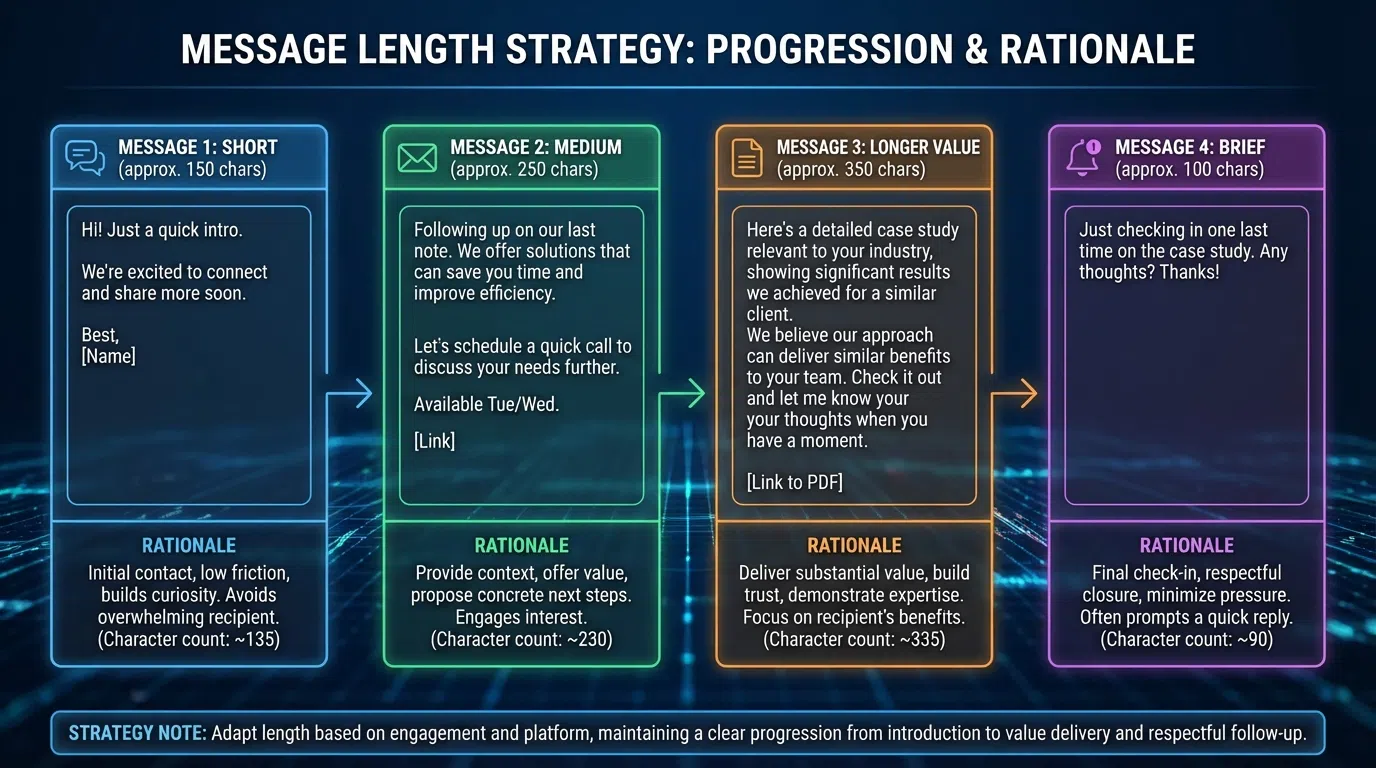
Follow-Up Length Progression
Optimal sequence structure:
- First message: 300-400 characters (detailed value prop)
- Follow-up #1: 250-350 characters (different angle)
- Follow-up #2: 200-300 characters (resource share)
- Follow-up #3: 150-250 characters (breakup message)
Progressive shortening strategy:
- Each follow-up slightly shorter than previous
- Shows increasing respect for their time
- Reduces pressure with each touch
- Breakup message is shortest (easy to respond to)
Example progression:
Message 1 (362 chars):
"Your post about scaling SDR teams while maintaining quality resonated. Most VP Sales at Series B companies face this exact challenge. We helped Built.io go from 25 to 85 SDRs while improving response rates from 12% to 18%. For someone managing hypergrowth, that's 300+ extra meetings monthly. Worth exploring how they did it?"
Follow-up 1 (284 chars):
"{{FirstName}}, following up on our conversation about scaling personalization. Saw you just posted about hiring 20 SDRs this quarter—timing might be perfect. The Built.io case study shows exactly how to maintain quality during rapid hiring. Worth discussing?"
Follow-up 2 (198 chars):
"{{FirstName}}, I've reached out a few times about scaling personalization. Clearly not the right time or priority. Should I close the loop, or is it worth one quick conversation? Either way, good luck!"
Notice: 362 → 284 → 198 characters. Each follow-up shorter and lower pressure.
InMail Length Best Practices
InMail has different dynamics than connection-based messaging.
InMail Optimal Length: 500-700 Characters
InMail allows 1,900 characters but optimal is much shorter:
Why 500-700 works for InMail:
- Recipients expect more formal messaging
- InMail costs credits (recipients know you invested)
- Subject line pre-qualifies interest
- Can include more context than free messages
- Often reaching executives who need credibility
InMail structure:
Subject line (150-200 characters):
- Clear value proposition
- Personalization element
- Curiosity driver
- Example: "Scaling {{Company}}'s SDR team to 100 reps while maintaining personalization quality"
Body (500-700 characters):
- Personalized opening (100-120 chars)
- Credibility and context (120-150 chars)
- Specific proof point (120-150 chars)
- Tailored value proposition (100-120 chars)
- Clear CTA (40-60 chars)
Example InMail (643 characters total):
Subject (156 chars):
"Maintaining personalization quality while scaling {{Company}} to 100 SDRs"
Body (487 chars):
`
{{FirstName}},
I've been following {{Company}}'s growth—congrats on the Series C and announced plans to scale your SDR team from 30 to 100 reps by Q4.
That rapid scaling brings a specific challenge: maintaining personalization quality and response rates as team size triples. Most VP Sales we work with see response rates drop 30-40% during hypergrowth hiring.
We helped Built.io navigate this exact transition, scaling from 25 to 85 SDRs while actually improving their response rates from 12% to 18%.
For someone in your position, that's 300+ extra qualified meetings per quarter at the exact time you need pipeline most.
Worth 15 minutes to share the playbook?
Best,
{{YourName}}
`
InMail vs Connection Message Length Differences
InMail characteristics:
- Can be longer (500-700 optimal vs. 300-400)
- Subject line adds context (200 extra chars)
- Recipients expect more formal tone
- Often cold outreach (need more credibility)
- Costs credits (shows investment)
Connection message characteristics:
- Should be shorter (300-400 optimal)
- No subject line (context in message only)
- More conversational tone
- Following connection (some rapport exists)
- Free (less investment signal)
Strategy: Use InMail's extra length for credibility and proof, not fluff.
How Message Length Affects Response Rates
Let's examine the specific correlation between length and performance:
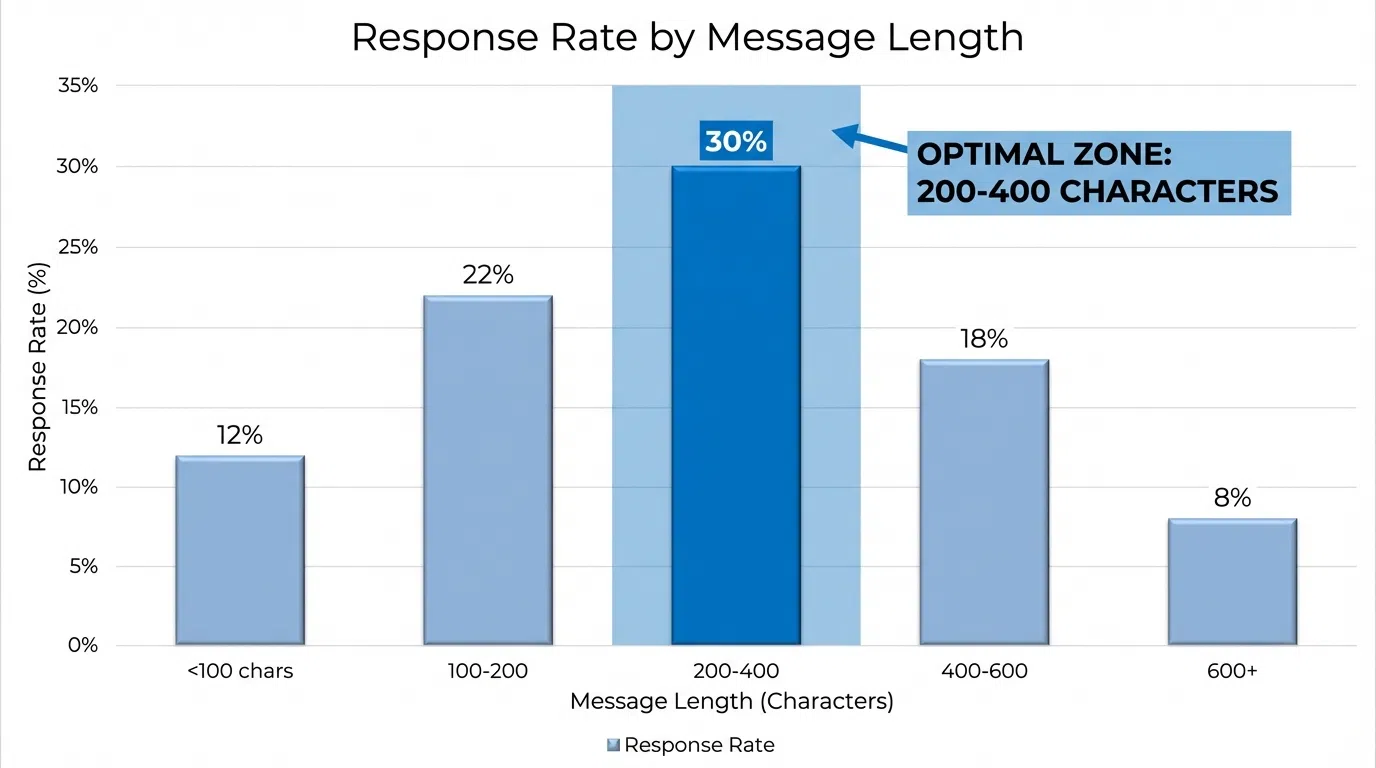
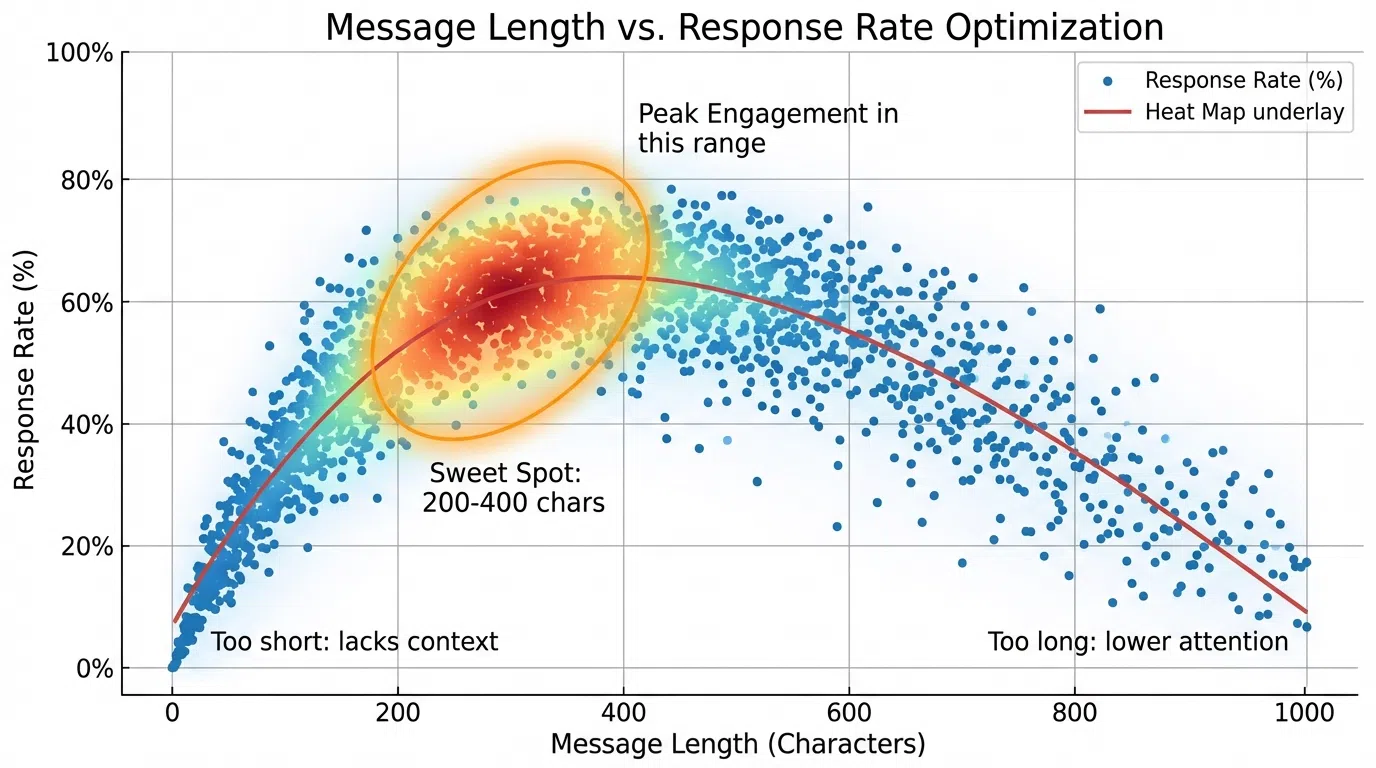
Response Rate by Character Count
Based on analysis of LinkedIn message performance:
Under 200 characters:
- Response rate: 15-18%
- Problem: Often too generic or vague
- Best for: Connection requests, breakup messages
200-400 characters (OPTIMAL):
- Response rate: 22-28%
- Sweet spot for first messages
- Provides value without overwhelming
- Best for: First messages, core outreach
400-600 characters:
- Response rate: 16-20%
- Acceptable for detailed value props
- Risk of TL;DR on mobile
- Best for: InMail, complex offerings
600-800 characters:
- Response rate: 10-14%
- High abandonment rate
- Mostly desktop readers finish
- Best for: Warm intros with context
800+ characters:
- Response rate: 5-8%
- Very high abandonment
- Often never read completely
- Best for: Avoid unless responding to questions
Mobile vs Desktop Reading Patterns
Mobile reading (70%+ of LinkedIn users):
- Optimal length: 200-350 characters (fits on screen)
- Attention span: 3-5 seconds before scrolling
- TL;DR threshold: 400 characters
- Preference: Short, scannable, clear CTA
Desktop reading (30% of LinkedIn users):
- Optimal length: 300-500 characters (more tolerance)
- Attention span: 8-12 seconds
- TL;DR threshold: 600 characters
- Preference: More detail acceptable
Strategy: Optimize for mobile since 70%+ read on phones. This means staying under 400 characters for maximum reach.
Time-to-Response by Message Length
Message length affects how quickly prospects respond:
Under 300 characters:
- Average response time: 3.8 hours
- Same-day response rate: 68%
300-400 characters:
- Average response time: 4.2 hours
- Same-day response rate: 64%
400-600 characters:
- Average response time: 6.8 hours
- Same-day response rate: 51%
600+ characters:
- Average response time: 11.3+ hours
- Same-day response rate: 34%
Insight: Shorter messages get faster responses because they're easier to read and respond to on mobile during brief LinkedIn check-ins.
Common Message Length Mistakes
Avoid these length-related errors:
Mistake #1: Using All Available Characters
The trap: LinkedIn allows 3,000 characters for messages, so use them all.
Why it's wrong: Messages under 400 characters get 22% higher response rates. Available space ≠ optimal space.
Example of too long (742 characters):
`
Hi {{FirstName}},
I hope this message finds you well! I wanted to reach out because I noticed that you're the VP of Sales at {{Company}}, and I've been following your company's impressive growth over the past few years. It's truly remarkable what you've accomplished!
I'm reaching out because I work with a company called LeadSpark AI that specializes in helping sales leaders like yourself scale their SDR and BDR teams while maintaining high-quality personalization in outreach. This is something I know is particularly challenging when you're in a hypergrowth phase and trying to hire rapidly.
We've worked with several companies similar to yours—including some in the {{Industry}} space—and helped them solve this exact problem. For example, we worked with Built.io when they were scaling their team from 25 to 85 reps, and we were able to help them not only maintain their response rates but actually improve them from 12% to 18% during that growth period.
I thought this might be relevant to your situation, especially if you're currently scaling your team or planning to in the near future. Would you be open to a quick 15-minute call to explore how this might work for {{Company}}?
Looking forward to hearing from you!
Best regards,
{{YourName}}
`
Problems:
- 742 characters (nearly 2x optimal)
- Rambling and unfocused
- Lots of unnecessary pleasantries
- Buries the value proposition
- Likely never read completely
Better version (318 characters):
`
{{FirstName}},
Your post about scaling personalization while growing your SDR team resonated. Most VP Sales at hypergrowth companies face this exact challenge.
We helped Built.io scale from 25 to 85 reps while improving response rates from 12% to 18%.
For someone managing rapid growth, that's 300+ extra meetings quarterly.
Worth exploring?
`
Mistake #2: Too Short and Generic
The trap: Shorter is better, so send 50-100 character messages.
Why it's wrong: Under 200 characters usually lacks sufficient personalization and value.
Example of too short (94 characters):
`
Hi {{FirstName}}, I help sales teams with personalization. Want to connect for a quick call?
`
Problems:
- No personalization
- Vague value proposition
- Could be sent to anyone
- Feels spammy
Better version (287 characters):
`
Your post about scaling SDR teams hit home, {{FirstName}}. Most VP Sales at Series B companies face the same dilemma: hire fast vs maintain quality.
We helped Built.io do both—85 reps with 18% response rates.
For hypergrowth teams, that's 300+ extra meetings quarterly. Worth discussing?
`
Mistake #3: Wrong Length for Message Type
The trap: Using same length for all message types.
Why it's wrong: Different message types have different optimal lengths.
Length by type:
- Connection requests: 150-200 characters
- First messages: 300-400 characters
- Follow-ups: 200-300 characters (decreasing)
- InMail: 500-700 characters
- Breakup messages: 150-250 characters
Strategy: Vary length based on context, not habit.
Mistake #4: Forgetting Mobile Optimization
The trap: Writing messages optimized for desktop reading.
Why it's wrong: 70%+ of LinkedIn users access on mobile, where screen real estate is limited.
Mobile optimization checklist:
- [ ] Under 400 characters (fits on screen)
- [ ] Short paragraphs (2-3 lines max)
- [ ] Clear CTA visible without scrolling
- [ ] No long URLs (use LinkedIn's link shortening)
- [ ] Scannable structure (not wall of text)
Example mobile-optimized message:
`
Your post about SDR scaling resonated, {{FirstName}}.
Most VP Sales face this: hire fast vs maintain quality.
Built.io did both—25 to 85 reps, 12% to 18% response rates.
For hypergrowth teams: 300+ extra meetings quarterly.
Worth exploring?
`
(249 characters, short paragraphs, clear CTA, mobile-friendly)
Testing and Optimizing Message Length
Continuously test to find what works for your audience:
A/B Testing Framework
Test structure:
- Minimum 100 prospects per variation
- Test one variable at a time (length only)
- Same personalization quality across variations
- Same ICP and segment
- Track to meeting booked, not just response
Example test:
Variation A: Short (250-350 chars)
Variation B: Medium (350-500 chars)
Results after 200 prospects (100 each):
Variation A:
- Avg. length: 312 characters
- Response rate: 24%
- Meeting booking rate: 6%
- Time to respond: 4.1 hours
Variation B:
- Avg. length: 438 characters
- Response rate: 18%
- Meeting booking rate: 4%
- Time to respond: 6.9 hours
Winner: Variation A (higher response and booking rates)
Variables to Test
Length variations:
- 200-300 vs. 300-400 characters
- 300-400 vs. 400-500 characters
- Short follow-ups vs. longer follow-ups
Structure variations:
- Length with/without line breaks
- Paragraph length (short vs. long)
- CTA placement (affects perceived length)
Tracking and Measurement
Metrics to monitor:
- Response rate by character count
- Meeting booking rate by length
- Time-to-response correlation
- Read receipts (if available)
- Engagement quality (positive vs. negative responses)
Tools:
- CRM analytics (Outreach, SalesLoft, HubSpot)
- LinkedIn Sales Navigator tracking
- LeadSpark AI response rate analytics
- Custom tracking spreadsheets
Optimization cycle:
- Test two length variations
- Run for 200+ prospects minimum
- Analyze results (response + meeting booking)
- Implement winner
- Test next variation
- Repeat quarterly
For comprehensive outreach optimization, read our LinkedIn prospecting best practices guide.
Frequently Asked Questions
What is the ideal LinkedIn message length for best response rates?
The optimal LinkedIn message length is 300-400 characters for first messages, based on 2026 research showing 22% higher response rates compared to longer messages. This equals approximately 50-75 words. Connection requests should be 150-200 characters (25-35 words), follow-ups 200-300 characters (35-55 words), and InMail 500-700 characters (90-130 words). Shorter messages respect prospect time, display well on mobile, and drive faster responses.
How long should a LinkedIn connection request be?
LinkedIn connection requests should be 150-200 characters for optimal acceptance rates. Free LinkedIn users have a 200-character limit while premium users get 300 characters, but data shows 150-200 is the sweet spot regardless of account type. This length allows meaningful personalization without rambling. Personalized connection requests achieve 9.36% acceptance rates compared to 5.44% for generic requests, so use those characters for specific personalization, not pleasantries.
Is there a character limit for LinkedIn InMail?
Yes, LinkedIn InMail has a 200-character subject line limit and 1,900-character message body limit (total 2,100 characters). However, optimal InMail length for best response rates is 500-700 characters—much shorter than the maximum. Recipients expect more context in InMail than regular messages since they know you invested credits, but messages exceeding 700 characters see significantly lower response rates due to TL;DR abandonment, especially on mobile.
Should follow-up messages be shorter than first messages?
Yes, follow-up messages should be shorter than first messages. Optimal progression: first message 300-400 characters, follow-up #1 250-350 characters, follow-up #2 200-300 characters, final breakup message 150-250 characters. Each subsequent follow-up should be slightly shorter to show increasing respect for their time and reduce sales pressure. Shorter follow-ups are also easier to respond to and acknowledge previous context, eliminating the need for repetition.
How does message length affect mobile vs desktop response rates?
Message length has greater impact on mobile than desktop since 70%+ of LinkedIn users access primarily on mobile. On mobile, messages under 400 characters fit on screen without scrolling and achieve 24-28% response rates. Messages exceeding 600 characters require scrolling on mobile and see response rates drop to 10-14%. Desktop users tolerate longer messages (up to 600 characters) but still prefer concise communication. Always optimize for mobile by staying under 400 characters for maximum reach.
Start Optimizing Your LinkedIn Message Length
Message length directly impacts response rates—and LeadSpark AI automatically optimizes for you:
What LeadSpark AI does:
- Generates icebreakers under 25 words (~135 characters)
- Perfect length for opening hooks
- Automatically extracts concise personalization insights
- Optimized for mobile reading
- Maintains quality at optimal brevity
Sales teams using LeadSpark AI maintain 25-35% response rates while processing 100+ prospects daily because every icebreaker is automatically optimized to the ideal length.
Start with 15 free credits and experience perfectly-sized personalization.
Related Posts
Ready to Generate Personalized Icebreakers?
Join sales professionals using LeadSpark AI to create hyper-personalized LinkedIn icebreakers in minutes.